



 0
0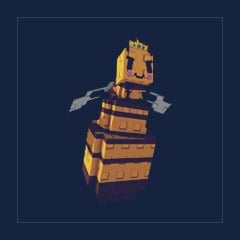
Queen Bee
Buy Grow a Garden Queen Bee Pet - Refresh Pets Skill
Unlimited
In magazzino
1
- 1
- 2
- 3
- 4
- 5
- 6
$0.92
You May Also Be Interested In:
In magazzino
Cheetah / Legendary
In magazzino


Frost Dragon / Divine

Unlimited
In magazzino
1
Legittimo. Divine Pets ok, zero problemi, comunicazione rapida.
Ricevuto in pochi secondi, perfetto.
Consegna istantanea, venditore affidabile.
Divine Pets consegnato subito, perfetto.

The Queen Bee is a large Divine Pet in the game Grow a Garden. She wears a crown, has a blush face, and a large belly, which is very conspicuous. The Queen Bee is not only a pet, but also a merchant NPC, who can exchange honey for specific items. She will automatically pollinate nearby fruits every 25 minutes, which is very suitable for accelerating crop growth.
Buy Bee Eggs
Hatch Bee Eggs
Trading
If you don't want to hatch it yourself, you can choose to trade with other players to get the Queen Bee. It can also be purchased at GGWTB!
When holding the Queen Bee, the crown occasionally emits a flashing special effect similar to Celestial mutation.
Queen Pollinator
Every 20-25 minutes, automatically apply the pollination mutation effect to a nearby fruit.
For the Queen
Every 23-30 minutes, refresh the pet skill with the longest cooldown in the team (excluding mutation skills).
It can refresh the skills of another Queen Bee, and theoretically form an infinite loop until there is a pet with a higher cooldown.
Trivia & Easter Eggs
The Queen Bee's crown is very similar to the crown emblem of New Zealand, which is also the hometown of developer Jandel.
The mechanism of refreshing skills of the Queen Bee can be circulated with other Queen Bees, which is very interesting.
Queen Bee is a magical pet added during the Bizzy Bee event update.
Queen Bee is difficult to obtain (1% probability), but as a magical pet and NPC, it has a high collection value. Her skills are suitable for players who need automatic pollination and cooling lineups. If you just want to collect all pets or pursue extreme efficiency, you can consider buying it. If you are just a casual player, you can choose whether to brush the Queen Bee according to your needs and luck.

Utilizziamo i cookie per garantire la funzionalità del sito web e migliorare la tua esperienza. Clicca su "Accetta tutto" per acconsentire, oppure su "Personalizza" per gestire le tue preferenze. Consulta la nostra Informativa sulla Privacy.