



 0
0
Raccoon
Buy Grow a Garden Raccoon Pets - Get extra benefits
Unlimited
In magazzino
1
- 1
- 2
- 3
- 4
- 5
- 6
$2.99
You May Also Be Interested In:
In magazzino

Cheetah / Legendary
In magazzino


Frost Dragon / Divine

Unlimited
In magazzino
1
Consegna istantanea. Pets tutto ok al primo colpo.
Veloce e preciso, Pets consegnato subito.
Pets perfetto.
Tutto liscio. Pets ok, risposte immediate, molto serio.
Divine Pets arrivato subito, consigliatissimo.
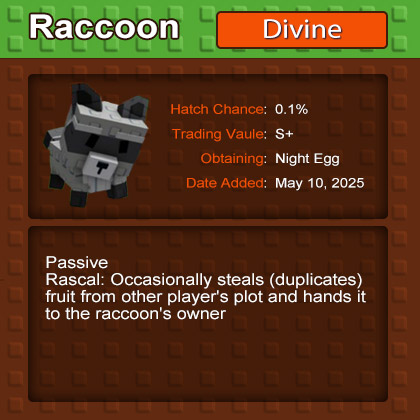
Grow a Garden Raccoon is an extremely rare and powerful pet in the game Grow a Garden. It can help players get more crops and is a top pet with both collection and practical value.
In the new update of Grow A Garden, the way to unlock Raccoon Pets has changed significantly. Previously in the Moon Update, players could obtain Raccoon Pets through Night Eggs, but this method has been discontinued. In the latest "Event Track" update, players can obtain this rare pet through specific strategies. This guide will detail how to efficiently complete the event track tasks and unlock Raccoon Pets.
In the new event track system, Raccoon Pets are rare (Rare), and usually require players to reach about 5,000 event points to unlock. At higher levels, such as the Legendary level (Legendary), players also have the opportunity to obtain rare rewards such as "Moon Mango". Therefore, the accumulation of points in the event track is the key to unlocking Raccoon Pets.
| Feature | Description | Notes |
| Obtain Method | Hatch from Night Egg with a very low probability (0.1%). | Extremely rare |
| Exclusive Skill | Every 15 minutes, copies a random crop from other players' gardens and brings it back. | Equivalent to stealing a crop |
| Player Interaction | Can actively interact with other players. | Few pets have this feature |
| Rarity Level | Second rarest pet in the game, only behind Kitsune. | Symbol of status |
| Appearance | Large face, prominent nose and mouth, pentagonal ears, silver-gray body, dark gray mask, black-striped tail, white hair on chest and snout, no visible mouth, calm expression. | Unique and recognizable |
In order to quickly accumulate event points, many players have adopted the following efficient scoring methods:
1. Using Mythic Rarity Plants for Scoring
Mythic Rarity plants are very common in the new update, so they have become the core resource for scoring. Players can plant and collect as many Mythic Rarity plants as possible and use these plants to increase event points.
2. Use auxiliary accounts for auxiliary scoring
Auxiliary scoring is a very effective strategy. The specific steps are as follows:
- Create an auxiliary account: Players can create one or more auxiliary accounts.
- Plant and collect plants: Plant summer plants on the auxiliary account and fill its inventory. These plants can be plants in the store or plants obtained through seed packets.
- Transfer plants to the main account: At the start of the event, transfer all plants in the auxiliary account to the main account to quickly increase the event points of the main account.
- If the auxiliary account inventory is full, you can create a new auxiliary account and repeat the above process.
3. Phased Score-Growing Strategy
Many players adopt the three-hour strategy, which divides time into three phases:
- First two hours: Focus on filling up the inventory of the auxiliary account and not participating in the event.
- Third hour: Quickly accumulate points by transferring plants to the main account when the event starts.
To further improve efficiency, it is recommended to use the following tools and resources:
1. Inventory tracker
Some players have developed inventory tracker websites that display the plants and seeds available in the store in real time. Although these tools may have a slight delay, they are still an important resource for planning score-growth.
2. Plant value calculator
Some websites provide plant value calculators to help players estimate the value and rarity of specific plants. For example, if a plant has multiple mutation properties, its value will be higher.

Utilizziamo i cookie per garantire la funzionalità del sito web e migliorare la tua esperienza. Clicca su "Accetta tutto" per acconsentire, oppure su "Personalizza" per gestire le tue preferenze. Consulta la nostra Informativa sulla Privacy.