0
0 Created: Dec 14,2025 | Steal a Brainrot
How to Find and Redeem Steal a Brainrot Plush DLC Code?

If you've grabbed – or are thinking about grabbing – the Steal a Brainrot! plush, you're not just buying a cute toy. You're paying for in‑game DLC that comes as a unique code, and that code is easy to waste if you don't know where to redeem it.
If you've ever bought a DLC item and then stared at the menu wondering what to click, this will save you that headache.
1. What This DLC Code Is and Where You Get It
Before talking about the redeem screen, it helps to understand what you're dealing with.
- 1. What This DLC Code Is and Where You Get It
- 1.1 What the Plush DLC Actually Is
- 1.2 Where You Can Buy the Plush
- 1.3 What a DLC Code Looks Like
- 2. Step‑by‑Step: How to Redeem a DLC Code in Steal a Brainrot!
- 2.1 Preparation: Keep the Code Safe and Visible
- 2.2 In‑Game Redemption Path
- 2.3 Quick Reference Table: Redeem Flow
- 3. Giveaway Angle vs. Buying It Yourself
- 3.1 Path A: Buy the Plush Yourself
- 3.2 Path B: Rely on Giveaways
- 4. Common Issues and How to Avoid Them
- 4.1 Typo Hell: Letters vs. Numbers
- 4.2 Redeeming in the Wrong Place
- 4.3 Lost Code Problems
- FAQ
- Wrap‑Up: Make the Plush Worth It
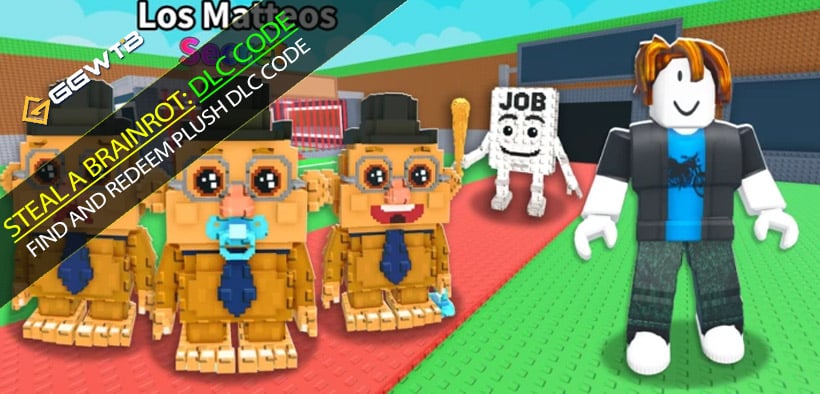
1.1 What the Plush DLC Actually Is
Released an official Steal a Brainrot! plush. When you buy it, you don't just get the physical toy; you also get an in‑game DLC code printed or included with the order.
That code unlocks exclusive content inside the game. It's limited, and it's tied to the merch, which is why people care about doing it right.
1.2 Where You Can Buy the Plush
Based on the instructions:
- Official site: playsab.com
- Or via their official Discord server (they share the legit purchase link there)
To keep things clear:
| Step | Action | Why It Matters |
|---|---|---|
| Decide to buy | Choose the official plush from playsab.com | Avoid fake links / scams |
| Check price | The plush costs around the stated amount (e.g. 67) | Make sure you're on the real product, not a random listing |
| Place your order | Use the official link or the Discord link | Only official orders come with valid DLC codes |
If you see some shady site offering Brainrot DLC codes for dirt cheap without the plush, you should be immediately suspicious.
1.3 What a DLC Code Looks Like
The DLC code:
- Is a mix of letters and numbers;
- Is usually printed or included on a card, receipt, or inside the packaging;
- Has a limited-time redemption window or limited use (once per account / once per code).
If your code is just a single word or a short all‑caps meme, that's probably a standard promo code, not the plush DLC.
2. Step‑by‑Step: How to Redeem a DLC Code in Steal a Brainrot!
Let's get to the part you care about. Here's the flow from the moment you have the code in your hand.
2.1 Preparation: Keep the Code Safe and Visible
Before you even open the game:
1. Locate the code in your plush package (card, insert, or email).
2. Take a clear photo of it with your phone.
3. Optionally type it into a note app so you can copy it later.
If you've already pre‑ordered the plush, then your main job now is to not lose that code card. You'd be surprised how many players throw away the packaging and then panic.
2.2 In‑Game Redemption Path
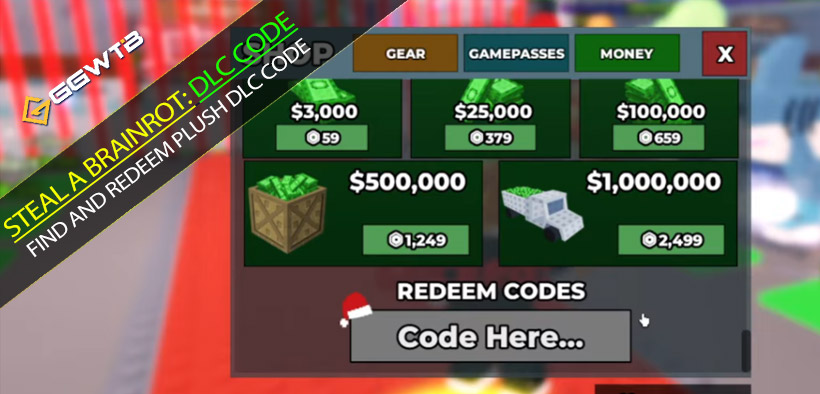
Now open Steal a Brainrot! and follow these steps:
1. Launch the game and load into your usual menu.
2. Open the Shop menu.
- Look for a Shop button on the main interface.
3. Scroll down inside the Shop.
- Don't stop at the top sections; keep scrolling.
4. Find the Redeem Codes section.
- This is where all codes go, including DLC codes.
5. Click Redeem Codes.
- A text input field should appear.
6. Enter your DLC code carefully.
- Use the photo/notes to avoid misreading letters and numbers.
7. Confirm / press Redeem.
- Wait a moment for the server to validate your code.
If everything is correct, your DLC reward should be added to your account (often instantly).
2.3 Quick Reference Table: Redeem Flow
| Step | In‑Game Menu | What You Do | Common Mistakes to Avoid |
|---|---|---|---|
| 1 | Main Screen | Open the game | — |
| 2 | Shop | Click Shop | Clicking random menus and wondering where it is |
| 3 | Shop (scroll) | Scroll down to the bottom area | Assuming it's on the first screen |
| 4 | Redeem Codes | Click Redeem Codes | Typing in chat instead of the redeem box |
| 5 | Redeem Codes popup | Enter the full DLC code | Mixing up 0 and O, 1 and I, missing characters |
| 6 | Redeem | Confirm and wait for success notification | Spamming redeem after a failed attempt |
Double‑check every character before you hit Redeem. One wrong letter and you'll get a invalid code message that looks like the DLC is broken when it's really just a typo.
3. Giveaway Angle vs. Buying It Yourself
Mentioned planning a giveaway: ordering a plush and giving the DLC code to one lucky winner who comments their username and likes the video.
That leads to two realistic paths for you:
3.1 Path A: Buy the Plush Yourself
Pros:
- 100% control – you know you'll get the plush and the code;
- You get both physical and digital value;
- You're supporting the official directly.
Cons:
- You pay full price;
- You wait for shipping and packaging.
If you care about both collectibles and in‑game bonuses, this is the straightforward route.
3.2 Path B: Rely on Giveaways
Pros:
- It's free if you win;
- You just leave your username and like the video.
Cons:
- Very low odds if many players participate;
- You're dependent on timing and honesty;
- You might get nothing even after following all steps.
Giveaways are fun to enter, but if you really want that DLC content, treat them as a bonus, not a plan.
4. Common Issues and How to Avoid Them
Most my code doesn't work problems come from a few repeatable mistakes.
4.1 Typo Hell: Letters vs. Numbers
DLC codes often use characters like:
- 0 (zero) vs O (capital O)
- 1 (one) vs I (capital i) vs l (lowercase L)
If you find yourself entering the code three times and it keeps failing, slow down and:
- Compare each character on the card to the input box;
- Try typing on a larger keyboard (e.g. PC instead of mobile) if possible.
4.2 Redeeming in the Wrong Place
Some players:
- Try typing the DLC code in chat;
- Or look for a DLC button instead of Redeem Codes.
Remember:
In Steal a Brainrot!, the path is: Shop → scroll → Redeem Codes
If you're not going through the Shop, you're probably in the wrong place.
4.3 Lost Code Problems
If you've lost the physical code:
- Check your email or account from playsab.com – sometimes codes are sent digitally;
- Check the original packaging one more time (inside flaps, behind inserts);
- If everything fails, contact the official support with order proof, but don't expect guaranteed reissue.
Codes are typically treated like cash vouchers: once exposed and used, they can't be undone.
FAQ
Q1: Is a DLC code the same as a normal promo code I see on YouTube or TikTok?
No. The plush DLC code is tied to a physical purchase. Normal promo codes are often shared publicly and used by many players; DLC codes from merch are usually one-time-use and unique.
Q2: Do I need to redeem the DLC code as soon as I receive the plush?
You don't have to redeem it instantly, but you shouldn't forget about it either. If the DLC is marked as limited time, there might be an expiry date in the future. Use it once you're sure you're logged into the correct account.
Q3: Can I use one DLC code on multiple accounts?
In almost all cases, no. DLC codes from physical merch are typically single-use. Once redeemed on one account, that's it. Decide carefully which account is your main before redeeming.
Q4: I entered my code and nothing happened. What now?
Check these points:
- Did you get any error message (invalid/expired/already used)?
- Are you sure you were on the correct account?
- Did you check your inventory or relevant section for the unlocked item?
If the code is still not working after triple-checking, contact official support with a screenshot of the card and your in-game info.
Q5: Is it safe to share my DLC code in a screenshot?
No. If you leak your DLC code publicly, someone can redeem it before you and you'll get an already used error. Only share the full code with someone if you're intentionally giving it away.
Wrap‑Up: Make the Plush Worth It
You're paying real money for that Steal a Brainrot! plush, which means the DLC code attached to it deserves to be treated like a real asset, not just a random string of characters.
If you:
- Buy only from official links (playsab.com or their Discord);
- Keep the code safe and readable;
- Go through Shop → scroll → Redeem Codes;
- Type the code carefully and confirm you're on the right account,
then redeeming your DLC becomes a simple one-time process that turns a physical collectible into lasting in‑game value.
You get a plush on your shelf, a reward in your account, and zero confusion in between — which is exactly how merch DLC is supposed to feel.
Most Popular Posts
- Steal a Brainrot Best Los Tangcitos Crafting Guide: Recipes, Traits, Mutations, and Odds
- Steal a Brainrot Los Dragons Unit Recipe and Craft Guides
- Steal a Brainrot Tier List for Brainrots: Best Units Ranked by Aura
- Steal a Brainrot Guide: Rebirth Requirements, Lucky Blocks & Steals
- Steal a Brainrot Crafting Rare Los Cornis: Fusion Odds & Best Combos That Actually Work
- Steal A Brainrot Trades Guides: OG Spawn Sniping Guide
Popular Category Lists
- ARC Raiders / (351)
- Grow a Garden / (294)
- CoD: Black Ops 7 / (167)
- Star Citizen / (162)
- MLB 26 / (159)
- Monopoly Go / (152)
- ARK Survival Ascended / (128)
- Steal a Brainrot / (99)
- Blox Fruits / (74)
- Adopt Me / (74)
- Forza Horizon 6 / (72)
- Sailor Piece / (68)
- Grow a Garden 2 / (68)
- Diablo IV / (62)
- CoD: BLACK OPS 6 / (55)
- Aion 2 / (50)
- Path of Exile 2 / (48)
- Monster Hunter Wilds / (46)
- Windrose / (44)
- Donut SMP / (41)