You're not just buying an account, you're buying a shortcut to exclusive items. This is a Twitch account already pre-loaded with rewards; simply link it to your game account to claim your rewards in-game.
What's in the BO7 Twitch Drops Rewards? (Includes item list)
After payment, you'll receive a Twitch account with the following activated rewards.
This means you'll have them instantly:
- Surge (Weapon Blueprint): A powerful blueprint with a unique color scheme, making your weapon stand out in the lobby.
- Black Ops Swirl (Camouflage): The currently highly sought-after limited-edition vortex camouflage.
- To Battle! (Sticker/Keychain): Exclusive combat decorations.
- Armed to the 7th (Name Card/Badge): A symbol of veteran status.
What does this mean?
These are usually limited-time rewards that expire after a certain period. Once the season or event ends, they become unobtainable items.
Core Mechanics and Avoidance Guide
To ensure you receive your rewards smoothly, here are a few practical tips based on Activision server characteristics you need to know:
Delivery and Activation: After purchase, you will immediately receive your Twitch account password and a comprehensive tutorial.
Association Logic: You need to log in to this Twitch account and associate it with your Activision/game account in the settings.
The Truth About Delay: Rewards are usually credited instantly. However, if you don't see anything in the game, don't panic. Based on our long-term observation of game server load (especially on weekends or when a new season launches), data synchronization may have a delay of about 24 hours. This is a normal operation of the Activision backend; please be patient.
How to claim BO7 Twitch Drops?
1. After placing your order, we will send you a Twitch account via email.
2. Log in to the Twitch account we provide. If you see "Verify Your Email Address," please click "X" or "Remind me later" to dismiss it.
3. Log in to your Activision account and link it to the provided Twitch account at https://profile.callofduty.com/cod/profile
4. Restart your game and check for the rewards. It may take up to 24 hours for the rewards to appear in your game.
Frequently Asked Questions (FAQ)
Q: Can I unlink this Twitch account after claiming the rewards?
A: Yes. Once the rewards are safely in your game inventory, they are permanently yours. You can unlink this purchased Twitch account and switch back to your main account. However, to be on the safe side, it is recommended to wait 24 hours after claiming the rewards before unlinking to ensure cloud save synchronization is complete.
Q: What if I buy something but find it's not in the game?
A: First, check if your linked Activision account is correct; second, recall if you already own the item (duplicates cannot be claimed); third, wait 24 hours for server synchronization. If everything is fine and the rewards still haven't arrived, please send us a recording of your entire process, and we will process it for you immediately.
Q: Will doing this result in my game account being banned?
A: No. We obtained the drops through normal and compliant live stream viewing methods. From the game's official perspective, you're simply linking a legitimate Twitch account; it's an official feature of the game and completely compliant.
I Twitch Drops di BO7 sono ricompense gratuite nel gioco come progetti di armi, emblemi, carte chiamata e altro. I giocatori possono ottenere queste ricompense guardando le dirette di Call of Duty: Black Ops 7 su Twitch per un certo periodo di tempo. Dopo aver ricevuto i Drops e le ricompense, basta collegare il tuo account Activision per riscattarle nel gioco. Hai perso queste ricompense? Non preoccuparti: GGWTB offre Twitch Drops di BO7 in vendita. Basta acquistare un account; è conveniente e veloce.
Attualmente offriamo i seguenti Twitch Drops:
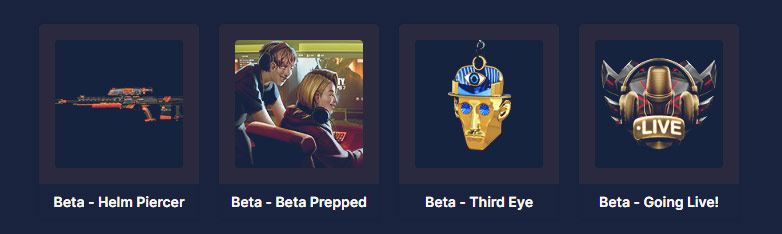
Twitch Drops Beta BO7
Emblema "Beta - Going Live!"
Carta sfida "Beta - Beta Prepped"
Ciondolo arma "Beta - Third Eye"
Progetto arma "Beta - Helm Piercer"
Come riscattare i Twitch Drops di BO7?
1. Dopo aver effettuato l'ordine, ti invieremo un account Twitch via email.
2. Accedi all'account Twitch fornito. Se vedi "Verifica il tuo indirizzo email", clicca su "X" o "Ricordamelo più tardi" per chiudere la finestra.
3. Accedi al tuo account Activision e collegalo all'account Twitch fornito su https://profile.callofduty.com/cod/profile
4. Riavvia il gioco e controlla le ricompense. Potrebbero essere necessarie fino a 24 ore prima che compaiano nel tuo gioco.




 0
0