0
0 Created: Feb 12,2026 | Blox Fruits
How to Get the Fruit Notifier for Free in Blox Fruits?

The Fruit Notifier Gamepass is arguably the most wanted Gamepass in all of Blox Fruits, and the 2,700 price tag is one of the largest obstacles in the way of most people obtaining it. Knowing exactly when and where a fruit spawns is a huge advantage in the game, and we all want it, but we aren't willing to spend that much money.
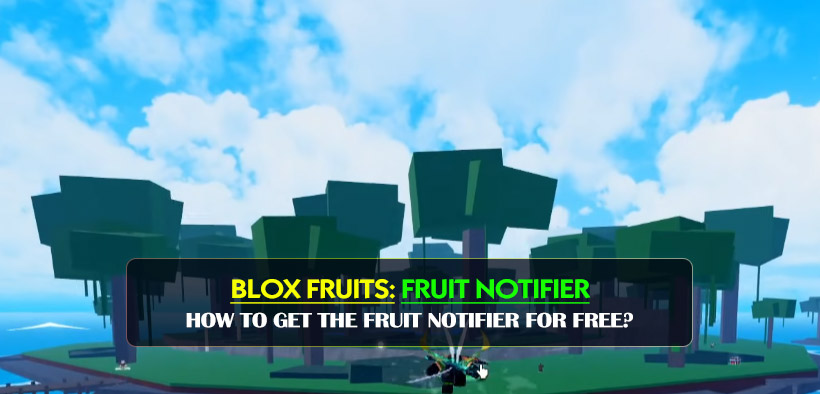
That's why we are really trying to find the newest glitch methods for 2026 that are being spread around the community. We have really tried this sequence on a lot of our alt accounts, and it seems to be working. This is a sequence of specific user interface (UI) manipulation, quest completion, and server resetting. It sounds a little bit complicated, but if you follow exactly what we are doing, you will be saving a lot of money.
- Part 1: Manipulating the UI & the Fake Purchase
- The Shop & Gift Sequence
- Phase 2: Environment & Profile Reset
- Profile Zeroing
- Adjusting System Settings
- Phase 3: Faction Switcher and Grand Brigade Method
- The Dragon Fruit Method
- Changing from Pirate to Marine
- Resetting the Grand Brigade
- Final Drive
- The Waiting Game
- Questions and Answers
- Conclusion
Part 1: Manipulating the UI & the Fake Purchase
The main part of this glitch is tricking the UI of the game's store. We are simply trying to trick the system into thinking that there is a transaction that is pending or complete without actually spending Robux.
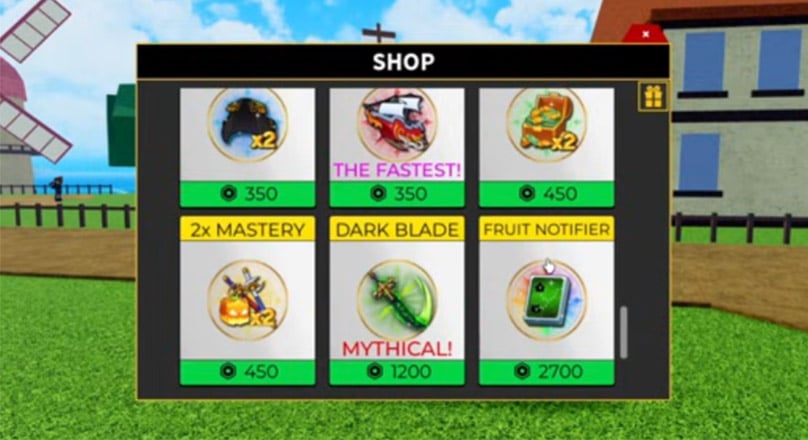
The Shop & Gift Sequence
To start, go to the Blox Fruit Dealer. You don't need to buy anything, we are just priming the menu.
1. Open the dealer menu and choose a fruit.
2. Press the Gift button. Do not gift it to anyone.
3. For the recipient, choose Global.
4. Press Cancel and then go to the Shop.
Very Important:
When you open the Shop, go to the Fruit Notifier. Press Buy. When the Robux prompt appears, press the X to close it. Don't purchase it. After closing the prompt, tap the black box area on the UI. If you don't do this, you will mess the whole thing up and we'll suggest you restart the whole game to clear everything.
Phase 2: Environment & Profile Reset
After priming the UI, we need to do something in the game world to 'lock' the game. It's a bit superstitious, but in our experience with glitches on Roblox, these actions trigger necessary server refreshes.### The Jungle Run
Head over to the Jungle. We have to do a simple cycle here:
Speak to the Adventurer and take a quest. (We picked the Gorillas/Good Looking quest because it is quick).
Finish the quest. No need to rush it, just make sure to get the Quest Completed message.
Profile Zeroing
This is the step that a lot of players miss. Open your Profile menu.
Clear your Showcase: click the X on all of the items in your Showcase. Your showcase should be completely cleared.
What is the reason for this?
We think this may help eliminate some of the cached data tied to your account's visual account, which may help in executing the glitch.
Adjusting System Settings
Before continuing, you must configure your settings for a certain glitching environment. Below are the settings required:
| Setting Category | Action Needed | Explanation |
|---|---|---|
| Who can join me? | Set to No One | Isolates your session data. |
| Shift Lock | OFF | Ensure no camera lock interference during resets. |
| Volume | Optional | Adjust to your preference (doesn't affect the glitch). |
| Shift Lock | OFF | Ensure no camera lock interference during resets. |
After you've set these, close the settings menu and look for an NPC. Click on the NPC and select the option Never Mind. This will end the interaction cycle.
Phase 3: Faction Switcher and Grand Brigade Method
This guide's most difficult and time-consuming section will have us trick the game to keep constant movement for all 4 factions and across the sea.
The Dragon Fruit Method
Head over to Middle Town and speak to the Blox Fruit Dealer once more.
1. Scroll down until you see Dragon Fruit (or select the most expensive option).
2. Click the Gift button, then select Store in Inventory.
3. When the pop-up appears, Close it and select Cancel. Then open the Shop.
4. Open the shop, go to History and close everything.
Changing from Pirate to Marine
Head towards the Pirate Starter Area.
1. Take the Bandit quest.
2. Defeat one bandit.
3. Run back to the Marine Recruiter, hit Join, and then Reset your character.
You should then spawn at the Marine Fortress.
Resetting the Grand Brigade
You need some in-game currency. Head to the Boat Dealer on the Marine side.
You need to purchase the most expensive ship you have unlocked. This should be the Grand Brigade.
Take the ship out to where you can enter the Sea zone (wait for the message to show up).
Reset your character while at sea zone.
Final Drive
After you spawn, buy the Frontier boat (the cheaper one) and drive it back to Middle Town. When you get back:
1. Set your Home Point to Middle Town.
2. Go to the Blox Fruit Dealer.
3. Make sure the fruit you have equipped is selected.
4. Click Gift -> Store in Inventory.
5. Close all menus.
The Waiting Game
You have done the hard work. Now, just wait.
Important:
Per our testing and logic for these steps, you must wait for 2 hours. You may stay AFK on the server, or you may leave the game altogether. It is believed that there are conflicted transactions data from Phase 1 and Phase 3 that the server needs this time to clear up.
What to look for:
After the two hours are up, log back to the server and check your inventory. If the glitch worked, you will see a premium item icon for the Fruit Notifier and will be able to Redeem a permanent perk on your account.
Questions and Answers
Q: Does this work on mobile?
A: Yes, the UI may look slightly different, but everything is in the same place. Just be careful to click the X to close pop-ups.
Q: Can I get banned for this?
A: UI glitches are not ban worthy, but abusing the game's mechanics in any way poses a small risk of being banned, so we recommend you try this on an alt account first, like we did.
Q: What happens if I click the black box before the time is right?
A: It's simple. You'll have to restart the entire game, since the actions have to be recorded in the appropriate order.
Q: am I required to be a certain level?
A: Absolutely not! However, you will need to have enough in-game currency (Beli) to purchase the boats mentioned in step 3.
Conclusion
For Blox Fruits players, getting the Fruit Notifier without spending 2,700 Robux is the ultimate goal. Although this strategy will require a lot of running, resetting, and clicking certain menu buttons, it is definitely worth if you are running low on Robux.
Be aware, glitches in Roblox are patched quickly, so if the steps do not work, the developers probably found a way to fix it. However, this method has been working the best. Good luck, and may you find the legendary fruits!
Most Popular Posts
- Blox Fruits Summer Update: Venom Rework, Magnet Fruit, New Islands & Prep Guide
- Blox Fruits Race Tier List 2026: Every Race Ranked Worst to Best After the Balance Patch
- Blox Fruits Update 30: Magnet Fruit, Venom & Shadow Rework Guide
- Blox Fruits PvP Tier List: Best Fruits Ranked After the Update
- Blox Fruits Redeem Codes August 2026 Full List: Working XP, Stat Reset & Beli Code
- Blox Fruits Summer Update: Balance Changes, Venom Rework, Magnet Fruit
Popular Category Lists
- ARC Raiders / (343)
- Grow a Garden / (292)
- CoD: Black Ops 7 / (167)
- Star Citizen / (160)
- MLB 26 / (159)
- Monopoly Go / (152)
- ARK Survival Ascended / (126)
- Steal a Brainrot / (98)
- Blox Fruits / (74)
- Adopt Me / (73)
- Forza Horizon 6 / (72)
- Sailor Piece / (68)
- Grow a Garden 2 / (68)
- Diablo IV / (62)
- CoD: BLACK OPS 6 / (55)
- Path of Exile 2 / (48)
- Monster Hunter Wilds / (46)
- Aion 2 / (45)
- Windrose / (44)
- Donut SMP / (41)