0
0 Created: Nov 29,2025 | Grow a Garden
Grow a Garden Trading World Update: RAP Secrets & Token Strategy, and Dev Server Insights

This isn't just a map update; it is a complete overhaul of the Grow a Garden economy. I know you have questions swarming in your head right now: How do I get in? What are Tokens worth? Is my inventory safe? Don't worry. I'm going to answer every single question you have about the Farmers Market, the RAP system, and privacy settings. Whether you are a seasoned veteran or a casual planter, this is what you need to know to survive the chaos.
- Access & The Anti-Hack Security
- The RAP System: Your Best Friend or Worst Enemy?
- The Veteran's Warning: The Weight Blind Spot
- Economic Strategy: How to Not Go Broke
- Risk Control: Your First-Week Rules
- Listing and Pricing: Use RAP, Don't Obey Blindly
- Power-Up and Preparation: Make Your Assets Worth More
- Tokens and Inflation: Managing the Money Side
- Frequently Asked Questions (FAQ)
- The Takeaway
Access & The Anti-Hack Security
First things first, to access the Trading World (also known as the Farmers Market), you need to head to the portal in the middle of the Garden World map.
Entry Fee: Currently, on the test server, it costs 100,000 Sheckles. This is subject to change, but you should start saving now.
Fast Travel: You don't always need to run to the portal. There is a new blue button in the bottom right corner of your UI that says Travel to Farmers Market.
But before you make your first trade, stop everything and read this.
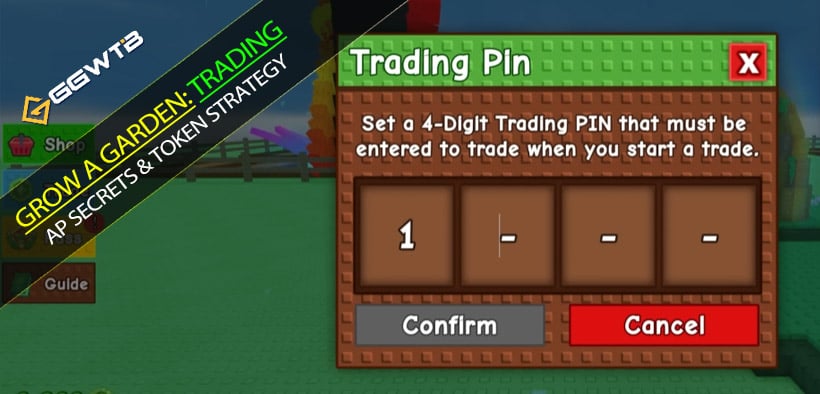
The developers have added a Trading PIN. This is not optional if you care about your grow a garden pets. If someone hacks your account, this PIN is the only thing stopping them from trading away your entire inventory.
Do this immediately:
1. Go to Settings and set a 4-digit PIN.
2. The game will give you 8 recovery words.
3. Do not screenshot them. Write them down on a physical piece of paper and hide it. If you forget your PIN, these words are your only way back in.
You can also toggle your inventory privacy. If you don't want people snooping on your hoard, set your inventory visibility to Friends Only or None.
The RAP System: Your Best Friend or Worst Enemy?
Once you are in the market, it feels a lot like the classic trading worlds in OSRS. You can claim a stall, apply a skin, and list your items.
This introduces the RAP (Recent Average Price) system.
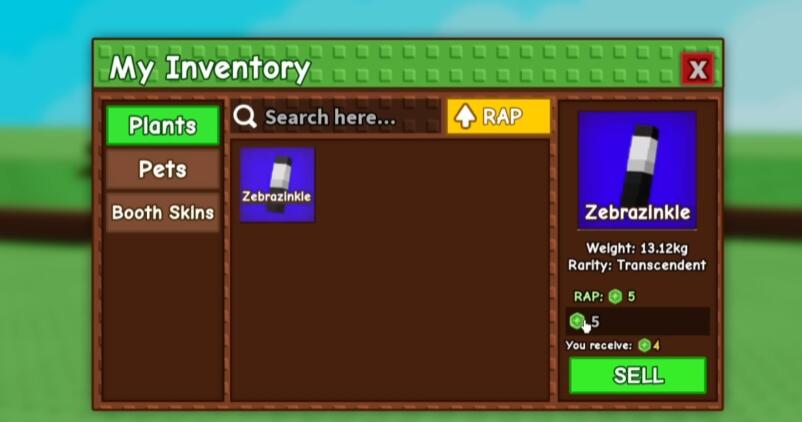
When you click an item, you see what it has been selling for recently.
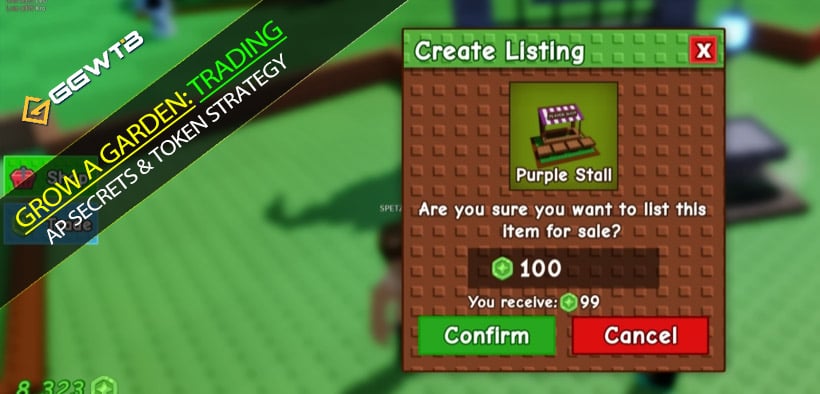
The Tax: There is a 1% tax on transactions to curb inflation. If you sell for 100 Tokens, you pocket 99.
Pricing Freedom: You can list items for whatever you want. If the RAP is 400, nothing stops you from listing it for 1,000 or 10.
The Veteran's Warning: The Weight Blind Spot
Here is where things get tricky. The RAP system currently has a massive flaw: It does not account for Weight or Age.
What does this mean for you?
It means a generic Peacock and a massive, heavy, high-age Peacock might show the exact same RAP value.
If you are buying: Pay attention! Click the item and check the stats (Weight/Age). Do not assume a cheap RAP price is a good deal—you might be buying a low-stat dud.
If you are selling: Do not blindly follow the RAP price for your heavy pets. You will be practically giving them away.
Fortunately, special variants like Ghostly or Rainbow hatches are indexed separately, so their RAP values should be more accurate.
Economic Strategy: How to Not Go Broke
This is the most important section of this guide. The new currency is Trading Tokens, and the exchange rate is fixed at 1 Robux = 1 Token.
For Free-to-Play (F2P) Players:
Do not sell your best pets on Day 1.
Why?
When the update drops, the supply of Tokens in the economy will be incredibly low. Only people spending Robux will have them.
If you sell your rare items immediately, you will get a tiny amount of Tokens because the purchasing power just isn't there yet.
Your Strategy: Be patient. Wait a few weeks. As more Tokens flood the economy (inflation), the RAP values will rise, and you will get significantly more Tokens for the same pet.
For P2W / Veteran Traders:
Day 1 is your hunting ground.
If you have Robux (and thus Tokens), you are the king of the market initially.
You will find impatient players selling high-tier items for dirt-cheap prices just to get their hands on some new currency. This is your chance to acquire assets at rock-bottom prices.
Risk Control: Your First-Week Rules
Concrete actions to avoid paying tuition during launch volatility.
Entry pacing and price reading
If you're new to RAP and conversions, spend the first 1–2 weeks observing real trades and price bands before committing big.
Even if you chase early arbitrage, let RAP be your anchor: when a listing deviates ±30% or more, verify with recent sales and competing listings in multiple servers.
Compare apples to apples: same item, rarity, level, and mutation. Use the median, not an outlier.
Visibility and privacy
If you're worried about being targeted, switch inventory visibility to Friends only or No one in Trade settings.
Conditional trigger: if someone repeatedly scans your rare items and pushes aggressive discounts, pause, change privacy, or swap servers.
Common scam patterns
RAP anchoring scam: shoppers fake high self-trades to lift RAP, then cite RAP is high to pressure you. Counter: check cross-server listings and actual transaction volume.
Token FOMO: It'll cost more tomorrow is used to push you into high token buys. Counter: set daily caps and avoid emotional trades.
Seed/cosmetic rumors: currently, plants, pets, and booth skins are tradeable; wait for official updates on seeds or cosmetics.
Listing and Pricing: Use RAP, Don't Obey Blindly
Practical mechanics to set fair prices without getting trapped.
Booths and listing flow
Claim a booth → pick category (plants/pets/booth skins) → create listing. RAP auto-fills a reference price that you can tweak.
If RAP samples are thin (niche items), add an attributes premium (level, mutation, rarity) of roughly 10–25% and watch feedback over 24 hours.
Three-step repricing
Initial post: RAP ±10% to test demand.
6–12 hour review: track views, DMs, and competing prices.
Second pass: if silence, cut 5–8%; if oversubscribed, lift 3–5%.
Hunting across servers
There isn't a confirmed teleport-to-specific-item feature at launch; server hopping for, say, hamsters is time-consuming.
Practical trade-off: prioritize the larger Trading World servers; if repeated hops fail, post a buy order price and let sellers find you.
Power-Up and Preparation: Make Your Assets Worth More
Direct upgrades that increase sale value the moment Trading World opens.
Pet leveling: Golden Pig tables for speed
Field-tested: clustering around Golden Pig tables yields rapid XP; with proper placement, going from level 1 to 100 can be done in about a day.
If XP feels inconsistent, check spacing—pets drift off and miss boosts, cutting XP ticks.
Why this matters: higher levels raise weight and accelerate ability cycles, which buyers value and pay for.
Mutations and rarity tags
Re-rolling mutations increases utility and scarcity—both justify premiums.
Pricing stack: level 100 + rare mutation + limited series + low circulating supply.
Plants as token generators: watch duplication risks
Hyper-productive plants (sextillion-scale outputs) convert to tokens well.
Even if duplication mechanics (e.g., certain animals) can flood supply, the team may nerf or remove them, which would reprice the market—price with caution.
Tokens and Inflation: Managing the Money Side
Trading tokens currently appear to be primarily Robux-purchased; in-game earning isn't confirmed from dev server observations.
If you plan early token deployment:
Set a daily budget cap and total exposure limit (e.g., ≤20% of your portfolio).
Prefer high-liquidity staples (mainline pets) over niche items with weak turnover.
If you spend little or nothing:
Stockpile high-level, rare-mutation pets or productive plants; sell after a week of observation to convert into tokens.
Why this helps
Early inflation often stems from fresh money; delaying large sales helps you approach a truer value range.
Frequently Asked Questions (FAQ)
Q: Are Trading Tickets gone?
A: No. According to the test server, Trading Tickets and the gifting system are still in the game. If you hate this new market, you can keep playing and trading the old-fashioned way.
Q: Can I convert Tokens back into Robux?
A: No, it is a one-way street. However, you can use Tokens to buy almost anything in the game that usually costs Robux (like shop items). This is a huge win for F2P players.
Q: What if someone manipulates the RAP?
A: This is a valid concern. If a player has two accounts and trades a specific item back and forth at a high price, they could artificially inflate the RAP. We hope the developers add a cooldown to prevent this, but for now, always use your own judgment rather than trusting the RAP blindly.
Q: Is 100,000 Sheckles the real entry cost?
A: That number is from dev server testing; live servers may raise or change the requirement.
Q: Can we trade seeds or cosmetics?
A: Current scope is plants, pets, and booth skins. Seeds/cosmetics are unconfirmed—watch official notes.
Q: No item-specific teleport—how do I find targets faster?
A: Stick to larger Trading World servers, set public buy orders, and only hop servers when necessary.
Q: RAP looks high but no one bids. What's up?
A: Likely manipulation or thin samples. Compare across servers, check real sales, and discount outliers.
Q: Are tokens only via Robux?
A: For now, most likely yes per dev server behavior; if in-game earn methods appear, adjust accordingly.
The Takeaway
This update is going to cause absolute madness in the pet values. The old tier lists? Throw them out the window.
We are entering a new era where the market is fluid and dynamic. If you are new to this, turn on the Show Warnings for Unfair Trades option in the settings. It uses the RAP system to warn you if a trade looks sketchy.
The market will eventually stabilize, but until then, keep your PIN safe, double-check the weight of every pet you buy, and don't let the Day 1 hype trick you into selling your best assets for pennies.
See you in the Farmers Market
Most Popular Posts
- Grow a Garden Secret Badge Walkthrough: Carrot Weight & Puzzle Guide
- Grow a Garden Get Secret Seeds & Rare Pets Guides: DLC Codes + Trading Guide
- Grow a Garden Enfield Guide: Everfallen Roll Rules & Level Loss
- Grow a Garden Moon Harvest Part 4 Guide: Gear Odds, Reset Rewards, Cornling Strategy, New Seeds
- Grow a Garden: Beanpod Chest Farming and Elder Beanstalk Guides
- Grow a Garden Arctic Fox Guide: Best AFK Setup for Seeds, Gears, Eggs & Pet XP
Popular Category Lists
- ARC Raiders / (356)
- Grow a Garden / (295)
- CoD: Black Ops 7 / (167)
- Star Citizen / (163)
- MLB 26 / (159)
- Monopoly Go / (153)
- ARK Survival Ascended / (128)
- Steal a Brainrot / (99)
- Blox Fruits / (74)
- Adopt Me / (74)
- Forza Horizon 6 / (72)
- Sailor Piece / (68)
- Grow a Garden 2 / (68)
- Diablo IV / (62)
- CoD: BLACK OPS 6 / (55)
- Aion 2 / (54)
- Path of Exile 2 / (48)
- Monster Hunter Wilds / (46)
- Windrose / (44)
- COD: Modern Warfare 4 / (44)