0
0 Created: Aug 12,2026 | Aion 2
AION 2 Combat Mode Guide: Classic vs Action (Which One Should You Pick?)

Two combat modes. One choice that shapes your entire AION 2 experience.
Classic Mode keeps your cursor visible, click-to-move intact, camera familiar. Action Mode hides the cursor, sharpens your camera response, and matches the game's actual combat speed.
Here's the blunt truth: AION 2 combat is faster than the original. Bosses punish slow repositioning. PvP punishes slow targeting. Pick the wrong mode and you'll be fighting your controls instead of your enemy.
- The Two Modes At a Glance
- Classic Mode: Comfort First
- Action Mode: Built for the New Combat
- Head-to-Head: Where Each Mode Actually Wins
- PvE: Bosses Don't Wait for Your Cursor
- PvP: This Is Where Classic Mode Falls Apart Fastest
- Fixing Bad Targeting (Before You Blame Your Class)
- The 6-Step Test (Don't Skip This)
- Recommendation By Player Type
- Setup Checklist Before Launch
- Common Mistakes
- FAQ
- What's the real difference between Classic Mode and Action Mode?
- Which mode is better for PvP?
- Is Classic Mode the same as original AION combat?
- Should new players default to Action Mode?
- Can we switch modes anytime, or should we commit early?
- Bottom Line
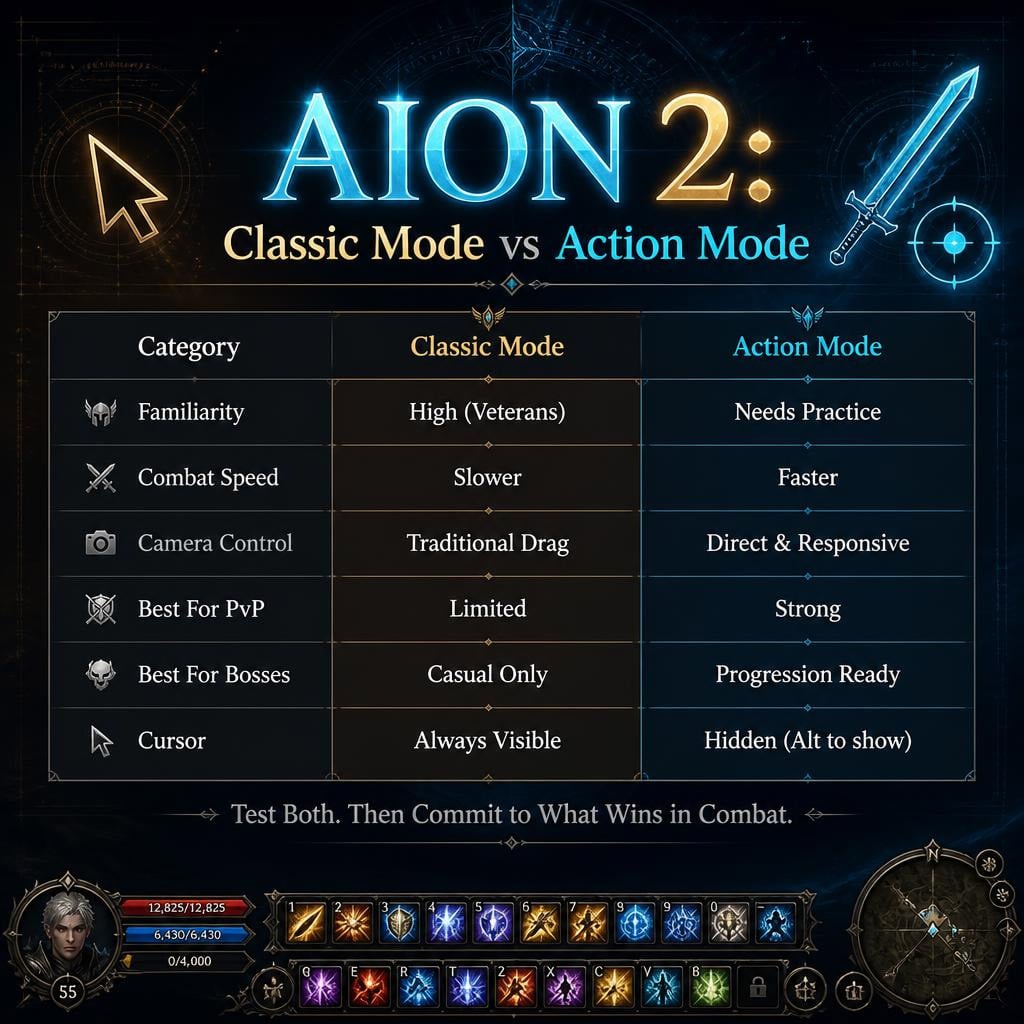
The Two Modes At a Glance
| Mode | Feel | Best For |
|---|---|---|
| Classic Mode | Cursor-based, familiar, click-to-move | AION 1 veterans, casual questing |
| Action Mode | Hidden cursor, camera-driven, fast | PvP, bosses, serious progression |
Neither is wrong. But one matches AION 2's actual combat rhythm better — and it's not the nostalgic pick.
Classic Mode: Comfort First
Cursor stays on screen. Click enemies, click skills, click-to-move.
This is the safe landing spot for original AION players. Muscle memory transfers. UI clicking feels natural. Camera drag works like the old days.
Use it if:
- You click-to-move by habit
- You click skills instead of hotkeying
- You want zero learning curve on day one
The catch: once fights speed up — bosses with ground AoEs, PvP target swaps — Classic Mode starts feeling one beat behind. You'll notice yourself losing target lock or fighting the camera mid-fight.
Action Mode: Built for the New Combat
Cursor hidden by default. Tap Alt to bring it back for menus.
This is the mode AION 2's combat was actually designed around. Camera turns tighter. Movement and attacks blend without cursor friction.
Use it if:
- You're pushing PvP seriously
- You're doing progression raids/bosses
- You want max responsiveness, not nostalgia
Why it wins in practice:
- Faster camera pivots = better boss dodge timing
- No cursor management = cleaner target switching
- Movement + skill casting feel connected, not separate actions
First hour warning: it feels weird. No visible cursor throws off veterans. Push through — most players adjust within a few real combat sessions, not town-walking.
Head-to-Head: Where Each Mode Actually Wins
| Category | Classic Mode | Action Mode |
|---|---|---|
| Familiarity | Wins | Needs adjustment |
| Combat speed/response | Slower | Wins |
| Camera control | Traditional | Wins |
| Click-to-move | Wins | Not the focus |
| UI interaction | Wins (instant) | Needs Alt toggle |
| Boss mechanics | Usable | Wins |
| PvP | Reactive lag | Wins clearly |
| Long-term ceiling | Comfort cap | Wins |
Bottom line: Classic wins on comfort and UI speed. Action wins on everything combat-performance related.
PvE: Bosses Don't Wait for Your Cursor
Casual leveling and predictable mob farming? Classic Mode works fine. Low pressure, low stakes.
Real boss mechanics — directional attacks, sudden adds, movement checks — demand Action Mode. You need to reposition and attack in the same motion. Classic Mode's click-based flow breaks that rhythm.
If you're gunning for progression content, don't learn it on Classic Mode and switch later. Learn it right the first time.
PvP: This Is Where Classic Mode Falls Apart Fastest
Human opponents don't play predictably. They punish every wasted half-second.
Action Mode advantages in PvP:
- Faster camera tracking on moving targets
- No cursor hunting mid-fight
- Movement and attack chain together
Some Classic Mode veterans with deep muscle memory can still perform — but that's the exception, not the strategy. Most players building PvP habits from scratch should start in Action Mode.
Fixing Bad Targeting (Before You Blame Your Class)
Targeting issues aren't always a mode problem. Check settings first.
| Symptom | Fix |
|---|---|
| Wrong enemy gets hit | Adjust target priority |
| Camera too fast/slow | Tune sensitivity gradually |
| Alt-cursor feels clunky | Practice the toggle deliberately |
| PvP targeting chaotic | Test target cycling settings |
| Combat feels clunky overall | Stop mixing control habits — commit to one mode for a few hours |
Rule: change one setting at a time. Test in real combat. If it gets worse, reset and rebuild — don't stack five changes and guess which one broke it.
The 6-Step Test (Don't Skip This)
Reading comparisons won't tell you what your hands need. Test properly:
1. Play Classic Mode 1-2 hours — establish the baseline feel
2. Fight elites, not just weak mobs — pressure reveals real weaknesses
3. Switch to Action Mode — direct comparison, same content
4. Run actual combat-heavy content — dungeons, not town
5. Adjust targeting/sensitivity — don't judge raw defaults
6. Reset if it gets messy — don't get stuck in a bad custom setup
Never judge a mode standing near a vendor. Combat pressure is the only fair test.
Recommendation By Player Type
| Player Type | Recommended Mode |
|---|---|
| Original AION veteran | Start Classic, force-test Action |
| New MMO player | Action Mode |
| PvP-focused | Action Mode |
| Progression raider | Action Mode |
| Click-to-move loyalist | Classic Mode |
| Casual questing only | Either works |
Setup Checklist Before Launch
1. Start default settings
2. Try Classic briefly if you're a veteran
3. Commit to Action Mode for several real sessions
4. Tune camera sensitivity
5. Tune targeting behavior
6. Bind cursor-toggle to a key you won't forget
7. Retest in actual combat
8. Reset only if changes make things worse
Keybind priority for Action Mode: core damage skills on easy reach, defensive skills on instant-access keys, cursor toggle on autopilot muscle memory. If you're looking at your keyboard mid-fight, your binds aren't ready.
Common Mistakes
Choosing on nostalgia alone. Classic Mode feels emotionally right for veterans. That doesn't make it mechanically optimal for AION 2's faster combat.
Quitting Action Mode in 5 minutes. The hidden cursor feels wrong at first. Give it real combat time before judging.
Changing everything at once. One setting change, one test, repeat. Chaos settings = false conclusions.
Testing only in town. Town tells you nothing. Test elites, dungeons, PvP duels if available.
FAQ
What's the real difference between Classic Mode and Action Mode?
Classic Mode keeps the cursor visible with click-to-move and manual mouse targeting. Action Mode hides the cursor by default and prioritizes camera responsiveness and keyboard-driven movement for faster combat.
Which mode is better for PvP?
Action Mode, clearly. Faster camera tracking, no cursor management overhead, better movement-attack chaining. PvP punishes every wasted second — Action Mode minimizes that waste.
Is Classic Mode the same as original AION combat?
Close, but not identical. AION 2's underlying combat system is faster and more hybrid regardless of mode — Classic Mode just recreates the control feel, not the old game's actual pace.
Should new players default to Action Mode?
Yes. It matches the intended modern combat design and builds correct movement habits from day one instead of habits you'll need to unlearn later.
Can we switch modes anytime, or should we commit early?
You can switch anytime in settings. But commit to one mode for several hours per test — switching every ten minutes gives you noise, not real comparison data.
Bottom Line
Action Mode wins for actual combat performance — PvP, bosses, movement-heavy fights, long-term ceiling. Classic Mode wins for familiarity and instant UI comfort, nothing else.
If you're a veteran: start Classic to ease in, but force yourself through several real hours of Action Mode before deciding. If you're new: skip straight to Action Mode.
The setup that wins is the one that disappears in your hands — when you stop thinking about controls and start thinking about the fight.

Most Popular Posts
- AION 2 Global Best Classes: Current Meta, PvE/PvP Roles, and Class Picking Guide
- Aion 2 Global Class Tier List: Best for PvE, PvP & Solo Play
- AION 2 Global PvE Guides: Dungeons, Raids and Weekly Priorities
- AION 2 Pet Guide: Souls, Genus Insight, Owned Effects and What to Farm First
- AION 2 PvE DPS Tier List: Highest-DPS Classes Ranked by Dungeon Data
- Aion 2 Best Leveling Build for All Classes: Fast 1–45 Global Launch Guide
Popular Category Lists
- ARC Raiders / (365)
- Grow a Garden / (297)
- CoD: Black Ops 7 / (167)
- Star Citizen / (166)
- MLB 26 / (159)
- Monopoly Go / (153)
- ARK Survival Ascended / (130)
- Steal a Brainrot / (99)
- Adopt Me / (75)
- Blox Fruits / (74)
- Forza Horizon 6 / (72)
- Sailor Piece / (68)
- Grow a Garden 2 / (68)
- Diablo IV / (62)
- Aion 2 / (59)
- CoD: BLACK OPS 6 / (55)
- COD: Modern Warfare 4 / (50)
- Path of Exile 2 / (48)
- Maplestory Classic / (48)
- Monster Hunter Wilds / (46)