0
0 Created: Oct 18,2025 | Grow a Garden
Grow a Garden: Black Cat - New Pet To Make You Rich!


Moon Cat has officially been dethroned, and its successor. Black Cat, is here to revolutionize your gardening experience. With unique abilities that make plants grow larger and profits soar, this new pet is a must-have for anyone looking to dominate the game. This guide we'll dive into why the Black Cat is so powerful, how to use it effectively, and why it's your ticket to getting rich in the game.
Overview
The new Halloween update has brought us a treasure trove of exciting features, including the Spooky Egg. Inside this egg lies the Black Cat, a pet with abilities so overpowered that it's likely to become your new favorite companion. Here's why:
- Incredible Growth Boost: Like other cats in the game, the Black Cat increases plant size by 1.3 times. But as it levels up, this effect becomes even stronger, making your plants absolutely massive.
- Unique Secret Ability: Every 4 minutes, the Black Cat naps near a witch's cauldron, which doubles as a pancake stack. This eliminates the need for both a pancake stack and a Moon Cat, combining their benefits into one adorable package.
- Massive Profit Potential: With the Black Cat's help, players have grown pumpkins worth billions of shekels. It's not just about growing big plants; it's about growing rich.
How to Get the Black Cat?
The Black Cat can be obtained through the spooky egg or premium Spooky Egg.
| Egg Type | Chance of Getting Black Cat |
|---|---|
| Spooky Egg | 6% |
| Premium Spooky Egg | 8.5% |

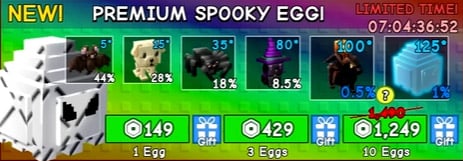
If you're lucky enough to hatch one, make sure to age it up using level-up lollipops for maximum effectiveness.
Setting Up
To fully utilize the Black Cat's potential, you'll need a witch's cauldron.
- Obtain a Witch's Cauldron: The cauldron is available in the pumpkin crate with a 5% drop rate. While it's rare, you only need one to get started.
- Stock Up on Black Cats: For maximum results, aim to have eight Black Cats. If you can't hold that many in your inventory, even four will make a noticeable difference.
- Timing is Key: Place all your cats at the same time so their abilities stack. This ensures your plants get the maximum growth boost.
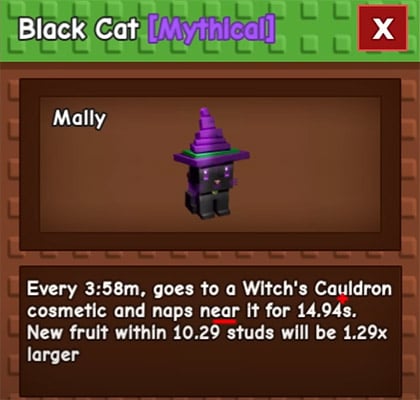
Testing Method
We put the Black Cat to the test on some great pumpkins and the results were astonishing: Without sprinklers, pumpkins grew to an impressive 51 kilograms and were worth 15 million shekels. With sprinklers added, the size and value skyrocketed even further.
Here's how you can replicate these results:
- Plant Your Crops: Use high-yield seeds like great pumpkins or crimson thorns.
- Position Your Cats and Cauldron: Ensure all cats are placed near the cauldron for synchronized naps.
- Optional - Use Sprinklers: Adding sprinklers will maximize growth potential.
Notes:
- Use Echo Frogs: These can instantly grow your plants, saving time and ensuring perfect timing with your cats' abilities.
- Invest in Grow All: If you're willing to spend Robux, this feature can speed up your gardening process significantly.
- Experiment with Mutations: Combining rainbow mutations with large plants can yield even greater profits.
Real Results
With just a handful of Black Cats and proper timing, players have reported earning tens of millions of shekels per harvest. For example:
- A pumpkin grown with no mutations was worth 56 million shekels.
- Crimson Thorns reached sizes that nearly covered entire gardens.
Imagine what you could achieve with a full set of eight max-level Black Cats!
The Black Cat is not just a replacement for the Moon Cat—it's an upgrade in every way. Its unique ability to combine plant growth boosts with cauldron naps makes it an essential asset for any serious Grow a Garden player.
If you found this guide helpful, don't forget to share it with your fellow gardeners and leave a comment below with your thoughts or questions. Let's grow rich together!
Most Popular Posts
- Grow a Garden Secret Badge Walkthrough: Carrot Weight & Puzzle Guide
- Grow a Garden Get Secret Seeds & Rare Pets Guides: DLC Codes + Trading Guide
- Grow a Garden Enfield Guide: Everfallen Roll Rules & Level Loss
- Grow a Garden Moon Harvest Part 4 Guide: Gear Odds, Reset Rewards, Cornling Strategy, New Seeds
- Grow a Garden: Beanpod Chest Farming and Elder Beanstalk Guides
- Grow a Garden Arctic Fox Guide: Best AFK Setup for Seeds, Gears, Eggs & Pet XP
Popular Category Lists
- ARC Raiders / (350)
- Grow a Garden / (294)
- CoD: Black Ops 7 / (167)
- Star Citizen / (162)
- MLB 26 / (159)
- Monopoly Go / (152)
- ARK Survival Ascended / (127)
- Steal a Brainrot / (99)
- Blox Fruits / (74)
- Adopt Me / (74)
- Forza Horizon 6 / (72)
- Sailor Piece / (68)
- Grow a Garden 2 / (68)
- Diablo IV / (62)
- CoD: BLACK OPS 6 / (55)
- Aion 2 / (50)
- Path of Exile 2 / (48)
- Monster Hunter Wilds / (46)
- Windrose / (44)
- Donut SMP / (41)