0
0 Created: Dec 3,2025 | Grow a Garden
How to Bypass the 4-Day Trade Cooldown in Grow a Garden (Instant Unlock Glitch)

We've all been there. You just obtained a high-tier pet—maybe a Cockatrice or a rare event unit—and you are ready to flip it for a profit or trade it to your main team. But then you see it: the dreaded Trade Cooldown: 4 Days red text at the bottom of the card.
Usually, this happens when you receive a pet through specific trade interactions or market purchases. The game forces you to wait, killing your momentum.
But here is the secret:
You don't actually have to wait. There is a specific interaction between the Trading System and the Gifting System that wipes this cooldown tag instantly. I've tested this personally on my own locked Cockatrices, and it works 100% of the time if you follow the steps exactly.
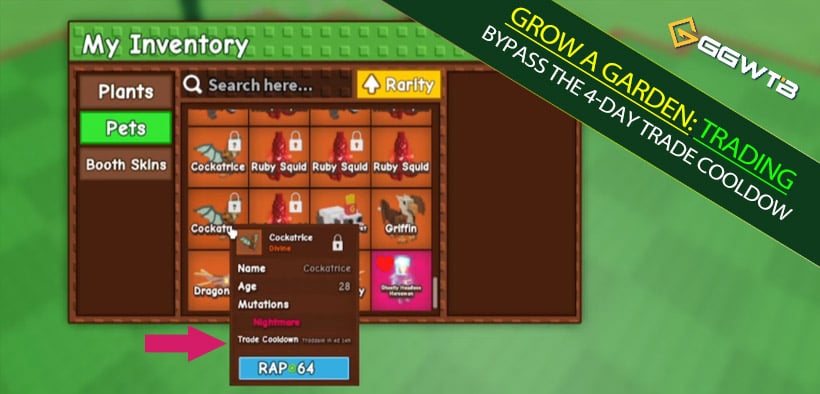
The Gift Loop Method
This method requires a specific setup. Do not try to do this alone in a public server without preparation, or you risk losing your pet.
Prerequisites
- The Locked Pet: The animal with the cooldown timer.
- A Partner: You need a friend you trust with your life, OR (highly recommended) a secondary account (Alt ID) that you control.
- Location: You must be in a Normal Server (Standard World), not the Trading Plaza/Booth World.
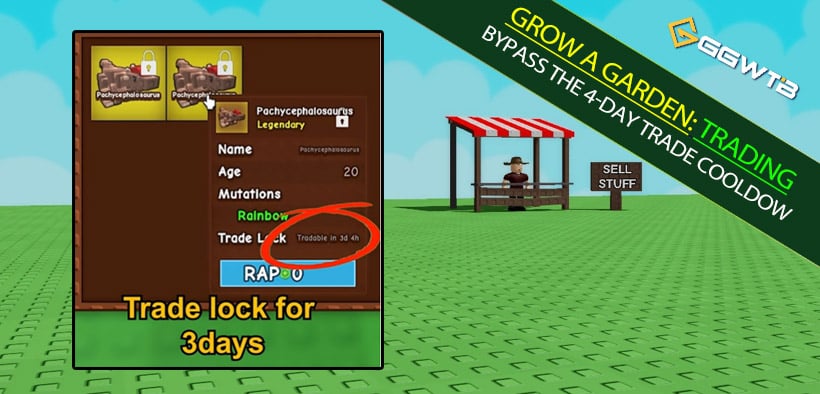
Step-by-Step Execution
1. Reset Your Environment
If you are currently in the Trading Plaza looking at your booth, leave.
Head back to a standard, normal server. The gifting mechanics work more reliably here for this glitch.
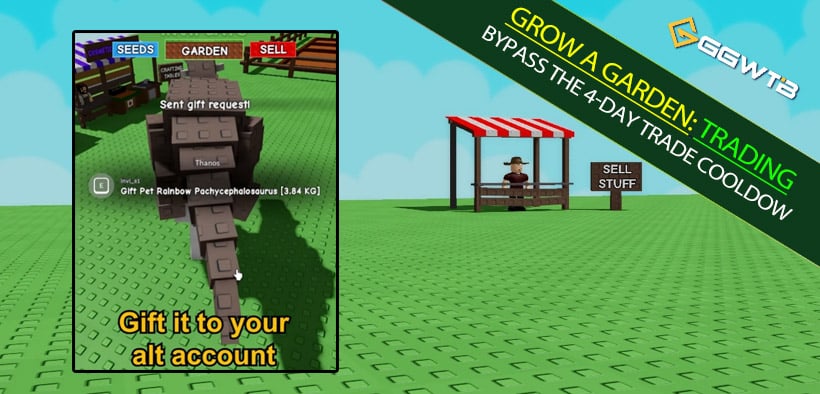
2. The Outbound Trade (The Lock Transfer)
Initiate a normal trade with your friend or alt account.
Put your locked pets (e.g., the 4 Cockatrices) into the trade window and confirm.
Note:
At this point, the pets are now in your friend's inventory, and they are likely still locked or have a transferred cooldown.
3. The Inbound Return (The Unlock Trick)
This is the most important step.
Do NOT trade them back using the normal trade window. If you trade them back normally, the cooldown often remains or resets to another timer.
Instead, tell your friend (or use your alt) to open the Gift / Mail System:
- Select your username.
- Select the pets they just received.
- Press Send (Gift).
4. Verify the Unlock
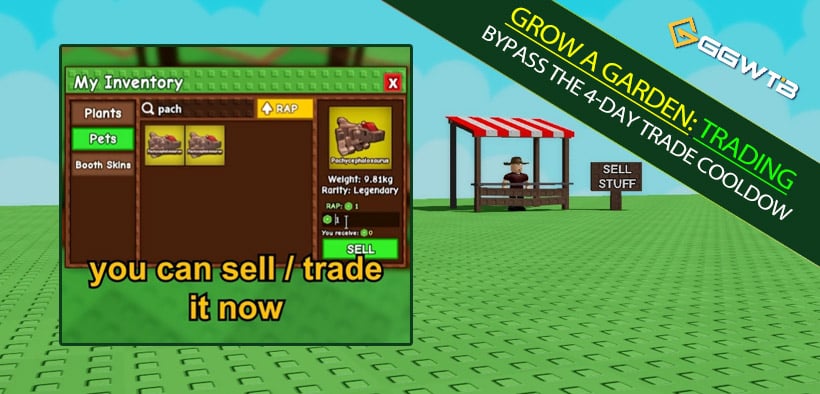
Open your inventory. When you click on the pets that were just gifted back to you, look at the bottom of their card.
The Trade Cooldown text should be gone. You can now list them in your booth or trade them immediately.
Critical Warnings & Mechanics
Why Does This Work?
From a technical perspective, the game likely treats Trading and Gifting as two different ownership transfer events.
Trading preserves the cooldown tag to prevent rapid market manipulation.
Gifting seems to reset the pet's Ownership Timestamp completely, treating it as a fresh acquisition without the market restriction tags.
The Trust Factor
I cannot stress this enough: If you do this with a random player, they will steal your pet.
Since you have to trade the item to them first, they have full control over it. If they leave the server, your pet is gone.
Best Practice:
Use a second device (phone/PC) and trade with yourself. It is the only way to be 100% safe.
FAQ: Common Issues
Q: Does this work on The Force Knights or 99 Chickens?
A: Yes. The method applies to the cooldown tag mechanism, not the specific pet species. As long as the pet is tradeable in general, this glitch removes the timer.
Q: I tried this, but the pet is still locked. What happened?
A: You likely had your friend trade it back instead of gifting it back. The return trip MUST be done via the Gift/Mail button. If you use the trade window twice, the lock stays.
Q: Is there a cost to gifting?
A: Usually, gifting requires a small amount of gems or diamonds depending on the server settings or recent updates. Ensure your alt account has a few diamonds to cover the postage fee.
Final Thoughts
The Trade Cooldown is designed to slow down the economy, but for active traders, time is money. By utilizing the Gift Loop, you bypass the 4-day wait and keep your inventory moving.
Just remember: Normal Server -> Trade Out -> Gift Back.
It's a simple trick, but it saves you 96 hours of waiting. Go unlock those pets and get your booth stocked up.


The GGWTB Editorial Team features 10 full-time gaming editors and 23 specialist contributors, delivering hands-on tested walkthroughs, easter egg breakdowns, and game updates.
Jordan — who spearheads our in-depth Grow a Garden, Steal a Brainrot guides, and patch notes—every guide is rigorously verified on live servers for accuracy.
Most Popular Posts
- Grow a Garden Clam Event Guide: Tide Tokens, Coastal Eggs & Best Summer Update 2 Strategy
- Grow a Garden Planting Trick Guide: Best Tomato Method, High Tide Radar Leak, Rewards
- Grow a Garden Secret Badge Walkthrough: Carrot Weight & Puzzle Guide
- Grow a Garden Get Secret Seeds & Rare Pets Guides: DLC Codes + Trading Guide
- Grow a Garden Moon Harvest Part 4 Guide: Gear Odds, Reset Rewards, Cornling Strategy, New Seeds
- Grow a Garden Enfield Guide: Everfallen Roll Rules & Level Loss
Popular Category Lists
- ARC Raiders / (339)
- Grow a Garden / (292)
- CoD: Black Ops 7 / (167)
- Star Citizen / (160)
- MLB 26 / (159)
- Monopoly Go / (152)
- ARK Survival Ascended / (125)
- Steal a Brainrot / (98)
- Blox Fruits / (74)
- Adopt Me / (73)
- Forza Horizon 6 / (72)
- Sailor Piece / (68)
- Grow a Garden 2 / (68)
- Diablo IV / (62)
- CoD: BLACK OPS 6 / (55)
- Path of Exile 2 / (48)
- Monster Hunter Wilds / (46)
- Windrose / (44)
- Aion 2 / (43)
- Donut SMP / (40)