0
0 Created: Apr 8,2026 | Grow a Garden
How to Find and Equip Fence Skins in Grow A Garden?

If you've been looking for fences in your inventory and finding nothing, you're not alone. In Grow A Garden, fences are cosmetic plot skins, not normal items, so the game handles them through your garden sign customization menu instead of your backpack.
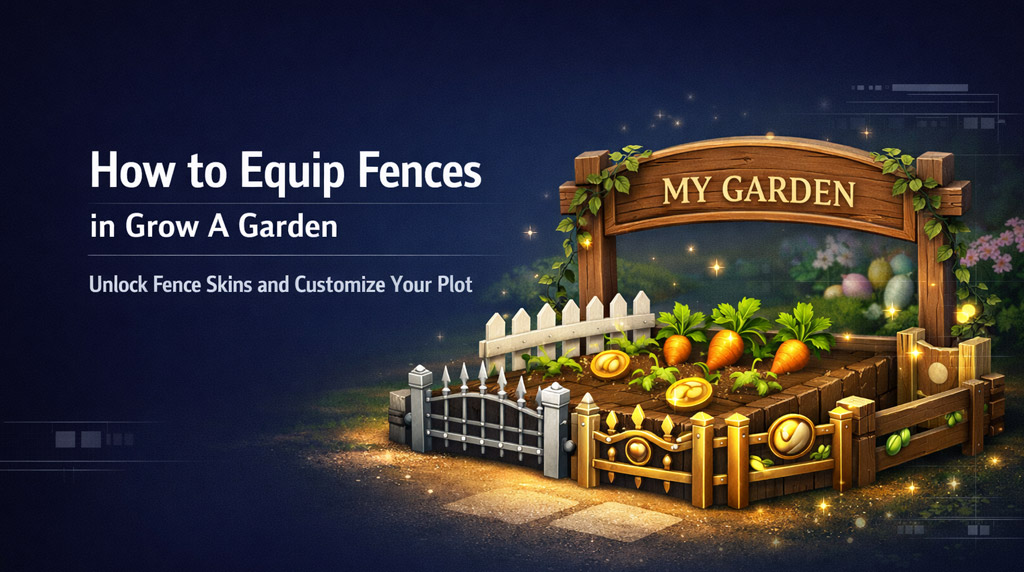
That small detail is why a lot of players think fences are bugged. They usually aren't. In most cases, the real issue is either using the wrong menu or not having any fence skins unlocked yet.
From regular play, this is one of the easier customization systems in the game once you know where to go.
- How to Equip a Fence
- Why Your Fence Menu May Be Empty
- Common reasons
- How to Unlock More Fence Skins
- Best Progression Path for Most Players
- Quick Tips From Regular Play
- FAQ
- How do I equip a fence in Grow A Garden?
- Why can't I find fences in my inventory?
- Why is my fence menu empty?
- What is the easiest fence to unlock?
- How do I get the Ascended Fence?
- Final Thoughts
How to Equip a Fence
The actual equip process is very quick.
Walk to the wooden sign at the entrance of your garden plot — the one that shows your player name — and interact with it. This opens the plot customization menu, where your available fence skins appear.
| Platform | How to Open the Menu |
|---|---|
| PC | Press E at your garden sign |
| Mobile | Tap the sign |
| Console | Press X or Square |
Once the menu opens:
1. Select the fence skin you want
2. Press Equip
3. Your garden border changes immediately
That's it. No inventory slot, no extra crafting step, and no separate placement process.
Why Your Fence Menu May Be Empty
If you open the menu and see nothing, the system is usually working as intended. It simply means you haven't unlocked any fence skins yet.
This is where many players get stuck, because the game doesn't always make that clear upfront.
Common reasons
| Problem | Likely Cause | Fix |
|---|---|---|
| Fence menu is empty | No fence skins unlocked | Progress levels or events |
| Can't find fence option | Looking in backpack/inventory | Use the garden sign instead |
| Fence won't change | Skin not equipped properly | Reopen menu and equip again |
If you find the sign isn't responding, make sure you are standing directly in front of your own plot sign, not slightly off to the side or near another player's entrance.
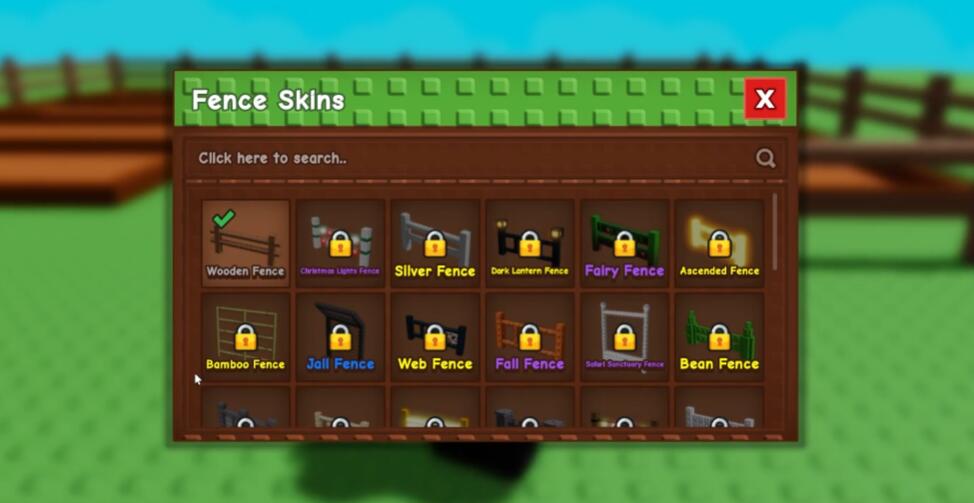
How to Unlock More Fence Skins
Most fence skins are tied to progression, so unlocking them is more about account growth than shopping around menus.
| Fence | How to Unlock |
|---|---|
| Bean Fence | Contribute to the Beanstalk event 10 times, then claim it at the top |
| Picket Fence | Reach Level 10 |
| Silver Fence | Reach Level 20 |
| Gold Fence | Reach Level 50 |
| Ascended Fence | Buy for 10 Garden Coin after your first ascension |
From a practical standpoint, the Picket Fence is usually the easiest long-term target for newer players, because it comes from normal progress. The Bean Fence can also be quick if the event is active and you're already participating.
Best Progression Path for Most Players
If your goal is simply to get a fence equipped fast, this is the easiest route:
| Player Stage | Best Fence Goal | Why |
|---|---|---|
| New player | Picket Fence | Simple level milestone |
| Event-active player | Bean Fence | Faster if event is live |
| Mid-game player | Silver Fence | Natural XP progression |
| Late-game player | Gold or Ascended Fence | Shows long-term progress |
In real play, this matters because not every fence is equally realistic for your account right now. Chasing Gold too early is usually a waste of focus when you could unlock Picket much sooner and still improve your garden's look.
Quick Tips From Regular Play
A few small things make this system easier:
- Don't look in your inventory — fences are not stored like tools
- Use your own garden sign — that's where customization happens
- Check event rewards — some fences are tied to limited-time content
- Treat fences as progression cosmetics — they show account growth more than gameplay power
That last point matters because fences don't boost income or crops. Their value is visual, but in a game built around plot identity, that still feels rewarding.
FAQ
How do I equip a fence in Grow A Garden?
Go to the wooden sign at the entrance of your garden, open the customization menu, select a fence skin, and press Equip.
Why can't I find fences in my inventory?
Because fences are cosmetic plot skins, not normal items. They're managed through the garden sign menu.
Why is my fence menu empty?
You probably haven't unlocked any fence skins yet. Most are tied to levels, events, or ascension progress.
What is the easiest fence to unlock?
For most players, the Picket Fence is the easiest steady unlock because it comes from reaching Level 10.
How do I get the Ascended Fence?
After your first ascension, you can buy it for 10 Garden Coin in the Ascension Shop.
Final Thoughts
Fences in Grow A Garden are easy to equip once you know the game treats them as plot customization, not inventory items. That's the one detail most players miss at first.
If your menu already has skins, equipping a fence only takes a few seconds. If it doesn't, then your next step is simple: focus on levels, event participation, and ascension milestones. That approach gives you a clear path forward and makes the whole system feel much less confusing.
Most Popular Posts
- Grow a Garden Secret Badge Walkthrough: Carrot Weight & Puzzle Guide
- Grow a Garden Get Secret Seeds & Rare Pets Guides: DLC Codes + Trading Guide
- Grow a Garden Enfield Guide: Everfallen Roll Rules & Level Loss
- Grow a Garden Moon Harvest Part 4 Guide: Gear Odds, Reset Rewards, Cornling Strategy, New Seeds
- Grow a Garden: Beanpod Chest Farming and Elder Beanstalk Guides
- Grow a Garden Arctic Fox Guide: Best AFK Setup for Seeds, Gears, Eggs & Pet XP
Popular Category Lists
- ARC Raiders / (354)
- Grow a Garden / (294)
- CoD: Black Ops 7 / (167)
- Star Citizen / (163)
- MLB 26 / (159)
- Monopoly Go / (153)
- ARK Survival Ascended / (128)
- Steal a Brainrot / (99)
- Blox Fruits / (74)
- Adopt Me / (74)
- Forza Horizon 6 / (72)
- Sailor Piece / (68)
- Grow a Garden 2 / (68)
- Diablo IV / (62)
- CoD: BLACK OPS 6 / (55)
- Aion 2 / (52)
- Path of Exile 2 / (48)
- Monster Hunter Wilds / (46)
- Windrose / (44)
- Maplestory Classic / (42)