0
0 Created: Mar 14,2026 | MLB 26
MLB The Show 26 Best Settings for Diamond Dynasty, Ranked, and offline grinding

The best settings in MLB The Show 26 are the ones that make the game clearer, faster, and easier to control. Some settings improve pure performance, while others save a surprising amount of time during Diamond Dynasty grinds. Here's a shorter setup guide focused on what matters most.
Most players only change the hitting camera, but the best setup goes further than that. We want settings that help us:
- see the ball better,
- remove unnecessary delays,
- and reduce avoidable mistakes.
That is why the most important changes are not just visual. They also affect pace, comfort, and consistency.
- Best Overall Settings at a Glance
- Hitting Settings
- Best hitting camera: Strike Zone
- Best backup camera: Strike Zone High
- Depth of Field and PCI
- Pitching Settings
- Best pitching setup
- Fielding and Baserunning Settings
- What to use
- Audio and Presentation Settings
- Best quality-of-life changes
- Best Settings by Playstyle
- FAQ
- What is the best hitting camera in MLB The Show 26?
- Should we use Hitting Depth of Field?
- What is the best pitching input?
- Is Quick CPU Pitching worth turning on?
- Should we turn Auto Defensive Shift off?
- Is Stretch Only worth using?
- Conclusion
Best Overall Settings at a Glance
Here is the quickest version of the full setup.
| Setting Category | Recommended Option | Why It Works |
|---|---|---|
| Hitting View | Strike Zone | Best competitive visibility |
| Alternate Hitting View | Strike Zone High | Better against tall pitchers or high release points |
| Hitting Depth of Field | On | Reduces visual clutter |
| Pitching Interface | Pinpoint | Best control and precision |
| Pitching View | Strike Zone High | Cleaner pitch tunneling view |
| Throwing Interface | Button Accuracy | Most reliable overall |
| Throw Canceling | On | Lets us recover from bad throws |
| Presentation Mode | Fast Play | Saves time in offline grinding |
| Quick CPU Pitching | On | Speeds up Diamond Dynasty games dramatically |
| Auto Defensive Shift | Off | Prevents too many weird cheap hits |
| Pitcher Delivery | Stretch Only | Makes offline games much faster |
| Commentary | Off or very low | Keeps audio cleaner and less repetitive |
This setup works well for most players right away.
Hitting Settings
Hitting settings matter the most, especially online.
Best hitting camera: Strike Zone
We recommend Strike Zone as the default. It gives the cleanest view of velocity and pitch movement, which is why it remains the safest competitive option.
Best backup camera: Strike Zone High
If you struggle with:
- high fastballs,
- tall pitchers,
- or awkward release points,
then Strike Zone High is the best adjustment.
| Hitting Camera | Best For | Trade-Off |
|---|---|---|
| Strike Zone | Competitive consistency | Less environmental context |
| Strike Zone High | High fastballs, tall pitchers | Slightly different timing feel |
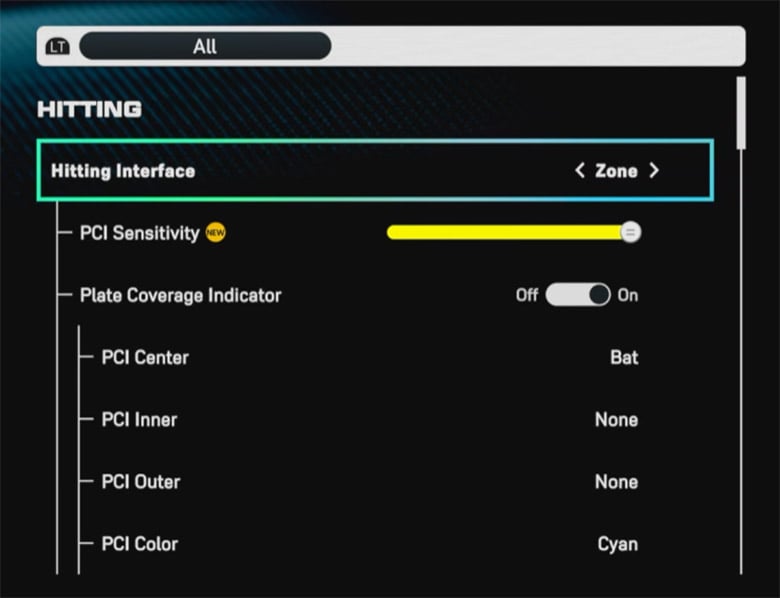
Depth of Field and PCI
Keep Hitting Depth of Field On if you want less background distraction. This is especially helpful in noisy stadiums or rough batter's-eye environments.
For PCI:
- Sensitivity: start high or max
- Center: Bat
- Anchor: Off for most players
- Opacity: medium
| PCI Setting | Recommendation | Reason |
|---|---|---|
| PCI Sensitivity | High / Max to start | Faster response |
| PCI Center | Bat | Clean and intuitive |
| PCI Anchor | Off for most players | Keeps the setup simpler |
| Opacity | Medium | Visible without becoming distracting |
If you find your PCI is too jumpy, then lower sensitivity gradually instead of overhauling everything.
Pitching Settings
Pitching settings should improve both control and pace.
Best pitching setup
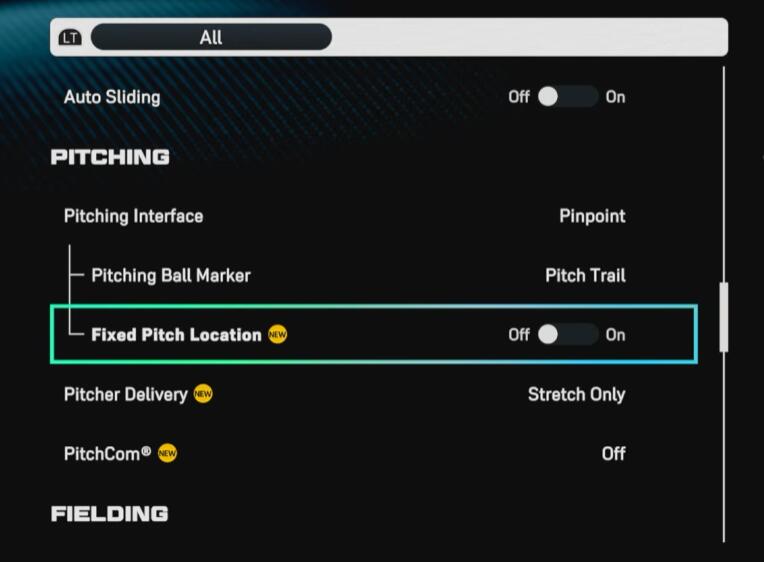
Use Pinpoint. It still gives the best ceiling for precision and remains the strongest competitive input.
For camera, Strike Zone High is a strong option because it gives a clean view of pitch location and tunneling.
Also:
- Pitch Trail looks cleaner than Chevron
- Pitchcom Off keeps things simple
- Stretch Only is excellent for offline grinding
| Pitching Setting | Recommended Option | Why |
|---|---|---|
| Interface | Pinpoint | Best overall precision |
| View | Strike Zone High | Clear command view |
| Ball Marker | Pitch Trail | Cleaner visual |
| Pitcher Delivery | Stretch Only offline | Faster games |
| Pitchcom | Off | Less clutter |
If you mostly grind Mini Seasons or Conquest, Stretch Only is one of the best hidden time-savers in the game.
Fielding and Baserunning Settings
These settings are easy to overlook, but they prevent a lot of avoidable mistakes.
What to use
- Throwing Interface: Button Accuracy
- Throw Canceling: On
- Auto Defensive Shift: Off
- Fielding View: High
- Auto Baserunning: Off
- Auto Sliding: Off
| Fielding/Baserunning Setting | Recommendation | Why It Matters |
|---|---|---|
| Throwing Interface | Button Accuracy | Most reliable |
| Throw Canceling | On | Fixes rushed mistakes |
| Auto Defensive Shift | Off | More natural positioning |
| Fielding View | High | Better ball tracking |
| Auto Baserunning | Off | More control |
| Auto Sliding | Off | Prevents bad forced actions |
If you find yourself throwing to the wrong base under pressure, Throw Canceling should be turned on immediately.
Audio and Presentation Settings
These settings are about comfort and efficiency more than raw skill.
Best quality-of-life changes
For Diamond Dynasty grinding, we recommend:
- Commentary Off or Low
- Sound Effects High
- Presentation Mode: Fast Play
- Batter Walkups Off
- Quick CPU Pitching On
| Audio/Presentation Setting | Recommendation | Why |
|---|---|---|
| Commentary | Off / Low | Less repetition |
| Crowd Volume | Personal preference | Depends on immersion |
| Sound Effects | High | Better contact feedback |
| Presentation Mode | Fast Play | Faster games |
| Batter Walkups | Off | Better for grinding |
| Quick CPU Pitching | On | Massive offline time saver |
Quick CPU Pitching is especially important. If you play offline a lot, this setting alone makes the game feel much faster.
Best Settings by Playstyle
Not every player needs the exact same priorities.
| Playstyle | Key Priorities | Best Settings to Focus On |
|---|---|---|
| Ranked / Competitive Online | Pitch recognition and control | Strike Zone, Pinpoint, Button Accuracy |
| Offline Grinder | Speed and efficiency | Fast Play, Quick CPU Pitching, Stretch Only |
| Casual DD Player | Clarity and comfort | Strike Zone or Strike Zone High, simpler PCI |
| New Player | Easy readability | Bat PCI center, medium opacity, lower clutter |
If you mainly play offline, focus on speed.
If you mainly play online, focus on visibility and control.
FAQ
What is the best hitting camera in MLB The Show 26?
For most players, Strike Zone is the best overall hitting camera. Strike Zone High is the best alternative if you struggle with high heat or tall pitchers.
Should we use Hitting Depth of Field?
Yes, for most players. It helps reduce visual clutter and keeps your eyes on the ball.
What is the best pitching input?
Pinpoint is still the best option if you want the most control.
Is Quick CPU Pitching worth turning on?
Absolutely. If you grind offline modes, it saves a lot of time.
Should we turn Auto Defensive Shift off?
For many players, yes. It creates more standard positioning and avoids some frustrating weak-contact outcomes.
Is Stretch Only worth using?
Yes, especially offline. It speeds up CPU games noticeably.
Conclusion
The best MLB The Show 26 settings are the ones that improve clarity, control, and pace. For most players, that means Strike Zone for hitting, Pinpoint for pitching, Button Accuracy for throwing, and Fast Play plus Quick CPU Pitching for efficiency. Once those are in place, the rest is about small adjustments that match how you like to play.

Most Popular Posts
- MLB The Show 26 God Squad Guide: Best Lineup, 98 Tarik Skubal, Bullpen Picks, and Legend Tips
- MLB The Show 26 Tier List: Best Diamond Dynasty Cards by Position
- MLB The Show 26 Hall of Fame Guide: 99 Hoffman, Best Spotlights & Chase Pack Value
- MLB The Show 26 Top 20 Endgame Cards Ranked for New Seasons
- MLB The Show 26 New Threads 2.0 Tier List Guide: Best Cards, Budget Picks, and Meta Fits
- MLB The Show 26 New 99 OVR Tier List: Best Cards Ranked
Popular Category Lists
- ARC Raiders / (354)
- Grow a Garden / (294)
- CoD: Black Ops 7 / (167)
- Star Citizen / (163)
- MLB 26 / (159)
- Monopoly Go / (153)
- ARK Survival Ascended / (128)
- Steal a Brainrot / (99)
- Blox Fruits / (74)
- Adopt Me / (74)
- Forza Horizon 6 / (72)
- Sailor Piece / (68)
- Grow a Garden 2 / (68)
- Diablo IV / (62)
- CoD: BLACK OPS 6 / (55)
- Aion 2 / (53)
- Path of Exile 2 / (48)
- Monster Hunter Wilds / (46)
- Windrose / (44)
- COD: Modern Warfare 4 / (43)