



 0
0
Clam
Grow a Garden Clam Chance not Consumed Watering Cans
Unlimited
In Stock
1
- 1
- 2
- 3
- 4
- 5
- 6
$1.19
You May Also Be Interested In:
In Stock

Cheetah / Legendary
In Stock


Frost Dragon / Divine

Unlimited
In Stock
1
Friendly help, instant updates.
Pets valid; order tracking was confusing.
Instant delivery; worked as expected.
Best price; instant Pets delivery, worked.
Smooth trade, professional seller.
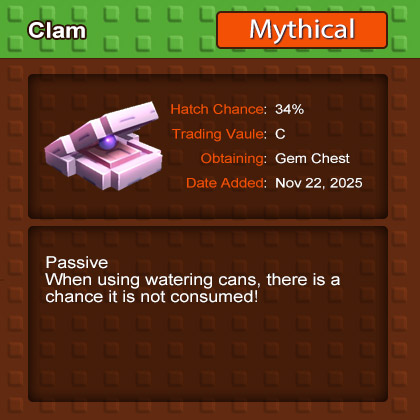
If you're constantly burning through watering cans in Grow a Garden, the Clam offers a lightweight, high-value fix. Its hallmark trait introduces a not consumed check when you water, nudging your supply to last longer and stabilizing costs during busy planting cycles. Here's a structured walkthrough, from how to get it, to how to make it pay off - so your high-frequency watering feels efficient rather than exhausting.
This section clarifies what the Clam is, when it arrived, and why it matters.
- Core identity: The Clam is an Uncommon pet—pink shell, purple pearl—added with the Trader Event.
- Availability window: Introduced on 2025-11-22 (Trader Event context).
- Beginner upside: It directly impacts watering can consumption, which is a key pain point for new players. That makes it a smart gift to onboard newcomers.
How you can reliably get the Clam.
- Primary sources: Obtainable during the Trader Event; tradable and often gifted by veteran players to help starters.
- Drop reference: Player-reported data notes a 34.5% drop rate for Clam (Resource Saver) from Gem Chests.
- Actionable tips:
- If time is tight, focus Gem Chest runs; the rate is respectable for Uncommon targets.
- If budget is tight, lean on event exchange and player trades to limit spend.
Objective: Understand how Water Reserve actually saves resources.
- Trait description: Water Reserve—when you use a watering can, there's a chance it is not consumed.
- Key figure: About a 6.58% chance per use (roughly 6–7 out of 100 waterings won't consume a can).
- What this means:
- In high-frequency watering, your cans last longer; purchase and refill cycles stretch out, flattening upkeep costs.
- In resource-scarce early play, you reduce the risk of mid-task supply breaks.
| Metric | Value / Notes |
|---|---|
| Rarity | Uncommon |
| Event | Trader Event (2025-11-22) |
| Appearance | Pink clam with a purple pearl |
| Non-consumption chance | ~6.58% per watering |
| Drop reference | ~34.5% from Gem Chest (player-reported) |
Takeaway: 6.58% looks small, but with high-maintenance plants, the cumulative savings are consistent and noticeable over long runs.
This part turns small probabilities into stable savings.
- Why stack: The Clam alone can feel subtle. When paired with Ruby Squids, the overall non-consumption rate rises.
- How it works: Resource-preserving effects typically resolve via independent checks. With multiple independent checks, the chance that at least one prevents consumption increases.
- Intuitive example (illustrative):
- If Clam p1 = 6.58% and Ruby Squid p2 = X%, independent checks yield combined non-consumption ≈ 1 − (1 − p1) × (1 − p2).
- Across 100 waterings, going from 6–7 saved cans to low double digits changes your refill cadence meaningfully.
- Steps to execute:
1) Confirm both pets are active and eligible in your squad.
2) Run 50–100 consecutive waterings on high-maintenance plants; track can usage to verify uplift.
3) If uplift is muted, check pet levels, environment modifiers, and any squad slot conflicts.
Decide when the Clam deserves a slot.
- Early-game: If you notice cans depleting constantly, slot the Clam to stabilize early progression.
- High-maintenance plants: Frequent watering amplifies probability-based savings; low-maintenance plants show weaker impact.
- Tight-resource weeks: During event starts or expansion pushes, the Clam helps smooth spend and time pressure.
Guard against misinterpretation and over-expectation.
- Small probability: 6.58% is incremental, not a blanket free watering. Evaluate on long-run averages.
- Patch variability: Balance updates may adjust checks or stacking behavior. Track patch notes.
- Sampling bias: Player-reported drop and trigger rates can vary by sample size, event cycle, and server.
A practical measurement routine to validate savings.
- Test setup: Perform 200 waterings in a high-maintenance plot; log can consumption across pet setups.
- Single Clam sample: Expect roughly 10–14 non-consumptions (ideal ~13). Small fluctuations are normal.
- Clam + Ruby Squid sample: If Ruby Squid offers an additional ~8–10% independent check (illustrative), combined non-consumption can approximate 14–16%; across 200 waterings, that's ~28–32 cans saved.
- Practical inference: If realized savings are much lower, investigate hard caps, regional modifiers, or inactive bonuses.
Convert probability into dependable savings.
- Batch operations: Cluster watering sessions; consecutive actions surface the effect more clearly.
- Squad composition: Ensure both the Clam and Ruby Squid are active and not displaced by non-synergistic pets.
- Weekly review: Track consumption and savings, then tune plant selection and watering cadence to maintain a smooth resource curve.
- Is the 6.58% fixed?
- Generally stable, but events or patches can tweak it. Follow official notes and player testing.
- Is stacking linear or independent?
- It's closer to independent checks composed into a combined probability—not simple addition.
- Do beginners need both pets immediately?
- If budget is tight, start with the Clam; add Ruby Squid once you enter heavy-watering play or feel resource strain.
- How reliable is the 34.5% drop rate?
- It's player-reported. Expect deviation; running Gem Chests during event windows improves consistency.
The Clam shines as a low-barrier, steady resource saver. In heavy-watering setups, its non-consumption check behaves like a quiet background script that extends your cans and smooths costs. Pairing with Ruby Squids elevates the effect from nice to have to tangibly felt. In short: for high-maintenance plant lines, use small, repeatable probability over long horizons to turn resource savings into a stable advantage.

We use cookies to ensure website functionality and enhance your experience. Click "Accept All" to consent, or "Customize" to manage your preferences. See our Privacy Policy.