



 0
0
Tiger
Buy Grow a Garden Tiger Pet - Shared XP and Mutations
Unlimited
In Stock
1
- 1
- 2
- 3
- 4
- 5
- 6
$0.92
You May Also Be Interested In:
In Stock

Cheetah / Legendary
In Stock


Frost Dragon / Divine

Unlimited
In Stock
1
Safe trade; got Divine Pets instantly after confirmation.
Safe exchange; seller followed steps and delivered fast.
Pets came quickly. I’d like better status updates.
Quick handoff, friendly chat, thanks.
Legit seller, accurate Divine Pets .
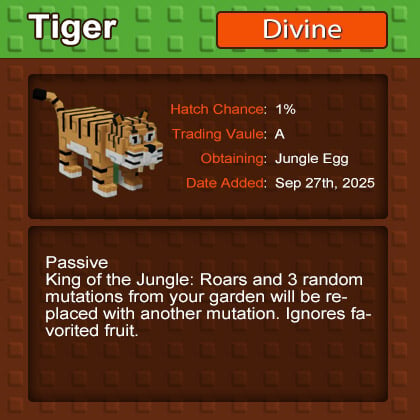
The Tiger pet in Grow a Garden is one of the rarest and most powerful additions to the game. With its unique grouping skill and a cooldown that can go as low as 15 seconds, it's no wonder players are calling it OP.
The Tiger comes from the Jungle Egg, but hatching one isn't easy—it's one of the rarest pets in the game.
Here are two main ways to get it:
Buy Jungle Eggs Directly:
You can purchase Jungle Eggs from the pet egg shop, but the spawn rate for Tigers is ridiculously low. Even after several hours of grinding, you might only end up with a few eggs, let alone a Tiger.
Upgrade Seeds in the Garden:
This method is much more efficient if you know the trick. Head to the seed stage in the middle of the map and start upgrading seeds. By leveling them up from Stage 3 to Stage 4, you'll earn rewards, including Jungle Eggs. However, upgrading seeds can feel painfully slow unless you use this combo:
Using this strategy, I managed to collect 327 Level 4 Mushroom Seeds and 32 Jungle Eggs in just a few hours. With a drop rate of around 10%, this is by far the fastest way to farm for Tigers.
The Tiger's skill is where things get interesting.
Here's how it works:
- Skill Activation: Every 12 minutes, the Tiger attracts nearby pets and grants them up to 800 XP.
- Cooldown Reduction: With the right upgrades, the cooldown can drop to an insane 15 seconds on a Titan Tiger.
- Strategic Advantage: While the XP cap limits its leveling potential, the real power lies in its ability to group pets together. This makes it perfect for AoE (area of effect) combos with pets like Peacock, Capy Bara, or Mooncat.
To fully exploit the Tiger's potential, try these combinations:
If you don't have these pets, consider trading for them on platforms like GGWTB Grow a Garden Pets, where hundreds of players are actively listing trades.
Q: How rare is the Tiger pet?
A: The Tiger is one of the rarest pets in the Jungle Egg pool, with a very low spawn rate.
Q: Does the Tiger's grouping skill work with all pets?
A: While the grouping effect works with most pets, the freezing bug only seems to affect certain ones like Capy Baras and Shroomies.
Q: How do I reduce the Tiger's cooldown to 15 seconds?
A: You'll need a Titan Tiger with specific upgrades to achieve this cooldown.

We use cookies to ensure website functionality and enhance your experience. Click "Accept All" to consent, or "Customize" to manage your preferences. See our Privacy Policy.