0
0 Created: Aug 22,2026 | COD: Modern Warfare 4
Modern Warfare 4 Settings: Best Controller, Graphics & PC Config for Max FPS

Skip the fluff. Here's what actually moves the needle in MW4 beta — tighter aim, cleaner movement, higher FPS, zero wasted clicks.
- Controller Settings
- Dead Zones
- Movement
- Combat Settings
- Paddle & Keybind Strategy
- Mouse & Keyboard
- Key Binds Worth Copying
- Graphics: Display
- Upscaling
- Quality Settings (Competitive Build)
- FOV & Audio
- HUD & Telemetry
- Windows Settings
- NVIDIA Control Panel
- Config File Tweaks
- GPU Upload Heaps / Resizable BAR
- Quick Setup by Player Type
- FAQ
- Best sensitivity for MW4 controller?
- Dynamic or Standard aim curve?
- Is DLSS worth it in MW4?
- Best FOV for MW4?
- How do I know if I'm CPU or GPU bound?
- Bottom Line
Controller Settings
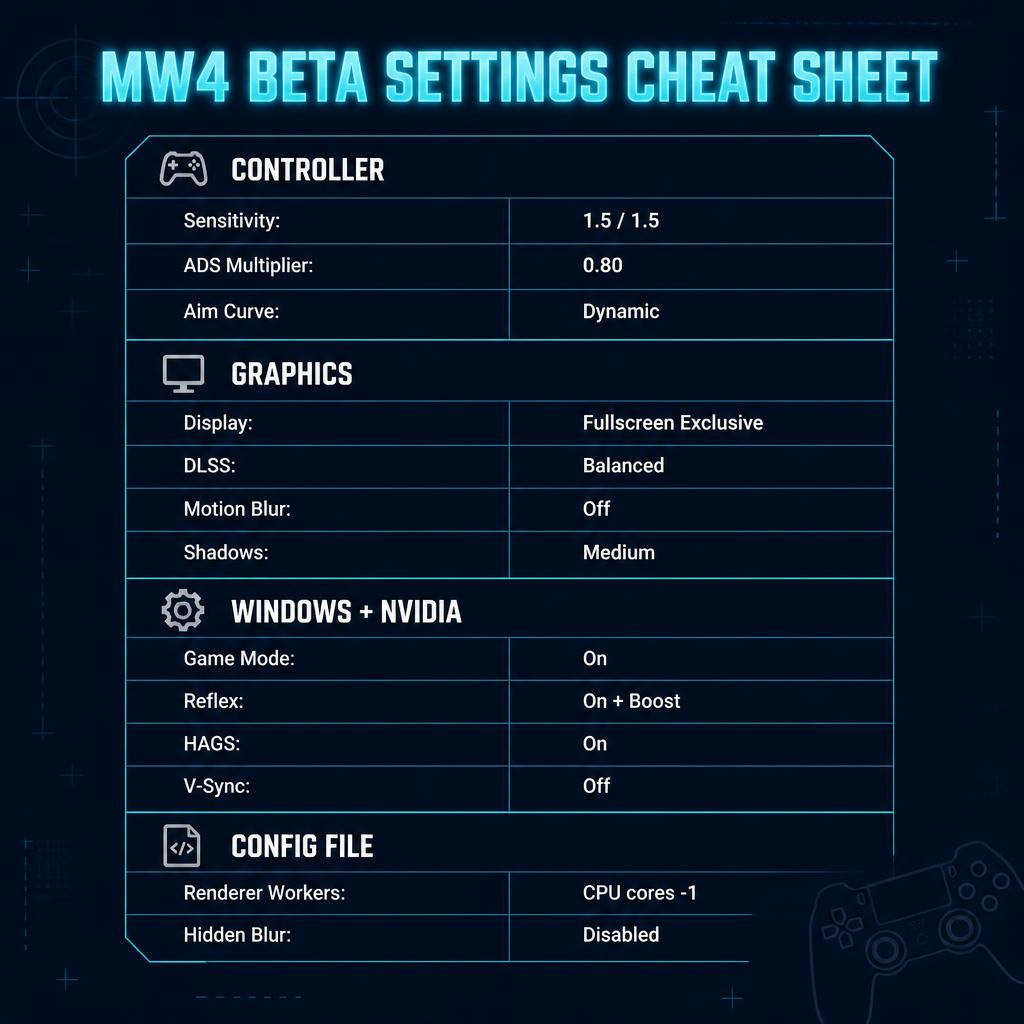
| Setting | Value |
|---|---|
| Horizontal/Vertical Sens | 1.5 |
| ADS Multiplier | 0.80 |
| Aim Response Curve | Dynamic |
| Vibration | Off |
| Aim Assist | On |
Overshooting? Drop ADS to 0.70–0.75. Feels sluggish up close? Bump base sens to 1.6 first — don't touch ADS.
Dead Zones
| Setting | Value |
|---|---|
| Left/Right Stick Min | 2 |
| Left Stick Max | 90 |
| Trigger Dead Zone | Default/0 |
Crosshair drifting on its own? Raise right stick min by 1. Movement feels laggy? Lower left stick min.
Movement
| Setting | Value |
|---|---|
| Tactical Sprint Assist | On |
| Sprint Assist Delay | 0 |
| Mantle Assist | Off |
| Corner Slice | Off |
| Slide Maintain Sprint | On |
| Automatic Parachute | Off |
Sprint Delay: 0 is non-negotiable. Any delay = slower repositioning = lost gunfights.
Mantle Assist off stops the game grabbing ledges mid-fight and locking you in an animation while you get beamed. Bind mantle manually.
Combat Settings
| Setting | Value |
|---|---|
| Interact/Reload | Multiplayer: Reload / Warzone-style: Interact |
| Mantle Cancels Reload | On |
| Akimbo Behavior | Independent |
| Depleted Ammo Switch | Off |
Auto weapon-swap on empty mag will get you killed. Keep it off and build the reload habit yourself.
Paddle & Keybind Strategy
Don't stack actions on one button. Split them:
- Slide → dedicated paddle
- Crouch → dedicated paddle
- Dive → dedicated paddle
- Mantle → dedicated paddle
- Melee weapon → dedicated paddle
One press, one result. Overloaded buttons = the game guessing what you meant = dead.
Mouse & Keyboard
| Setting | Value |
|---|---|
| ADS Multiplier | 0.80 |
| Mouse Smoothing | Off |
| Monitor Distance Coefficient | 1.33 or match old COD setting |
Change sensitivity one variable at a time. Change five settings together and you'll never know what fixed it.
Key Binds Worth Copying
| Action | Bind |
|---|---|
| Slide | Left Ctrl (dedicated) |
| Mantle | V |
| Lethal | Middle Mouse |
| Tactical | Q |
| Armor Plates | 4 |
| Dedicated Melee | Left Alt |
| Ping | Forward Mouse Button |
Dedicated slide bind fixes the classic crouched instead of slid death.
Graphics: Display
| Setting | Value |
|---|---|
| Display Mode | Fullscreen Exclusive |
| Resolution | Native |
| Brightness | ~55 |
| NVIDIA Reflex | On + Boost |
| V-Sync | Off |
| HDR | Off |
240Hz monitor? Cap frames at 237 for cleaner pacing with G-Sync.
Upscaling
| Setting | Value |
|---|---|
| Upscaling | DLSS |
| DLSS Preset | Balanced |
| DLSS Sharpness | ~80 |
| Frame Generation | Off |
Frame Gen inflates FPS numbers but adds input latency. Skip it for competitive play.
Quality Settings (Competitive Build)
| Setting | Value |
|---|---|
| Motion Blur / Weapon Blur | Off |
| Depth of Field | Off |
| Shadow Quality | Medium/Low |
| Ambient Occlusion | Off |
| Screen Space Reflections | Off |
| Volumetric Quality | Low |
| Texture Resolution | High/Medium |
Shadows on Ultra tank frame rate for zero gameplay benefit. Medium is the sweet spot — Low goes blocky.
Want max FPS instead? Drop everything to Low/Very Low, reflections off.
FOV & Audio
| Setting | Value |
|---|---|
| FOV | 110–120 |
| Third-Person FOV | 90 |
| Camera Movement | Lowest |
120 = max awareness. 105–110 = bigger, easier-to-hit targets.
Audio:
| Setting | Value |
|---|---|
| Music Volume | 0 (competitive) |
| Effects Volume | High |
| Reduce Tinnitus Sound | On |
Music covers footstep audio. Kill it.
HUD & Telemetry
Turn on: FPS Counter, Server Latency, Packet Loss, GPU Time, CPU Time.
| GPU Time | CPU Time | Bottleneck |
|---|---|---|
| 7ms | 5ms | GPU bound |
| 5ms | 7ms | CPU bound |
This number decides your GPU Upload Heap / Resizable BAR setup below.
Crosshair: Static, bright color (green). HUD Widget Shake: Off.
Windows Settings
1. Search Game Mode Settings → turn On.
2. Disable Xbox Game Bar.
3. Search Graphics Settings → HAGS On.
4. Variable Refresh Rate: Off.
HAGS causing instability? Test with it off — not every rig likes it.
NVIDIA Control Panel
| Setting | Value |
|---|---|
| Low Latency Mode | On |
| Power Management | Prefer Maximum Performance |
| Threaded Optimization | On |
| Triple Buffering | Off |
| Vertical Sync | Off |
Check your refresh rate. Plenty of 240Hz monitors run at 60Hz because Windows defaulted them wrong. Fix in Change Resolution → your monitor → highest Hz. Bad HDMI/DP cable can also cap you silently.
Config File Tweaks
Path: %localappdata% → Activision > Call of Duty > players beta. Back up the file first.
| Setting | Value | Why |
|---|---|---|
| Renderer Worker Count | CPU cores − 1 | Better scheduling, fixes 1% lows |
| Enable Velocity Based Blur | False | Kills hidden blur |
| Weapon Eject Brass | False | Less clutter |
| Show Blood Effects | False | Cleaner visibility |
Renderer Worker Count example:
| CPU Setup | Worker Count |
|---|---|
| 6 P-cores | 5 |
| 8 P-cores | 7 |
| 12 cores | 11 |
| 16 cores | 15 |
Intel P/E-core CPUs: count only performance cores.
GPU Upload Heaps / Resizable BAR
| Bottleneck | Upload Heaps | Resizable BAR |
|---|---|---|
| GPU bound | True | Enabled |
| CPU bound | False | Disabled |
4K = usually GPU bound. 1080p + strong GPU/weak CPU = usually CPU bound. Check your telemetry numbers to confirm.
Quick Setup by Player Type
| Player Type | Priority Setup |
|---|---|
| Competitive MP | Low shadows, blur off, Reflex On+Boost |
| Warzone-style | Prioritize Interact, balanced graphics |
| Controller | 1.5 sens, 0.80 ADS, Dynamic curve |
| Mouse | Smoothing off, tuned ADS |
| Low-end PC | DLSS Performance, low everything |
| High-end PC | DLSS Balanced, high textures, medium shadows |
FAQ
Best sensitivity for MW4 controller?
1.5/1.5 with 0.80 ADS multiplier. Overshooting → drop ADS to 0.75. Slow in close range → raise base sens, not ADS.
Dynamic or Standard aim curve?
Dynamic for anyone with controller experience. Standard is more predictable but weaker once you adapt.
Is DLSS worth it in MW4?
Yes. DLSS Balanced on RTX cards. Avoid Frame Generation — it adds latency competitive play can't afford.
Best FOV for MW4?
110–120. Go 120 for awareness, drop to 105–110 if enemies look too small at range.
How do I know if I'm CPU or GPU bound?
Enable CPU Time / GPU Time in telemetry. Higher GPU time = GPU bound. Higher CPU time = CPU bound. This decides your Upload Heap and Resizable BAR settings.
Bottom Line
Precise controller feel, motion blur nuked, Reflex on, shadows dropped to medium, telemetry running, renderer worker count matched to your CPU — that's the whole game plan. Tune one variable at a time, watch your CPU/GPU time, and MW4 stops feeling okay and starts feeling locked in.


The GGWTB Editorial Team features 10 full-time gaming editors and 23 specialist contributors, delivering hands-on tested walkthroughs, easter egg breakdowns, and game updates.
Luke — who spearheads our in-depth ARK Survival Ascended, COD: Modern Warfare 4 guides, and patch notes—every guide is rigorously verified on live servers for accuracy.
Most Popular Posts
- MW4 Apex Attachments: The Complete Weapon-Breaking Guide (Every Kit Ranked)
- MW4 Beta Meta Weapons Class Setups: Attachments, Perks, and Tuning included
- Cod MW4 Warzone New Maps - Zodiac Resurgence Map & Hajan BR
- Modern Warfare 4 Beta: Full Breakdown of Entrench, Maps, Zodiac Resurgence
- Modern Warfare 4 Carry Forward: XP Tokens, COD Points, Camos, Monster Energy
- MW4 Beta Early Access Guide: Weapon Levels, Operators, Modes, Rewards
Popular Category Lists
- ARC Raiders / (354)
- Grow a Garden / (294)
- CoD: Black Ops 7 / (167)
- Star Citizen / (163)
- MLB 26 / (159)
- Monopoly Go / (153)
- ARK Survival Ascended / (128)
- Steal a Brainrot / (99)
- Blox Fruits / (74)
- Adopt Me / (74)
- Forza Horizon 6 / (72)
- Sailor Piece / (68)
- Grow a Garden 2 / (68)
- Diablo IV / (62)
- CoD: BLACK OPS 6 / (55)
- Aion 2 / (52)
- Path of Exile 2 / (48)
- Monster Hunter Wilds / (46)
- Windrose / (44)
- Maplestory Classic / (42)