0
0 Created: Aug 5,2025 | Rust
Rust Next Twitch Drops Event - Round 42 Homebrewed 3 (August 10)

Rust Twitch Drops is an event where you can earn exclusive in-game items by watching Rust gameplay streams on Twitch. The Rust Twitch Drops are a fun way to stack cool skins and gear while hanging out on Twitch. Whether you've built your base or are just loading your first map, you can snag loot that fits your style. Just remember to link your account, watch the timer on your drops, and grab them before they fade away!
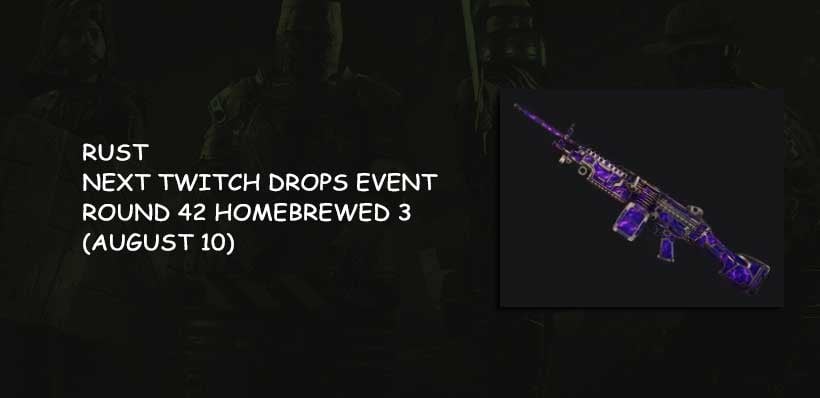
Homebrewed 3 42nd round Twitch Drops
The Rust Twitch Drops event returns in its 42nd round, named Homebrewed 3, kicking off August 10. During this event, you can snag limited-edition in-game gear simply by tuning in to Rust streamers you already watch on Twitch. To get in on the drops, make sure your Steam and Twitch accounts are linked. If they're tied to different profiles, just unlink and relink them to get started.
- General Drops
These items can be unlocked by tuning into any Rust stream tagged Drops Enabled. The time you need to watch for each item is below:
| Item | Watch Time | Category |
| Retuu Garage Door | 2 Hours | General Drop |
| Gorliac Vending Machine | 4 Hours | General Drop |
| CaliRust Metal Double Door | 6 Hours | General Drop |
| Spiicy Assault Rifle | 8 Hours | General Drop |
- Streamer-Specific Drops
These drops are locked to particular streamers. You have to watch for exactly 2 hours on their channel to get each item:
| Item | Watch Time | Creator |
| Garage Door | 2 Hours | moons |
| Assault Rifle | 2 Hours | moons |
| MP5A4 | 2 Hours | Tanizen |
| Assault Rifle | 2 Hours | GEVAD1CH |
| Semi-Automatic Pistol | 2 Hours | vaybae |
| Assault Rifle | 2 Hours | vaybae |
| Sheet Metal Double Door | 2 Hours | ravennrust |
| Assault Rifle | 2 Hours | Wabbit |
| Thompson | 2 Hours | Wabbit |
| M249 | 2 Hours | Wabbit |
Event Period
Rust Twitch Drops are typically available during a specific timeframe. For example, the most recent event may be from August 7 to August 17, 2025 (check the official announcement for the exact timeframe).
Rewards
By participating in the event, you can unlock the following types of rewards:
- Game Skins: These include skins for weapons, equipment, and buildings.
- Exclusive Items: Some rewards may only be available during the event.
- Streamer-Exclusive Rewards: Some rewards require watching a specific streamer's stream to unlock.
Participation Requirements
Account Linking:
- Link your Steam and Twitch accounts.
- After linking, ensure the link is successfully displayed on the Twitch Drops page.
Watching a Stream:
- Find a Rust stream with the Drops Enabled tag.
- Watch the required time (usually 30 minutes to several hours) to unlock the reward.
Claiming Rewards:
- Check your progress on the Twitch Drops Inventory page.
- Click the Claim button to automatically deposit the reward to your linked Steam account.
Steps to Claim Your Reward
- Log in to your Twitch account.
- Find Rust's stream and confirm that Drops are enabled (labeled "Drops Enabled").
- Watch the stream and complete the required time.
- Go to the Twitch Drops page and click the "Claim" button.
- The reward will be automatically added to your Steam inventory.
Notes
- Linking Issues: If your Steam account is not linked, your rewards may not be claimed properly. Ensure your account is linked correctly.
- Watching Multiple Channels: Watching multiple channels simultaneously will not speed up your drop rate.
- Reward Expiration: Claimed rewards must be redeemed in your Steam inventory within 180 days or they will expire.
- Not Purchased the Game: You can claim rewards even if you haven't purchased Rust. Once you purchase the game, link your account to use them.
Event Rules
- Each reward can only be claimed once.
- Some rewards may require completing specific tasks or watching a specific streamer.
FAQ
Not Received:
- Check that your Steam account is linked.
- Confirm that you have completed your watch time. If the issue persists, try relinking your account or contacting support.
Watching time isn't increasing:
- Make sure you're watching a stream with the Drops Enabled tag.
- Refresh the page or log in to Twitch again.
By participating in the Rust Twitch Drops event, players can easily earn exclusive rewards while enjoying the live stream! If you need further help or have any other questions, feel free to let me know.
Most Popular Posts
- Rust Next Twitch Drops Event - Round 42 Homebrewed 3 (August 10)
- Rust Workbench Upgrades Guide: Best Upgrades, Slot Limits, and What to Use First
- Best Rust Settings for PvP and FPS in 2026: Optimization Guide
- Rust Apartment Raid Guide: Master Key, Room Value, Costs & Best Targets
- Rust Best Weapons Rankings: Economy, and Combat Tactics
- Rust Console 2025 Arctic Update: Research Base, Snowmobiles, Polar Bears, AI
Popular Category Lists
- ARC Raiders / (343)
- Grow a Garden / (292)
- CoD: Black Ops 7 / (167)
- Star Citizen / (160)
- MLB 26 / (159)
- Monopoly Go / (152)
- ARK Survival Ascended / (125)
- Steal a Brainrot / (98)
- Blox Fruits / (74)
- Adopt Me / (73)
- Forza Horizon 6 / (72)
- Sailor Piece / (68)
- Grow a Garden 2 / (68)
- Diablo IV / (62)
- CoD: BLACK OPS 6 / (55)
- Path of Exile 2 / (48)
- Monster Hunter Wilds / (46)
- Aion 2 / (45)
- Windrose / (44)
- Donut SMP / (41)