COD: BLACK OPS 6 Twitch Drops get by watching 4 hours of Black Ops 6 Stream on Twitch. The activation time of drops may be limited, you must activate them immediately. These drops can only be received once per game account.
About BO6 Twitch Drops
After payment, we will send the Twitch account that protects BO6 items to your email, please check it!
The activation time of drops may be limited, you must activate them immediately.
These drops can only be received once per game account.
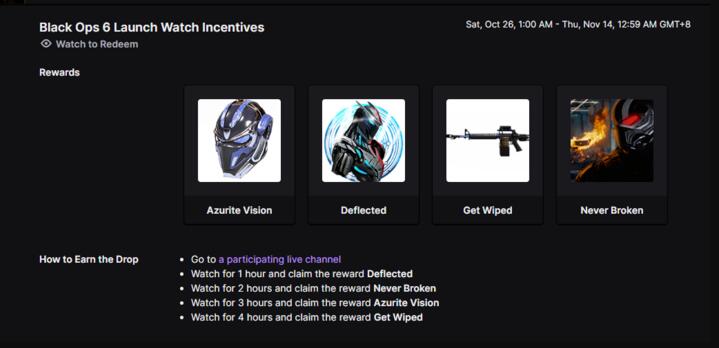
Get Wiped Twitch Drops #1 Item List:
- Azurite Vision
- Deflection
- Never Broken
- Get Wiped
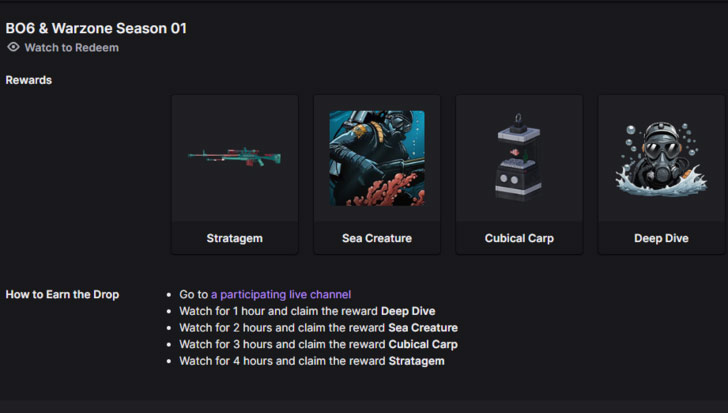
Stratagem Twitch Drops #2 Item List:
- Stratagem
- Cubical Carp
- Sea Creature
- Deep Dive
How to get the drop?
Go to a participating streamer's channel
- Watch 1 hour and claim Deflected
- Watch 2 hours and claim Never Broken
- Watch 3 hours and claim Azurite Vision
- Watch 4 hours and claim Get Wiped
How to Got BO6 Items?
On TWITCH.TV, log out of your account and log in to your Twitch account.
If Twitch asks you to enter the code from your email, click "Remind me later", "X" or F5 on your keyboard.
Go to the link twitch.tv/drops/inventory, click the "Connect" button, and connect your game account.
Everything is ready, the reward will be available the next time you launch the game. If it does not arrive within 10 minutes, reconnect Twitch. After receiving the item, you can unlink your Twitch account and the item will not disappear




 0
0