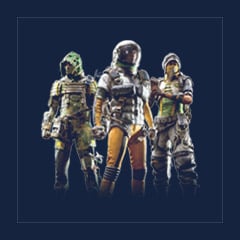
ARC Raiders redeem codes are special codes that players can enter on the webpage to unlock exclusive rewards, such as Sky Ice Hiker Backpack, and more. These gift codes are usually provided through events and can be redeemed on any platform (PlayStation, Xbox, Steam, or Epic Games).
GGWTB currently offers these ARC Raiders Redeem Codes. While you may have been able to get these codes for free, you might have missed the opportunity or it could take you more time to obtain them. With GGWTB, you can quickly get ARC Raiders Redeem Codes through purchase and enjoy instant delivery. For more codes, stay tuned to GGWTB.
| Redeem Codes | You can get |
|---|
| Sky Ice Hiker Backpack | Take a stroll on the surface for 15 minutes with Discord open to claim |
| Emerald Wave Electrician Backpack | Available through the Nvidia app |
How to Redeem ARC Raiders Codes?
It's very simple, just follow the steps below:
1. Visit: https://id.embark.games/id/arc-raiders/giveaway
2. Log in to your account
3. Enter the game's activation code
4. Link the game platforms to your account to play on all supported devices
How to fix “Can’t Redeem ARC Raiders Code” on PC/Steam.
Most failures come from browser quirks, account mismatch, network/VPN issues, or temporary server load. Start with easy fixes; move down only if it still fails.
1. Basics
Update NVIDIA App to latest; ensure the eligible NVIDIA GPU is properly installed.
Log into the correct accounts: the same NVIDIA and Steam accounts tied to the reward.
2. Browser
Switch to Chrome or Edge (avoid Firefox for this flow).
Clear cache and cookies, restart the browser.
Ensure pop-up blockers and ad/script-blocking extensions are off.
3. Network
Turn off VPN/proxy. NVIDIA may block masked IPs.
Optionally disable IPv6 in network settings.
Restart PC → open NVIDIA App → try redeem again.
4. If the page flashed and vanished
Reopen NVIDIA App → Sign in via Steam → press REDEEM again. No need to restart the whole process.
5. Server side delays
During peaks or limited events, redemption can be rate-limited. Try again in a few hours or the next day.
6. Still not working
Temporarily disable antivirus web shields/overlays that might close login windows.
Contact NVIDIA Support with an error screenshot and a partial code (never the full key). They can check redemption status/flags and unblock if needed.




 0
0