0
0 Created: Jun 5,2026 | ARK Survival Ascended
ARK Survival Ascended Update: Planning Mode, Server Character Issue, Snow Dragon Nerf, and Patch Notes

ARK Survival Ascended just got a big update, but it landed with two very different headlines: Planning Mode is a win for builders, while the official server character issue is a serious problem.
- ARK Survival Ascended Major Update: Fast Patch Overview
- Official Server Character Issue: What To Do First
- Why The RAM Issue Matters
- Planning Mode Guide: ARK's Best Building Feature In A Long Time
- How To Activate Planning Mode
- What Hologram Structures Do
- Best Uses For Planning Mode
- How We Build With Planning Mode
- 1. Place The Footprint First
- 2. Mark Main Movement Routes
- 3. Add Walls, Ceilings, And Utility Zones
- 4. Replace Holograms With Real Structures
- 5. Save Good Layouts As Templates
- Extended Range Mode: Build Large Without Running In Circles
- Planning Mode View Toggle
- Burrow Bug Changes: Less Clutter, Better Utility
- Snow Dragon Nerf: Aurora Laks Is Less Oppressive
- If You Use Snow Dragon
- If You Fight Snow Dragon
- Key Bug Fixes Worth Knowing
- What We Recommend After This Update
- If You Play Official Servers
- If You Play Unofficial Servers
- If You Build Often
- FAQ
- How do you use Planning Mode in ARK Survival Ascended?
- Can enemies see Planning Mode holograms?
- What should I do if ARK asks me to create a new character?
- Was the Snow Dragon nerfed in this ARK update?
- Can Planning Mode layouts be saved?
- Summary
Here's the practical breakdown. No fluff. Just what changed, why it matters, and what we should actually do in-game.
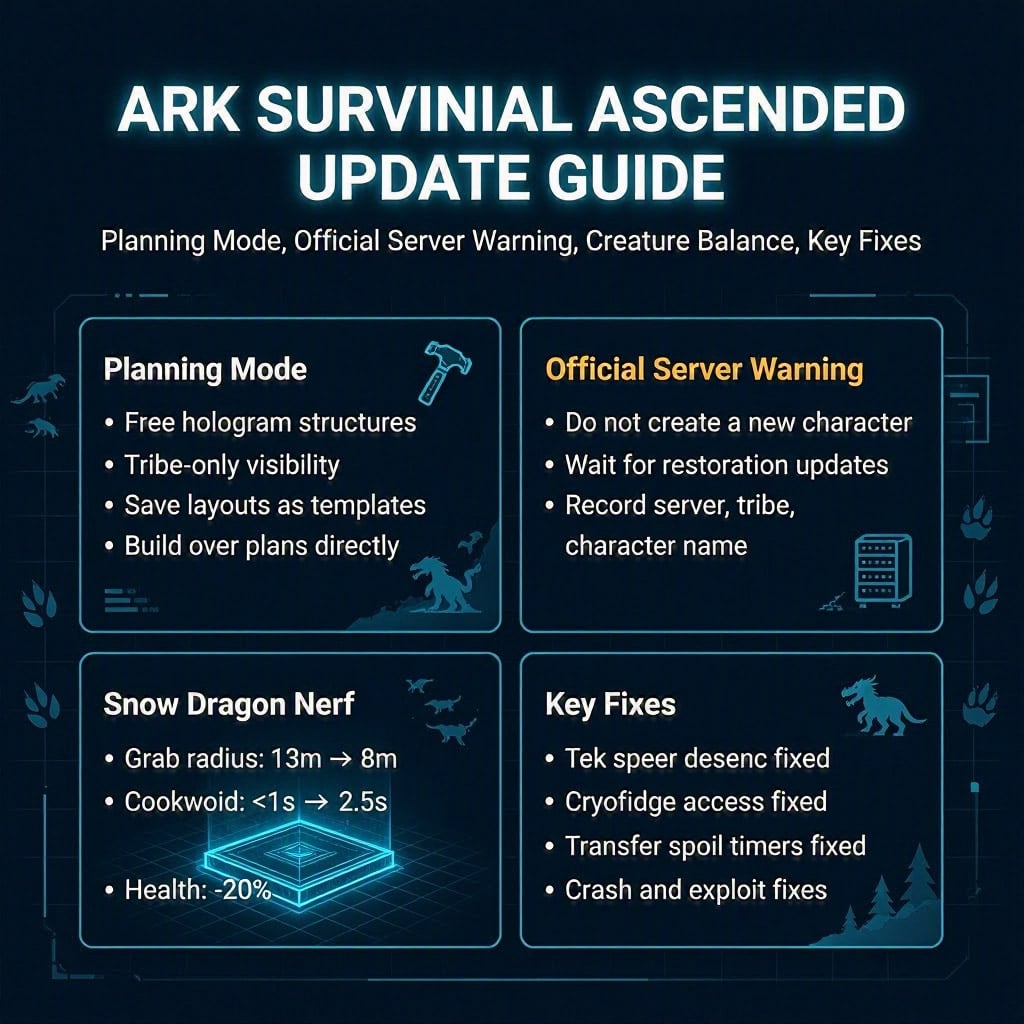
ARK Survival Ascended Major Update: Fast Patch Overview
The update is mainly about building, server stability, creature balance, and bug fixes.
| Area | Key Change | Player Impact |
|---|---|---|
| Planning Mode | Place hologram structures for free | Plan bases without wasting materials |
| Templates | Save and move full layouts | Faster repeat builds |
| Official Servers | Character login issue reported | Do not create a new character blindly |
| Server Performance | Increased RAM usage investigated | Possible downtime, crashes, rollbacks |
| Burrow Bug | AI, burrow, decay, and utility fixes | Cleaner behavior, less server clutter |
| Snow Dragon | Health and grab nerfs | Less oppressive in PvP and PvE |
| Bug Fixes | Tek spear, cryofridge, transfer, boss fixes | Better stability and fewer desyncs |
The standout feature is Planning Mode. The biggest risk is the official server character prompt.
Official Server Character Issue: What To Do First
Some official server players were asked to create a new character after the update. That is not a small bug. In ARK, your character controls:
- Boss unlocks
- Engrams
- Imprints
- Tribe permissions
- Upload access
- Long-term progression
If you see that prompt, stop.
| If This Happens | Do This | Why |
|---|---|---|
| Game asks you to create a new character | Do not create one unless officially confirmed safe | May complicate recovery |
| Server is offline | Wait | Downtime protects character data |
| Tribe access looks wrong | Coordinate before logging actions | Prevents ownership problems |
| Character appears missing | Record server, tribe, character name, time | Useful for support |
| You play unofficial | Check admin notices first | Issue appears mainly official-side |
From experience, character bugs are worse than normal crashes. A crash wastes time. A character conflict can break ownership, imprints, and progression.
Why The RAM Issue Matters
The update also caused increased memory consumption. In ARK terms, that can lead to:
- Rubber banding
- Save delays
- Rollbacks
- Transfer problems
- Server crashes
- Item or tame desync
If official servers stay offline, it is annoying but logical. Keeping unstable servers online risks more damage.
Planning Mode Guide: ARK's Best Building Feature In A Long Time
Planning Mode lets us place structures as holograms before spending materials.
That means we can test a base layout, fix snap problems, and build only when the design is right.
How To Activate Planning Mode
| Platform | Input |
|---|---|
| PC | Hold R while placing |
| Xbox | Hold X while placing |
| PlayStation | Hold Square while placing |
Hologram structures cost zero materials.
What Hologram Structures Do
| Feature | Result |
|---|---|
| No resource cost | Safe layout testing |
| Tribe-only visibility | Tribe members can plan together |
| Enemies cannot see them | Useful for PvP base planning |
| Real structures snap over them | Fast final construction |
| Supports skins | Visual layouts stay consistent |
| Can become templates | Save and reuse full builds |
This is huge for anyone who builds more than a 2x2 box.
If you have ever placed a metal wall line one foundation off and wanted to uninstall, this feature fixes that pain.
Best Uses For Planning Mode
Planning Mode is strongest when the build is expensive, large, or easy to misalign.
| Build Type | Why Planning Mode Helps |
|---|---|
| PvP turret towers | Test height, angles, and snap points first |
| Breeding barns | Check spacing for large dinos |
| Tek bases | Avoid wasting expensive materials |
| Castles | Keep symmetry clean |
| Water pens | Fix gate placement before committing |
| Outposts | Save layouts as templates |
| Crafting rooms | Plan vaults, benches, fridges, and power lines |
The rule is simple: if the structure costs real farming time, plan it first.
How We Build With Planning Mode
Use this workflow. It prevents 90% of bad layouts.
1. Place The Footprint First
Start with foundations.
Check:
- Terrain slope
- Obstructions
- Gate position
- Dino pathing
- Expansion space
Do not build walls until the footprint is clean.
2. Mark Main Movement Routes
Plan the paths for:
- Rexes
- Brontos
- Rhynios
- Flyers
- Boss lines
- Resource runs
If a big tame cannot move through the base, the build is bad. Pretty walls do not fix bad traffic.
3. Add Walls, Ceilings, And Utility Zones
After the footprint works, add:
- Walls
- Ramps
- Ceilings
- Pillars
- Crafting stations
- Storage areas
- Generator rooms
Use holograms to catch snap issues early.
4. Replace Holograms With Real Structures
Once the layout is right, place real structures directly over the holograms.
They should snap into the planned positions.
5. Save Good Layouts As Templates
Use the Lost Colony Template Hammer to save layouts.
Best template targets:
| Template | Use Case |
|---|---|
| Starter base | Fast early setup |
| Turret tower | Repeatable PvP defense |
| Breeding pod | Mutation and raising areas |
| Greenhouse module | Crop and irrigation layout |
| Crafting room | Organized production space |
| Outpost shell | Quick map expansion |
Good tribes will absolutely abuse this for consistency.
Extended Range Mode: Build Large Without Running In Circles
The update adds Extended Range Mode for hologram placement.
It lets us place planned structures from farther away. This is best for large bases.
Use it for:
- Castle walls
- Perimeter fences
- Multi-floor bases
- Cliff builds
- Large PvE compounds
- PvP defense shells
One catch: while active, regular structure interactions are disabled.
If your structures feel unresponsive, check whether Extended Range Mode is still on.
Planning Mode View Toggle
There is now a Planning Mode view toggle in the action wheel.
PC also gets a direct keybind option, but it is unbound by default.
Use the toggle when:
- Holograms clutter the screen
- You want to inspect finished sections
- Tribe members do not need the plan visible
- You are checking symmetry
- You are taking screenshots or reviewing layout
For big tribe builds, this matters. Too many holograms can turn a clean plan into blue spaghetti.
Burrow Bug Changes: Less Clutter, Better Utility
The Burrow Bug / Burrow Buck got several practical fixes.
| Change | Impact |
|---|---|
| Wild Burrow Bugs can share burrows | Fewer wild structures on servers |
| Burrows avoid ledges and obstructions | Fewer broken spawns |
| Tamed burrow mode fixed | Better post-tame behavior |
| Can harvest carrots | Extra farming utility |
| Off-screen burrow HUD fixed | Cleaner UI |
| Trap aggro improved | Nearby bugs react correctly |
| Camouflage drops wild non-boss aggro | Better escape tool |
| Unofficial decay config added | Server admins get control |
The biggest win is server cleanliness. ARK already tracks too many objects. Fewer unnecessary burrows means less clutter and potentially better long-term stability.
Snow Dragon Nerf: Aurora Laks Is Less Oppressive
The Aurora Laks, commonly called the Snow Dragon, took a real hit.
| Stat / Ability | Old Value | New Value | Impact |
|---|---|---|---|
| Claw grab radius | 13m | 8m | Much easier to avoid |
| Claw grab cooldown | Under 1s | 2.5s | Less spam |
| Base health | Previous | About 20% lower | Easier to kill |
The grab range nerf is massive. Dropping from 13m to 8m is roughly a 38% range reduction.
If You Use Snow Dragon
- Pick grabs carefully.
- Do not spam claws.
- Expect punishment after missed grabs.
- Avoid diving into grouped enemies without backup.
If You Fight Snow Dragon
- Stay outside 8m.
- Bait the claw grab.
- Punish during the 2.5s cooldown.
- Focus fire harder due to the 20% health nerf.
It is still dangerous. It is no longer brainless pressure.
Key Bug Fixes Worth Knowing
Not every fix matters equally. These are the ones players will actually feel.
| Fix | Why It Matters |
|---|---|
| Tek spear desync fixes | More reliable combat |
| Tek spear teleport fixes | Less jank on bad servers |
| Client attack desync fixes | Better hit registration |
| Zombie rubber banding fixes | Smoother movement |
| Lost Colony boss thrall fix | Fewer stuck enemies |
| Cryofridge corner access fix | Easier compact base layouts |
| Perishable timer transfer fix | Fewer spoiled item bugs |
| Dropped item teleport fix | Less item loss |
| Rhino cryopod web line fix | Exploit cleanup |
| Crash fixes | Better stability |
The Tek spear fixes matter most for PvP. Desync decides fights. A weapon that teleports inconsistently is not a weapon; it is a coin toss.
What We Recommend After This Update
If You Play Official Servers
Do this first:
- Avoid creating a new character.
- Avoid risky transfers until stability is confirmed.
- Screenshot or record character issues.
- Write down server name, character name, tribe, time.
- Coordinate with tribe members before anyone makes changes.
If You Play Unofficial Servers
Admins should:
- Restart cleanly after patching.
- Watch RAM usage.
- Check Burrow Bug decay settings.
- Test Planning Mode with mods.
- Warn players about hologram visibility.
If You Build Often
Start with a test project:
1. Place a 4x4 hologram foundation.
2. Add walls and ceilings.
3. Replace with real structures.
4. Save a small template.
5. Move it.
6. Check skins and snap points.
Do not test a new system on your main tek base. That is how expensive lessons happen.
FAQ
How do you use Planning Mode in ARK Survival Ascended?
Hold R on PC, X on Xbox, or Square on PlayStation while placing a structure. The structure becomes a hologram and costs no materials.
Can enemies see Planning Mode holograms?
No. Only tribe members can see hologram structures. Enemy tribes cannot see your planned base layout.
What should I do if ARK asks me to create a new character?
Do not create a new character unless official support confirms it is safe. Record your server, character name, tribe, and time, then wait for restoration updates.
Was the Snow Dragon nerfed in this ARK update?
Yes. The Aurora Laks / Snow Dragon had its claw grab radius reduced from 13m to 8m, grab cooldown increased to 2.5s, and base health reduced by about 20%.
Can Planning Mode layouts be saved?
Yes. Hologram structures can be converted into templates with the Lost Colony Template Hammer, letting us save and reposition full build layouts.
Summary
This ARK Survival Ascended update is a mixed one.
Planning Mode is excellent. It saves resources, prevents bad snap mistakes, helps tribes coordinate, and makes large builds far less painful. Builders should start using it immediately, especially for tek bases, turret towers, breeding barns, and repeatable outposts.
The official server character issue is the danger point. If you see a character creation prompt, stop. Do not gamble with progression.
The Snow Dragon nerf is also meaningful. Less grab range, longer cooldown, and lower health make fights fairer.
Best move right now: test Planning Mode safely, avoid risky official server actions, and let the stability fixes settle before moving anything valuable.


The GGWTB Editorial Team features 10 full-time gaming editors and 23 specialist contributors, delivering hands-on tested walkthroughs, easter egg breakdowns, and game updates.
LUKE — who spearheads our in-depth ARK Survival Ascended, COD: Modern Warfare 4 guides, and patch notes—every guide is rigorously verified on live servers for accuracy.

Most Popular Posts
- ARK: Survival Ascended Bjarnheim Farming Guide: Element, Pearls, Metal & Boss Routes
- ARK Astraeos Artifact Locations: 13 Caves, Routes, and Prep
- ARK Survival Ascended Desmodus Spawn Locations, Taming Method, and Best Uses
- ARK Survival Ascended August 2026: Bejornheim, Concavenator, Galleon & SOTF
- ARK: Survival Ascended Therizinosaurus Trap, Saddle, Combat & Harvesting Guides
- ARK Survival Ascended Creature TLC Guide: Giga, Therizinosaurus, Quetzal, Megalosaurus
Popular Category Lists
- ARC Raiders / (356)
- Grow a Garden / (295)
- CoD: Black Ops 7 / (167)
- Star Citizen / (163)
- MLB 26 / (159)
- Monopoly Go / (153)
- ARK Survival Ascended / (128)
- Steal a Brainrot / (99)
- Blox Fruits / (74)
- Adopt Me / (74)
- Forza Horizon 6 / (72)
- Sailor Piece / (68)
- Grow a Garden 2 / (68)
- Diablo IV / (62)
- CoD: BLACK OPS 6 / (55)
- Aion 2 / (54)
- Path of Exile 2 / (48)
- Monster Hunter Wilds / (46)
- Windrose / (44)
- COD: Modern Warfare 4 / (44)