0
0 Created: Oct 22,2025 | Grow a Garden
Grow a Garden Halloween: The Overpowered Grave-Digging Trick to Turbo Your Hex Serpent Odds

What if the most frustrating part of the Halloween event—those microscopic drop rates—could be turned into an advantage? You've seen the numbers: 2% for the Hex Serpent GaG Pet, roughly one dig per five minutes, and a hard cap on attempts. That sounds impossible, right? But here's the twist. With a simple, scalable routine using alts or friends, you can dramatically increase your effective attempts without spending a fortune.
- The Pain Point: Why You Feel Gated
- How the System Actually Works
- Target the Right Shapes: Efficiency Ranking
- The Scalable Method: Alt/Co-op Engine
- When to Avoid Sinks: Restart Costs and Late-Board Traps
- Reality Check: Paywalls, P2W Items, and What Changes for You
- Practical Runbook (Copy/Paste Workflow)
- FAQ
- Conclusion
The Pain Point: Why You Feel Gated
- - Tiny odds everywhere: Hex Serpent at ~2% per completion; certain quest drops like Weeping Branch at ~0.5%.
- - Time-gated digs: +1 dig every ~5 minutes, capped (commonly 10). If you sit at cap, you waste regeneration time.
- - Pay-to-skip pitfalls: Restarting boards costs Robux or huge in-game currency, often at low expected value late in a cycle.
So what does this mean for you? If you only play one account, you're hard-capped by the 5-minute regen cycle and the 10-dig limit. If you multiply concurrent timers, you multiply your chances—without directly tampering with probabilities.
How the System Actually Works
- - Timers are per account, not per device or IP. Therefore, if you run multiple accounts concurrently in a server, each accumulates digs independently.
- - Digs only regenerate while the account is in-game. If you log an alt out, its timer stalls.
- - Board contents are account-specific; you cannot mirror a good spot from one account to another. That said, the shape you target still affects your dig efficiency.
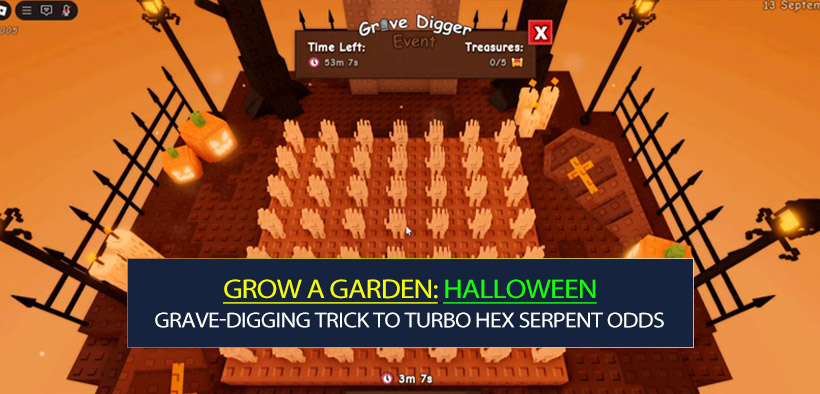
- - There are 49 dig spots per board. You won't clear them all in realistic time; target shapes that complete with fewer hits.
The key is that you're not changing the drop rates—you're changing the number of rolls per unit of real time by stacking parallel timers.
Target the Right Shapes: Efficiency Ranking
If you're optimizing for completions per time, choose shapes that require fewer tiles:
- - Candy Corn: best-in-slot, typically 2 tiles to complete. Fastest turnover, highest attempts per hour.
- - Pumpkin: next best, commonly 2 tiles as well. Great for quick cycles.
- - Skeleton: mid-tier (~3–4 tiles). Acceptable if it's what you find first.
- - Coffin: worst; often needs 6+ tiles. High time cost, low throughput. Only clear if you're forced or have surplus digs.
If you find part of a shape: then you should continue in its immediate neighborhood to close it fast. If a tile is surrounded by already-checked tiles and you can fully resolve a shape with minimal guesses, that's your mathematically efficient pick.
The Scalable Method: Alt/Co-op Engine
If you have friends, pair up; if not, use alts. Either way, the logic is identical.
- Setup
- Accounts: 2–4 alts are enough for most players; more scales linearly but adds management overhead.
- Access: Use multiple devices or a legitimate multi-account session manager (search Account Manager tutorials). Do not use automation/macros that violate ToS.
- Onboarding: New alts may need to finish the tutorial. If event UI doesn't appear after the early steps, rejoin to trigger it.
- Keeping Timers Hot
- Keep every account online in the same server; leave them idle near the gravedigger.
- If you hit 10 digs on an alt, immediately spend a few digs; otherwise you're wasting regen time.
- Rotation: Every 10–15 minutes, tab through each account, spend 2–4 digs on high-efficiency shapes, then park them again.
- Seeded Economy (Optional Boost)
- If an alt needs quick cash for basic participation, funnel them a sellable fruit from your main or run a couple of carrot cycles and sell. Then rejoin if the event UI lags.
- Proof of Concept
- In practice runs, fresh alts quickly hit max digs and can rip through candy/pumpkin boards. On-camera tests even pulled a Hex Serpent from a brand-new account—proving the throughput angle works. You're not guaranteed the drop, but your rolls per hour spike.
When to Avoid Sinks: Restart Costs and Late-Board Traps
If you are late in the event cycle: then spending Robux or a trillion in-game currency to restart a board is usually poor value. By that point, you have fewer real-time windows left to farm digs, and the EV plunges. Save currency for more flexible upgrades or cosmetics.
If you pull a coffin early: then resist the urge to finish it unless you're flush with digs. It's a time pit. Clear small shapes first to keep your attempts flowing.
Reality Check: Paywalls, P2W Items, and What Changes for You
- Monetized units like the Ghostly Dark Spriggan apply powerful map-wide effects and unique mutations not mirrored in the free path. That's a design choice that tilts late-game power toward spenders.
- Your lever as F2P: Increase attempts, compress cycle time, maintain online presence, and use shape targeting. You won't match raw paid power, but you can close the gap on key drops like the Hex Serpent.
Practical Runbook (Copy/Paste Workflow)
- Before Session
- Launch main + 2–4 alts, complete tutorial, rejoin if events don't show.
- Park all at the gravedigger and confirm dig timers are ticking.
- Every 10–15 Minutes
- Account 1: Spend 2–4 digs on candy/pumpkin. If you reveal skeleton, finish if it's ≤1 dig to clear; otherwise hold.
- Account 2…N: Repeat.
- If any account hits 10 digs, prioritize spending on that account first.
- Decision Rules
- If a tile reveals part of a small shape: focus the neighboring two tiles to resolve it.
- If your only live reveal is a coffin: skip until you have surplus digs.
- If you're under time pressure (event ending soon): dump digs into the smallest open shapes to maximize completions now.
FAQ
Q: Will using multiple accounts get me banned?
A: Running multiple accounts isn't inherently bannable on Roblox; however, automation, macros, or third-party tools that violate ToS can be. Keep it manual, avoid scripted inputs, and use legit session managers. When in doubt, use multiple devices.
Q: Do dig locations sync across accounts?
A: No. Boards are account-specific. You cannot copy a hot spot from one account to another. What transfers is strategy: target low-tile shapes for faster completions.
Q: Digs aren't regenerating on my alt—why?
A: Digs only regenerate while the account is online inside the game. If you leave, the timer stalls. Keep alts idling in the same server and spend before hitting the cap.
Q: Is it worth paying to restart a board?
A: Usually no—especially late in the event. The expected value drops because you have fewer real-time cycles left to farm digs. Use currency on flexible items or save it.
Q: How many alts should I run?
A: Two to four is a sweet spot. More accounts increase rolls linearly but add cognitive load. If you find you're frequently capped at 10 on multiple alts, add one more; if not, stick to fewer.
Q: I pulled a coffin early—finish it or skip?
A: Skip unless you're sitting on surplus digs. Coffins consume too many tiles compared to the same reward odds on smaller shapes.
Conclusion
If you feel hard-capped by Grow a Garden's Halloween odds, you're not wrong—but you're also not helpless. By stacking parallel dig timers across a few alts or friends, prioritizing low-tile shapes like candy corn and pumpkins, and refusing common EV traps (coffin first, late-board restarts), you convert the event's own time-gate into a throughput advantage. If you notice you hit 10 digs on any account, spend immediately; if you reveal a small shape, finish it now; if you're tempted by a restart button late, step away. The system rewards players who keep attempts flowing—and now you've got a framework to do exactly that.
Most Popular Posts
- Grow a Garden Secret Badge Walkthrough: Carrot Weight & Puzzle Guide
- Grow a Garden Get Secret Seeds & Rare Pets Guides: DLC Codes + Trading Guide
- Grow a Garden Enfield Guide: Everfallen Roll Rules & Level Loss
- Grow a Garden Moon Harvest Part 4 Guide: Gear Odds, Reset Rewards, Cornling Strategy, New Seeds
- Grow a Garden: Beanpod Chest Farming and Elder Beanstalk Guides
- Grow a Garden Arctic Fox Guide: Best AFK Setup for Seeds, Gears, Eggs & Pet XP
Popular Category Lists
- ARC Raiders / (350)
- Grow a Garden / (294)
- CoD: Black Ops 7 / (167)
- Star Citizen / (162)
- MLB 26 / (159)
- Monopoly Go / (152)
- ARK Survival Ascended / (127)
- Steal a Brainrot / (99)
- Blox Fruits / (74)
- Adopt Me / (74)
- Forza Horizon 6 / (72)
- Sailor Piece / (68)
- Grow a Garden 2 / (68)
- Diablo IV / (62)
- CoD: BLACK OPS 6 / (55)
- Aion 2 / (50)
- Path of Exile 2 / (48)
- Monster Hunter Wilds / (46)
- Windrose / (44)
- Donut SMP / (41)