0
Created: Nov 12,2026 | Star Citizen
Star Citizen Onyx Facility Guide: Start the Jorrit Dossier Missions

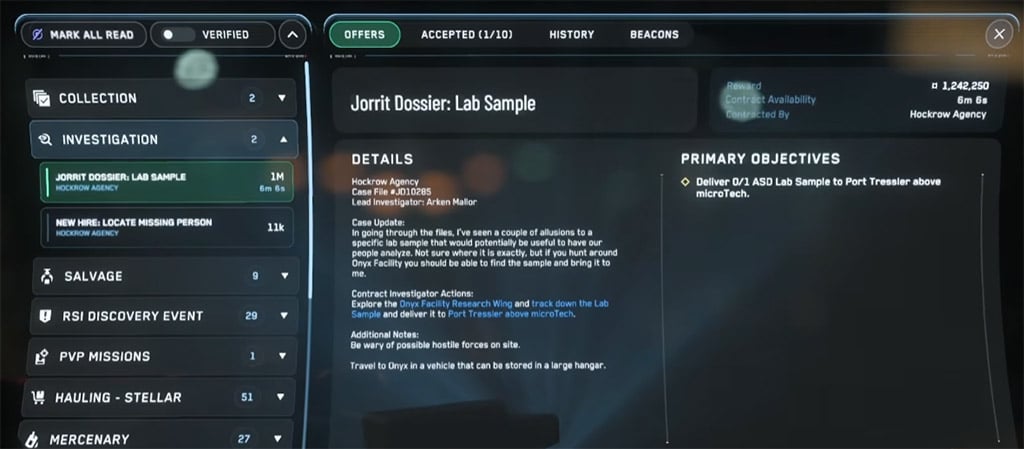
Start the ASD Onyx investigation with Jorrit Dossier: Onyx Personnel Files under the Investigation tab in mobiGlas → Contract Manager. Finish it, then accept Jorrit Dossier: Access Engineering Files. Completing both does not automatically grant Project Hyperion access; more assignments follow.
- Mission Overview
- Loadout and Travel
- Loadout Checklist
- Travel and Landing
- Complete the Opening Contracts
- 1. Jorrit Dossier: Onyx Personnel Files
- 2. Jorrit Dossier: Access Engineering Files
- Troubleshooting and Later Rewards
- FAQ (Frequently Asked Questions)
- How do I start the Onyx Facility missions in Star Citizen?
- Do I need a mining attachment for Access Engineering Files?
- Does completing both contracts unlock Project Hyperion?
- Where are the Onyx facilities located?
- What ship should I bring to the Onyx facility?
Mission Overview
The opening investigation runs in three stages.
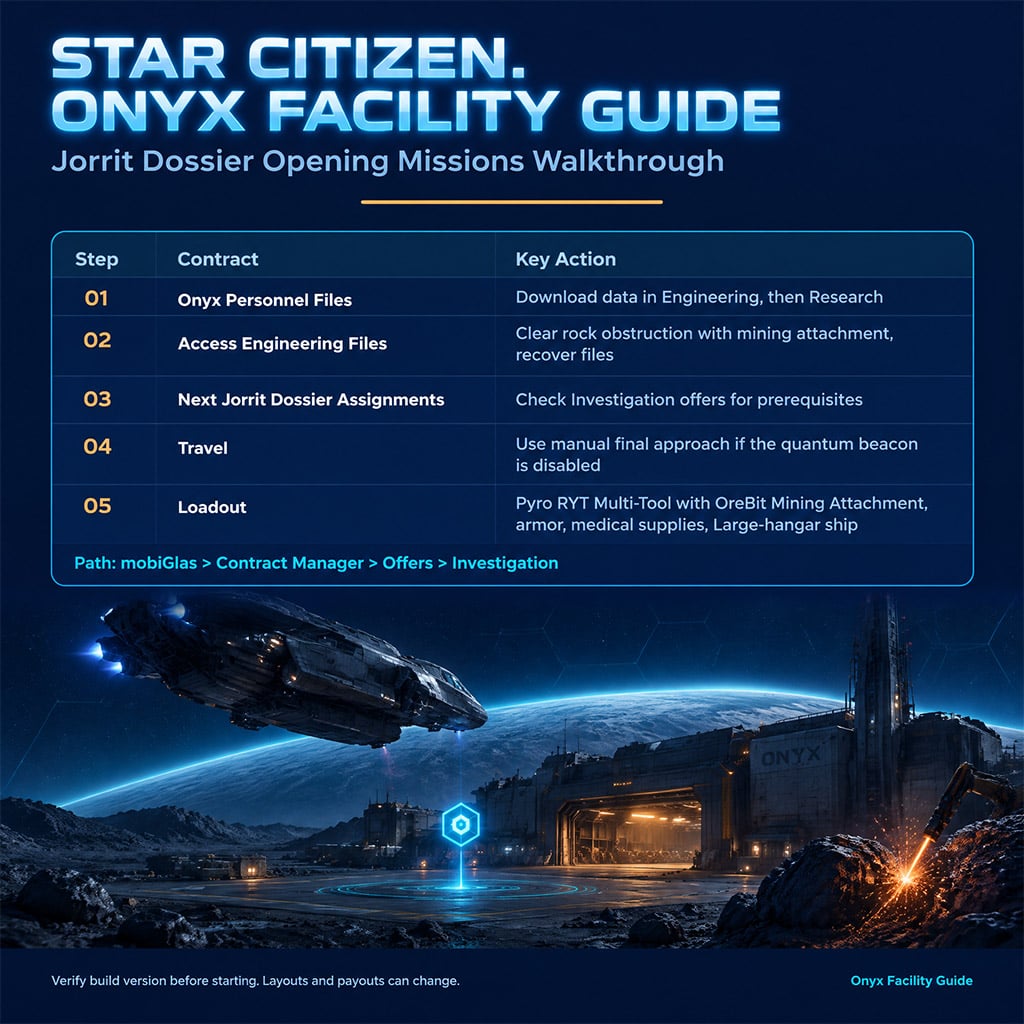
| Step | Contract | Key Action |
|---|---|---|
| 1 | Onyx Personnel Files | Download data in Engineering, then Research |
| 2 | Access Engineering Files | Clear the rock obstruction with a mining attachment and recover the files |
| 3 | Next Jorrit Dossier assignments | Check Investigation offers for prerequisites |
Expect the destination to change between contracts. Always follow the active contract's listed location.
Loadout and Travel
Pack for the objective and for a longer fight. Your multi-tool matters most for the Engineering mission.
Loadout Checklist
- Pyro RYT Multi-Tool with OreBit Mining Attachment: Bring it for the Engineering files instead of relying on a fabricator near the entrance.
- Armor and rifle: Choose protection you can afford to lose, and carry extra magazines for patrols.
- Medical supplies: Pack healing items and a ParaMed Medical Device, but treat it as backup, not protection from sustained fire.
- Food and drink: Carry enough for delays.
- Ship: Use one that fits a Large hangar.
Travel and Landing
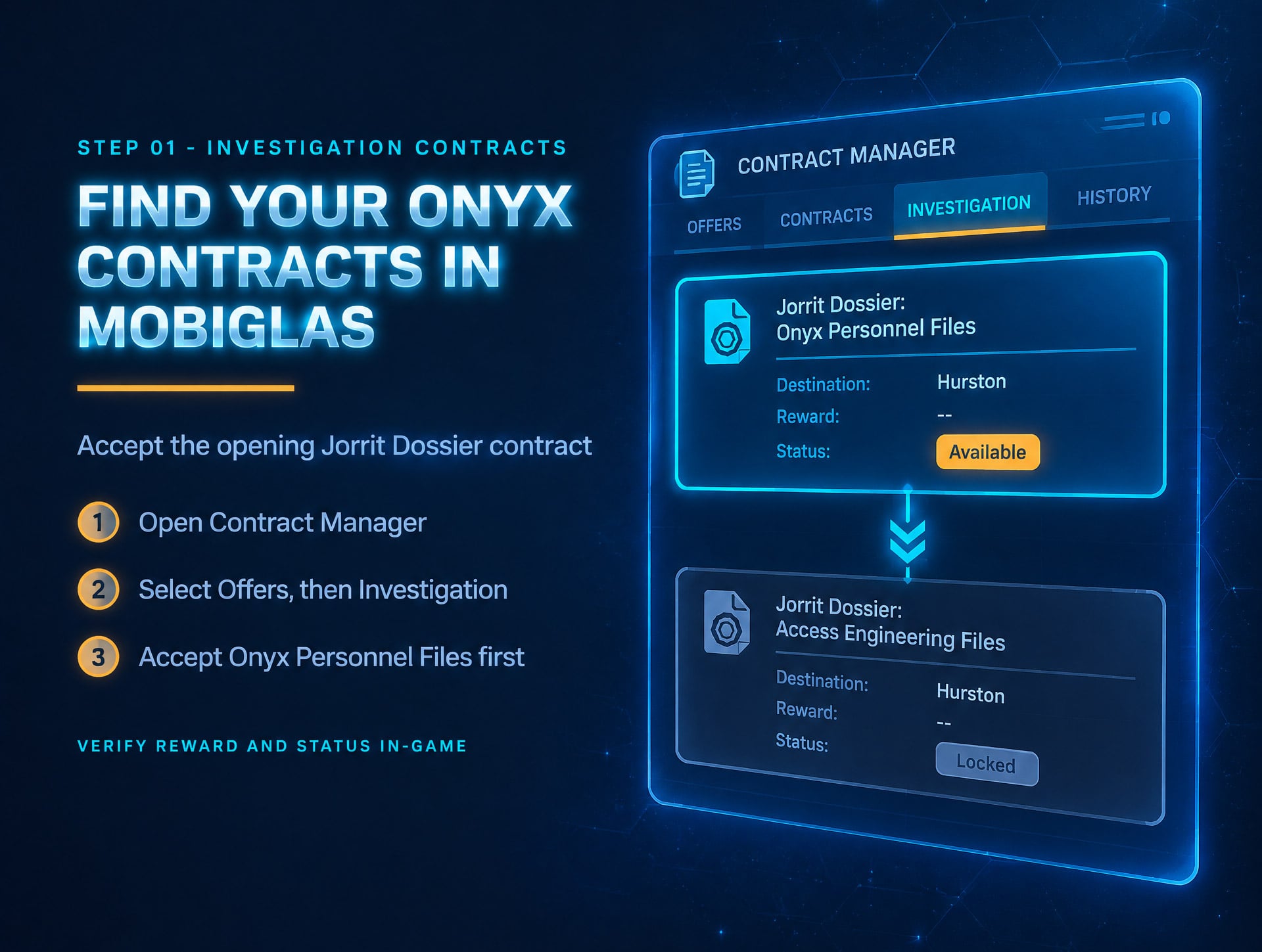
1. Open mobiGlas → Contract Manager → Offers → Investigation.
2. Accept Jorrit Dossier: Onyx Personnel Files and read the destination instructions.
3. Expect a disabled quantum beacon at the first facility. Fly to the nearby marker and make a manual final approach.
4. Request a hangar on arrival, land, and take the elevator to the lobby.
Skip the direct jump until the active contract provides a usable marker.
Complete the Opening Contracts
The route below covers the opening investigation only. Enemy placement and mission behavior can vary by build and server.
1. Jorrit Dossier: Onyx Personnel Files
1. From the lobby, enter Engineering.
2. Clear the area around the marked terminal and download the personnel data.
3. Return to the lobby and enter Research.
4. Download the remaining data from the terminal near the entrance.
5. Confirm the completion message before leaving.
Clear cover before approaching each terminal. A quiet room can still spawn enemies.
2. Jorrit Dossier: Access Engineering Files
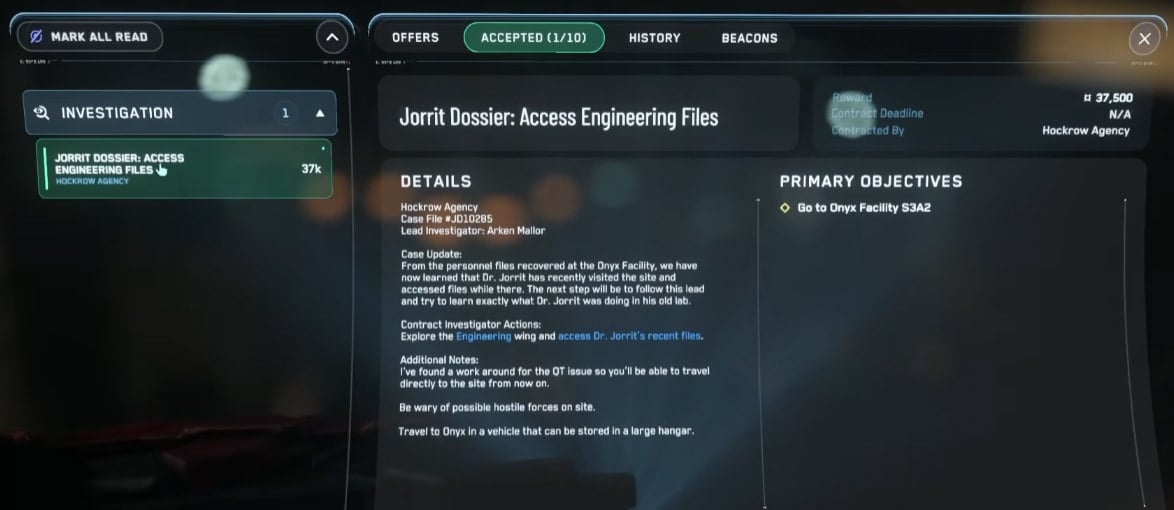
1. Accept the Engineering contract from the Investigation offers.
2. Travel to the destination listed in that contract.
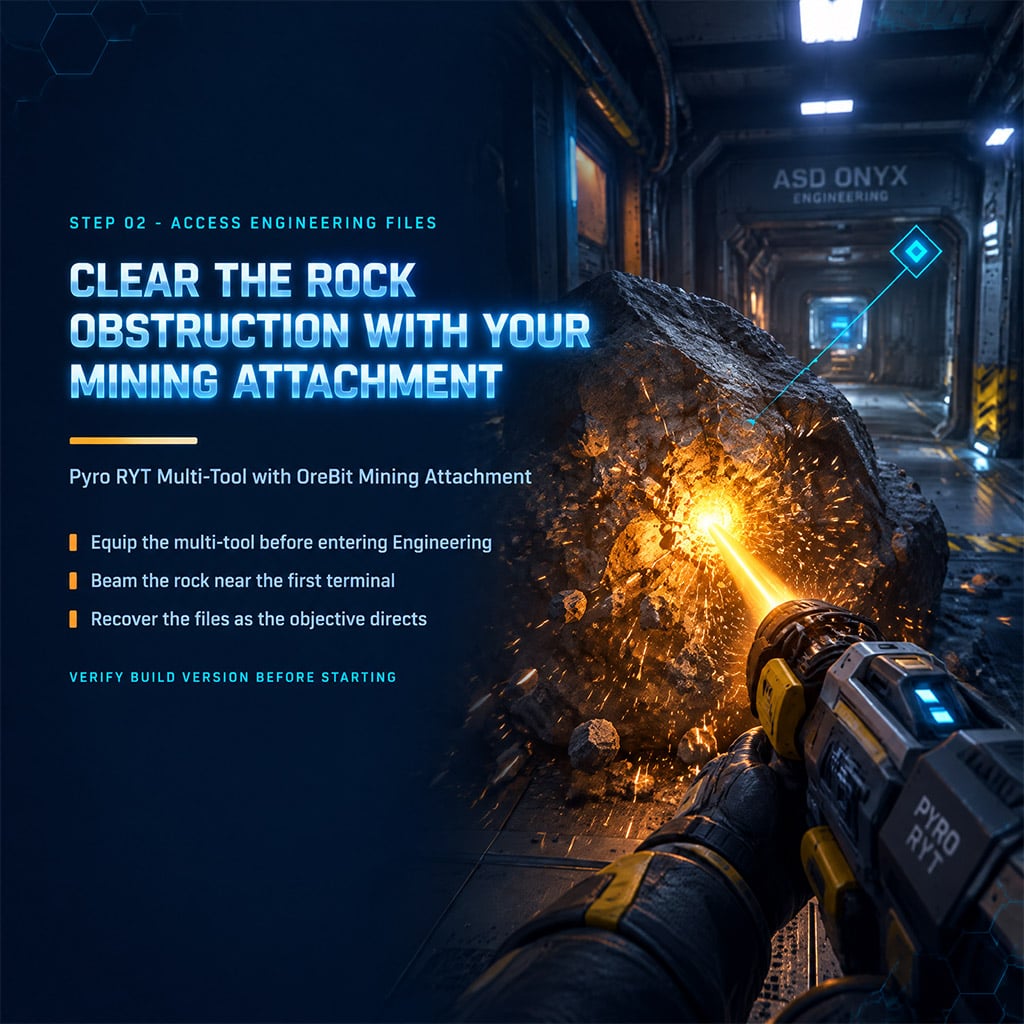
3. Enter Engineering with your Pyro RYT Multi-Tool and OreBit Mining Attachment.
4. Clear the rock obstruction near the first mission's Engineering terminal with the mining attachment.
5. Recover the files as the active objective directs.
6. Take the return elevator toward the rear laboratory area and confirm completion before departing.
If a terminal does not respond, read the active objective first. Ignore pipes, levers, or crates that the objective does not mention.
Troubleshooting and Later Rewards
Use the active contract and its completion message as your main checks. Layouts and mission behavior can change between builds.
- Next mission missing: Confirm the previous contract completed, then check the offer's prerequisites in Investigation.
- Another player enters the wing: Identify the target before firing, and check local combat rules first.
- Project Hyperion: Progress through the later Jorrit Dossier assignments, which include Research and data-recovery missions.
- 1 million aUEC payout: Confirm the amount on the live contract offer before planning a run around it.
FAQ (Frequently Asked Questions)
How do I start the Onyx Facility missions in Star Citizen?
Open mobiGlas Contract Manager, go to Offers, then Investigation, and accept Jorrit Dossier: Onyx Personnel Files. Complete it before accepting the Engineering contract.
Do I need a mining attachment for Access Engineering Files?
Yes. Bring a Pyro RYT Multi-Tool with an OreBit Mining Attachment to clear the rock obstruction in Engineering.
Does completing both contracts unlock Project Hyperion?
Not automatically. More Jorrit Dossier assignments follow, and each has its own prerequisites.
Where are the Onyx facilities located?
Onyx facilities are spread across Stanton. Each contract lists its own destination, so follow the active marker.
What ship should I bring to the Onyx facility?
Use a ship that fits a Large hangar. Request a hangar on arrival, then land and take the elevator to the lobby.

I’m Benjamin Walsh, an Australian Senior Copy Editor at GGWTB focused on survival crafting, open-world exploration, and extraction games. My guides weigh base locations, supply routes, and what deserves the last slot in your backpack. When editing, I look for skipped prerequisites and unclear directions—a useful guide shouldn’t send you across the map without the right tools.

Most Popular Posts
- Star Citizen 4.10 Quantum Drive Guide: Best Drives for Speed, Range, and Crafting
- Star Citizen Ship Update: Galaxy, Kraken and 2026 Release Forecast
- Star Citizen 4.10 Weapons and Components Guide: Best Quantum Drives, Ballistics, Distortions, and Ship Loadouts
- Star Citizen 4.10 Industry Guide: Cargo, Hull C, Salvage, Mining Modules and Battaglia Blueprints
- Star Citizen 4.10 Cargo Hauling Guide: What Works, What's Still Broken
- Star Citizen Ship Showdown: Top Bracket, Free Fly Rules, Idris-P Sale & Alpha 4.10 Timing
Popular Category Lists
- ARC Raiders / (371)
- Grow a Garden / (299)
- Star Citizen / (171)
- CoD: Black Ops 7 / (167)
- MLB 26 / (159)
- Monopoly Go / (153)
- ARK Survival Ascended / (132)
- Steal a Brainrot / (101)
- Adopt Me / (78)
- Blox Fruits / (74)
- Forza Horizon 6 / (72)
- Sailor Piece / (68)
- Grow a Garden 2 / (68)
- Aion 2 / (63)
- Diablo IV / (62)
- COD: Modern Warfare 4 / (57)
- CoD: BLACK OPS 6 / (55)
- Maplestory Classic / (50)
- Path of Exile 2 / (48)
- Monster Hunter Wilds / (46)