0
0 Created: Apr 1,2026 | MLB 26
MLB The Show 26 Best Parallel Mods We Actually Run and Why

Parallel Mods in MLB The Show 26 look simple at first, but the best setup is almost never one-size-fits-all. From our games, the right build depends on difficulty, position, and what the card is missing. That is why the smartest approach is not copying the same mod across your lineup. It is fixing real weaknesses without wasting boosts on stats that barely change gameplay.
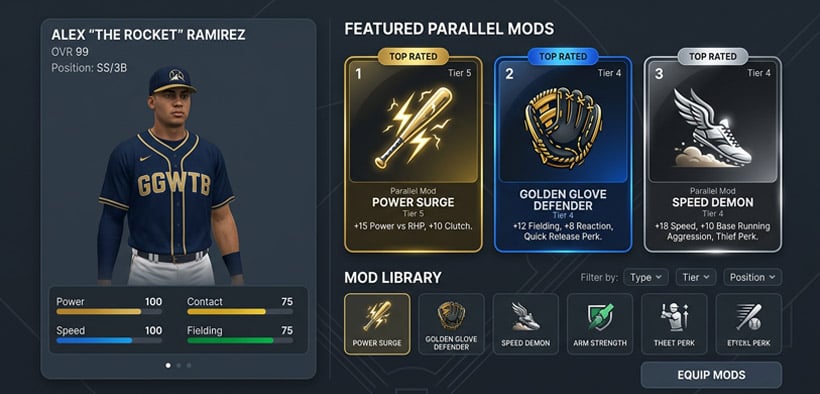
That is also where a lot of players go wrong. A card can look better in the menu and still not feel better in-game. So this guide stays focused on the part that matters: what actually helps you win more games.
- How We Think About Parallel Mods
- The basic rule
- Best Parallel Mods for Most Hitters
- Our general hitter logic
- When Fielding Mods Are Actually Worth It
- Speed Mods: Good on the Right Players, Wasteful on the Wrong Ones
- Best Parallel Mods for Pitchers
- Our pitcher rule of thumb
- What We'd Actually Recommend
- FAQ
- What is the best Parallel Mod in MLB The Show 26?
- Should we use Fielding mods on bad defenders?
- Is Speed worth it?
- What is the best Parallel Mod for pitchers?
- Final Thoughts
How We Think About Parallel Mods
The easiest way to approach Parallel Mods is to ask one question first: why is this player in the lineup?
If he is there to hit, then we usually lean into hitting.
If he is there to defend premium positions, then fielding matters more.
If he is already elite in one area, we usually do not waste the boost there.
The basic rule
- Boost strengths only if they change outcomes
- Fix weaknesses only if they become playable
- Ignore pretty numbers that do not matter in real games
That sounds simple, but it solves most bad Parallel choices immediately.
Best Parallel Mods for Most Hitters
For most hitters, the safest default is still Contact + Power or Power + Contact. That is especially true if the player is in your lineup mainly for offense.
Our general hitter logic
- Use Contact more on higher difficulties
- Use Power more on lower difficulties or offline grinding
- Use Fielding only if it clearly helps at a premium position
- Use Speed mostly for center fielders or real basestealing threats
| Player Type | Best Mod | Why It Works |
|---|---|---|
| Bat-first hitter | Contact + Power | Best all-around offensive value |
| Shortstop / catcher with weak defense | Fielding + Contact / Power | Makes the card more playable |
| Full-time center fielder | Speed + Contact | Better range and utility |
| DH / 1B type | Pure Contact or Contact + Power | No reason to spend on defense |
From experience, this is the biggest takeaway: not every weak defender is worth fixing. If a card still will not defend well after the boost, we would rather make the bat better.
When Fielding Mods Are Actually Worth It
This is where player-by-player context matters most.
A fielding mod is worth it when it changes the card from:
- shaky to usable
- average to reliable
- decent to clearly above average at an important position
It is usually not worth it when:
- the card is already a strong defender
- the boost barely changes animations or range
- you are hiding the card at an easier position anyway
That is why some cards like a Seager-type shortstop can justify fielding help, while a Santana-type defender usually should not get more defense at all. One becomes more usable. The other is already fine.
Speed Mods: Good on the Right Players, Wasteful on the Wrong Ones
Speed looks great in the menu, but it is one of the easiest stats to overvalue.
We usually like speed mods on:
- center fielders
- top-of-the-order base stealers
- cards whose range is part of their real value
We usually avoid speed mods on:
- corner bats
- players already fast enough
- cards that need offensive help much more than an extra step
| Use Speed Mod? | Usually Yes | Usually No |
|---|---|---|
| Center field | Yes | |
| Lead-off threat | Yes | |
| Corner infielder | Yes | |
| DH | Yes | |
| Already elite speed card | Sometimes | Often |
If you find yourself pushing a player to 99 speed just because you can, that is usually the moment to stop and rethink it.
Best Parallel Mods for Pitchers
Pitchers are a little different because not every boost feels equally useful in-game.
For most starters, we lean toward Control first. That is because command usually creates more value than chasing small gains in strikeout-related stats.
Our pitcher rule of thumb
- Starters: Control is usually safest
- Wild relievers: Hits or Control can both work
- Already accurate pitchers: stock build is sometimes fine
| Pitcher Type | Best Mod | Why |
|---|---|---|
| Starter | Control | Better consistency over long outings |
| Hard-throwing reliever | Hits / Control | Helps if command already feels shaky |
| Accurate pitcher | Leave stock or slight Control boost | Marginal gains otherwise |
In real games, especially on higher difficulty, better command tends to matter more than a stat boost you barely notice.
What We'd Actually Recommend
If you want the short version, this is the easiest path:
1. Hitters: start with Contact + Power
2. Premium defenders: only add Fielding if it changes real performance
3. Center fielders: consider Speed
4. Pitchers: start with Control
5. Do not chase stat caps that do not change how the card plays
That gives you a cleaner process and avoids wasting Parallel value.
FAQ
What is the best Parallel Mod in MLB The Show 26?
For most hitters, Contact + Power is the safest default. For pitchers, Control is usually the most useful starting point.
Should we use Fielding mods on bad defenders?
Only if the boost makes them clearly more playable. If not, improve the bat instead.
Is Speed worth it?
Yes, but mainly for center fielders and real basestealing threats. It is not a universal best choice.
What is the best Parallel Mod for pitchers?
Usually Control, especially for starters.
Final Thoughts
The best Parallel Mods in MLB The Show 26 are not the ones that make a card look nicest in the menu. They are the ones that make the card more useful in your actual lineup. That usually means boosting offense for hitters, saving fielding for the few cards where it truly matters, and using control on pitchers unless there is a clear reason not to.
Most Popular Posts
- MLB The Show 26 Draft Cards Guide: Best Budget Picks, Tier List, and Must-Use Rewards
- MLB The Show 26 God Squad Guide: Best Lineup, 98 Tarik Skubal, Bullpen Picks, and Legend Tips
- MLB The Show 26 Hall of Fame Guide: 99 Hoffman, Best Spotlights & Chase Pack Value
- MLB The Show 26 All-Star Collection Guide: Fastest Way to Unlock 99 Yordan Alvarez
- Best MLB 26 God Squad: Ranked Lineup, Rotation, Bullpen, and Platoon Meta
- MLB The Show 26 Tier List: Best Diamond Dynasty Cards by Position
Popular Category Lists
- ARC Raiders / (343)
- Grow a Garden / (292)
- CoD: Black Ops 7 / (167)
- Star Citizen / (160)
- MLB 26 / (159)
- Monopoly Go / (152)
- ARK Survival Ascended / (126)
- Steal a Brainrot / (98)
- Blox Fruits / (74)
- Adopt Me / (73)
- Forza Horizon 6 / (72)
- Sailor Piece / (68)
- Grow a Garden 2 / (68)
- Diablo IV / (62)
- CoD: BLACK OPS 6 / (55)
- Path of Exile 2 / (48)
- Monster Hunter Wilds / (46)
- Aion 2 / (45)
- Windrose / (44)
- Donut SMP / (41)