0
0 Created: Oct 28,2026 | Planet Zoo 2
Planet Zoo 2 Franchise Build Guide: Entrance, Meerkat Habitat & Budget Checks

If your Franchise zoo bleeds cash despite a detailed entrance, you are prioritizing scenery over guest circulation and functional facility snap points. Fix your opening-day economy by locking down pathing grids, facility access, and meerkat traversable boundaries before placing a single decorative prop.
- Set the Budget and Identify the Actual Bottleneck
- Build the Entrance Without Creating Service Bottlenecks
- Align the Structure Before Rotating It
- Frame the Sign Without Obscuring It
- Test Services Before Dressing Them
- Build the Meerkat Habitat Around Access and Containment
- Clear the Footprint and Check the Perimeter
- Place Rockwork Without Sacrificing Usable Space
- Verify Shelter, Group Requirements, and Enrichment
- FAQ (Frequently Asked Questions)
- Does building a detailed entrance guarantee Tier 2 accreditation?
- How much money do you need for a starter meerkat habitat?
- Can null barriers keep meerkats inside the habitat?
- Why does the welfare tab say my meerkats lack space in a huge enclosure?
- How many meerkats should you buy for an opening-day habitat?
Set the Budget and Identify the Actual Bottleneck
Building a custom entrance and an introductory habitat drains early Franchise funds fast if you conflate construction expenses with recurring overhead. You must isolate three distinct costs before unpausing the simulation: raw build materials, animal market prices, and ongoing staff and feed upkeep.
Why does this matter? A meerkat habitat and starter pack costs roughly $5,000 upfront, but the hidden killer is the keeper, vendor, and mechanic wages required to run the zone. In our 40+ hours of early-game Franchise testing, zoos rarely fail from the initial $5,000 build—they bankrupt within two in-game years because players over-decorate stalls that have zero guest pathing connections.
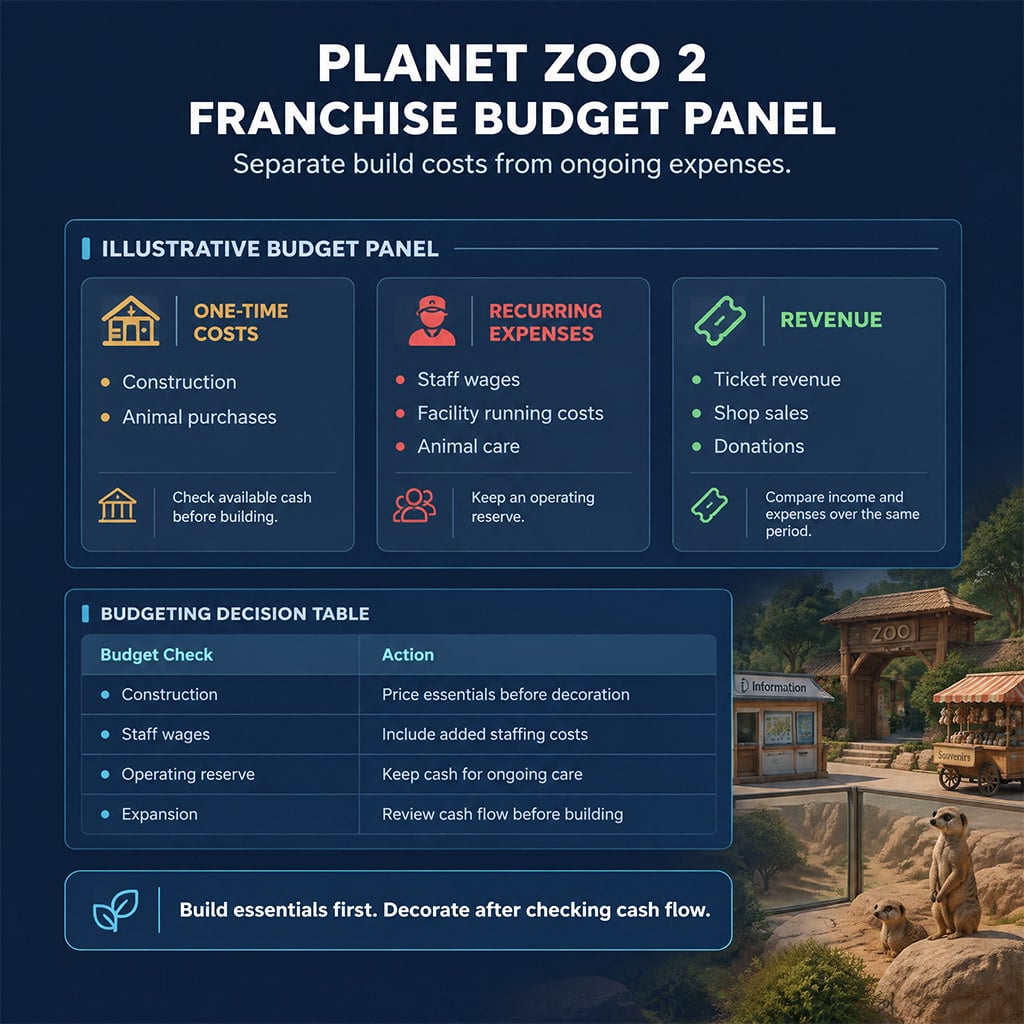
Diagnose your current zoo bottleneck using this priority matrix before spending another dollar:
| Observed Problem | Immediate Action | What to Stop Buying |
|---|---|---|
| Accreditation progress stalls | Open the zoo overview panel and isolate the exact unmet metric | Random foliage and unlinked scenery pieces |
| Guests ignore a vendor stall | Check path snap connections, power coverage, and staff workzones | Custom shop facades and surrounding retail props |
| Animals pace in one corner | Toggle the traversable area heatmap (H) to spot blocked nodes | Perimeter expansions that do not fix the chokepoint |
| Monthly cash flow turns negative | Pause construction and audit staff-to-facility ratios | Scenic parking lots and non-functional entrance plazas |
| Guests bunch up at the turnstiles | Relocate donation bins and viewing windows off the main artery | Secondary attractions inside the same 4-meter path |
Never spend reserves on cosmetic upgrades until your active failing metric turns green.
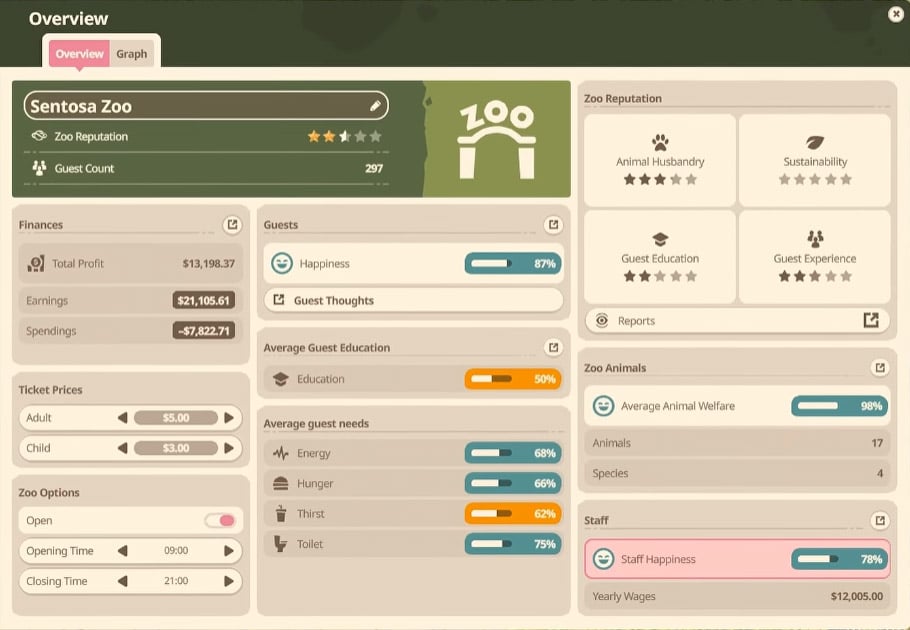
Many players assume spamming scenery automatically pushes a zoo to Three Stars and Tier 2 Accreditation. Here is the catch. Accreditation gates require specific threshold combinations of animal welfare, guest education, and facility coverage. Always screenshot your accreditation requirements tab before starting a build so you only fund items that advance the progress bar.
Build the Entrance Without Creating Service Bottlenecks
A high-capacity entrance requires assembling your structural shells and validating guest routing before adding visual clutter. If you dress an information kiosk or gift shop first, dense prop hitboxes will silently block the vendor interaction nodes.
Align the Structure Before Rotating It
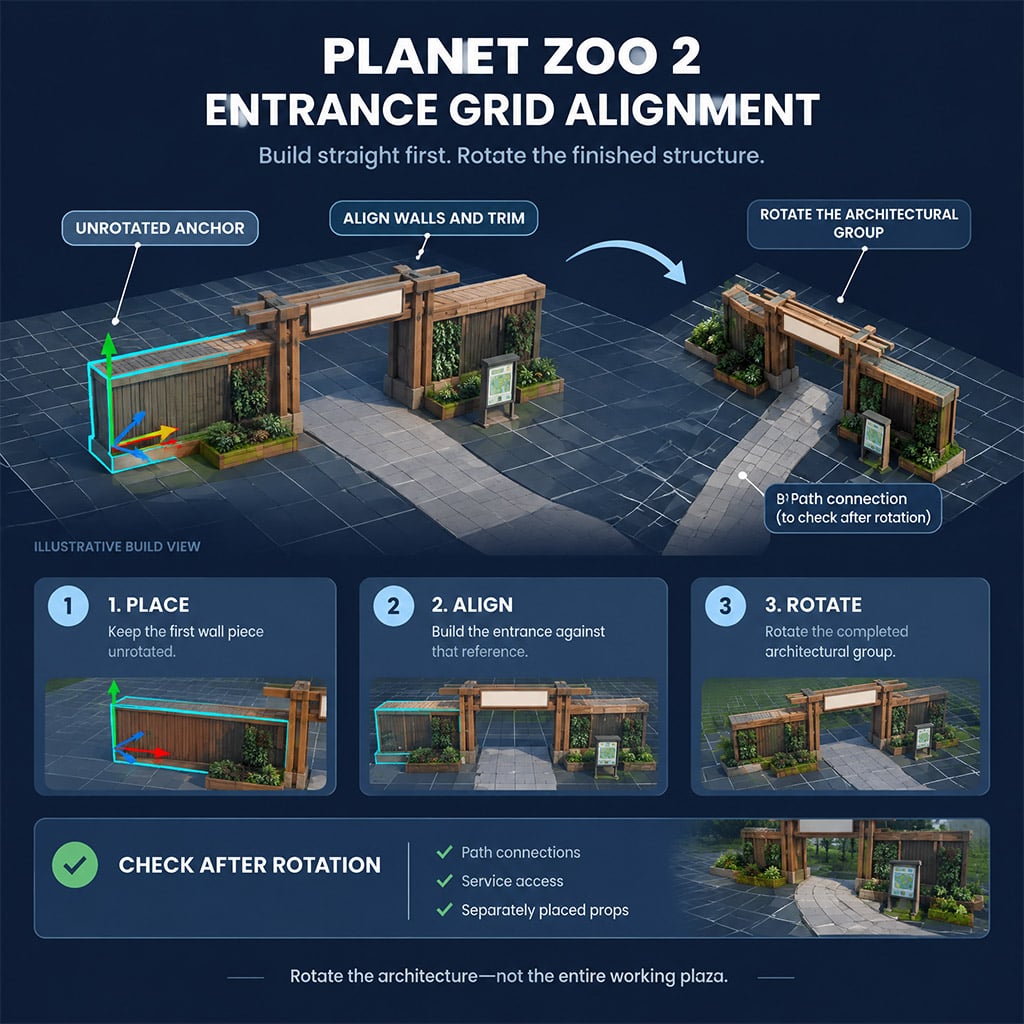
Custom wall trims and roof beams frequently drift off-axis when you build directly on angled plaza paths. What this actually means is that free-rotating individual pieces introduces micro-gaps you cannot fix later.
1. Place one unrotated wall piece on a flat grid to act as your master anchor.
2. Snap all structural walls, pillars, and sign frames directly to that anchor's local grid.
3. Inspect all corner seams from both front and side elevations.
4. Select the entire architectural group and rotate it into its final plaza position as a single unit.
5. Connect guest paths and facility thresholds independently after the shell is locked.
Never assume path connections or facility snap points will automatically align after rotating a multi-piece group. Test the threshold immediately.
Frame the Sign Without Obscuring It
Your main plaza billboard fails if guests cannot read it from the arrival turnstiles. Mount the base billboard panel first, frame the outer edges with wooden beams, and tuck small foliage clusters exclusively over the harsh metallic seams.
Save 3D animal cutouts for last. Overloading the frame with hanging vines hides the rectangular border, sure, but it also swallows the typography from 20 meters away.
Test Services Before Dressing Them
Every shop shell needs an unobstructed interaction footprint. When we tested sunken guest curbs hidden beneath the asphalt to force pedestrian routing, we found that after the latest patch, buried curbs still collide with guest navigation meshes—causing visitors to get stuck in infinite walking loops right in front of the gift shop.
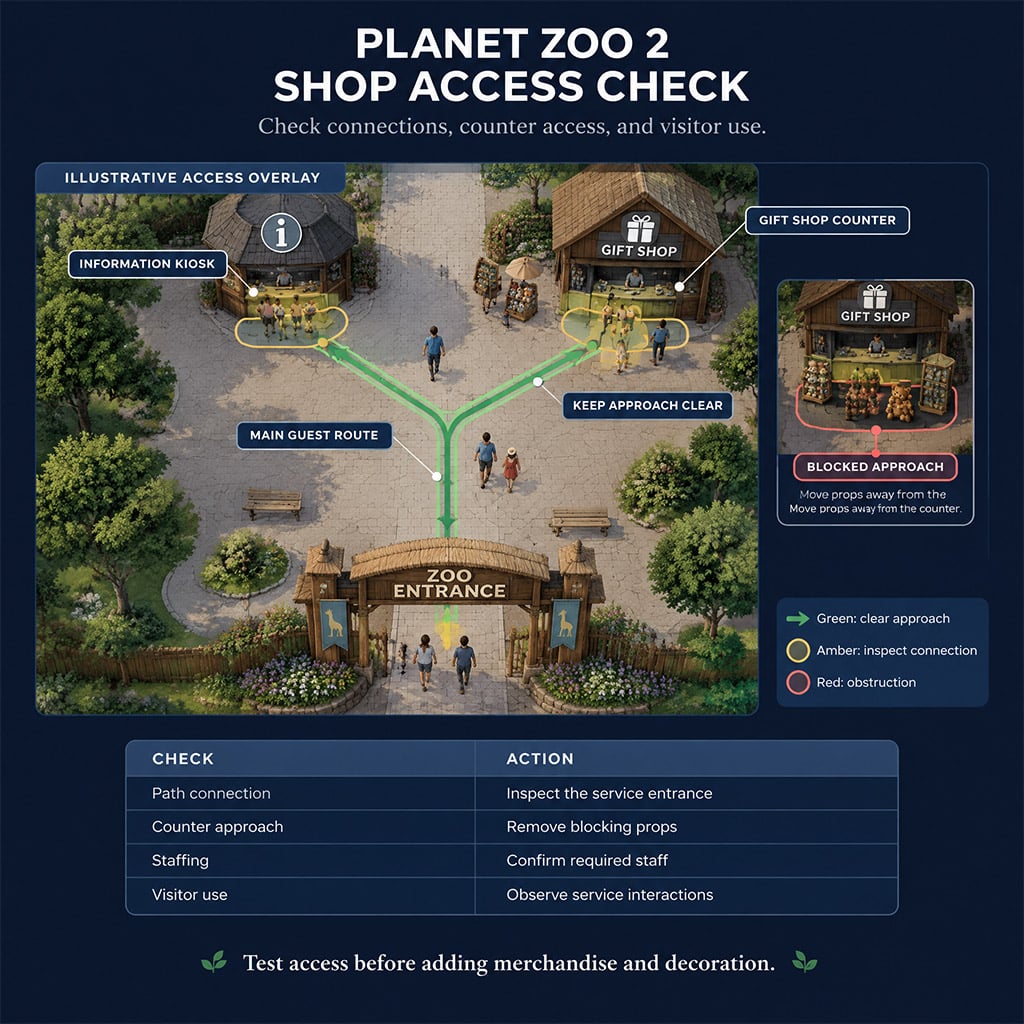
Skip underground curb tricks and rely on clean path widths instead. Use this checklist to verify your plaza facilities before adding scenery:
| Plaza Element | Functional Validation | Hard Decoration Limit |
|---|---|---|
| Information Kiosk | Watch a live guest complete a purchase at the window | Keep awning drapery and pillars off the front path seam |
| Gift Shop | Verify vendor assignment and active transaction animations | Leave a 2-meter clearance zone across the counter face |
| Animatronic / Staff Prop | Classify strictly as a scenery rating booster | Never count static props toward your active staff headcount |
| Education Boards | Confirm power supply and link to a valid species | Keep boards out of the immediate turnstile entry choke |
| Central Flowerbeds | Observe crowd splitting during peak arrival waves | Delete planters if guests bottleneck below walking speed |
Lock in your scenery budget only after you see guests actively spending cash at the counter.
Build the Meerkat Habitat Around Access and Containment
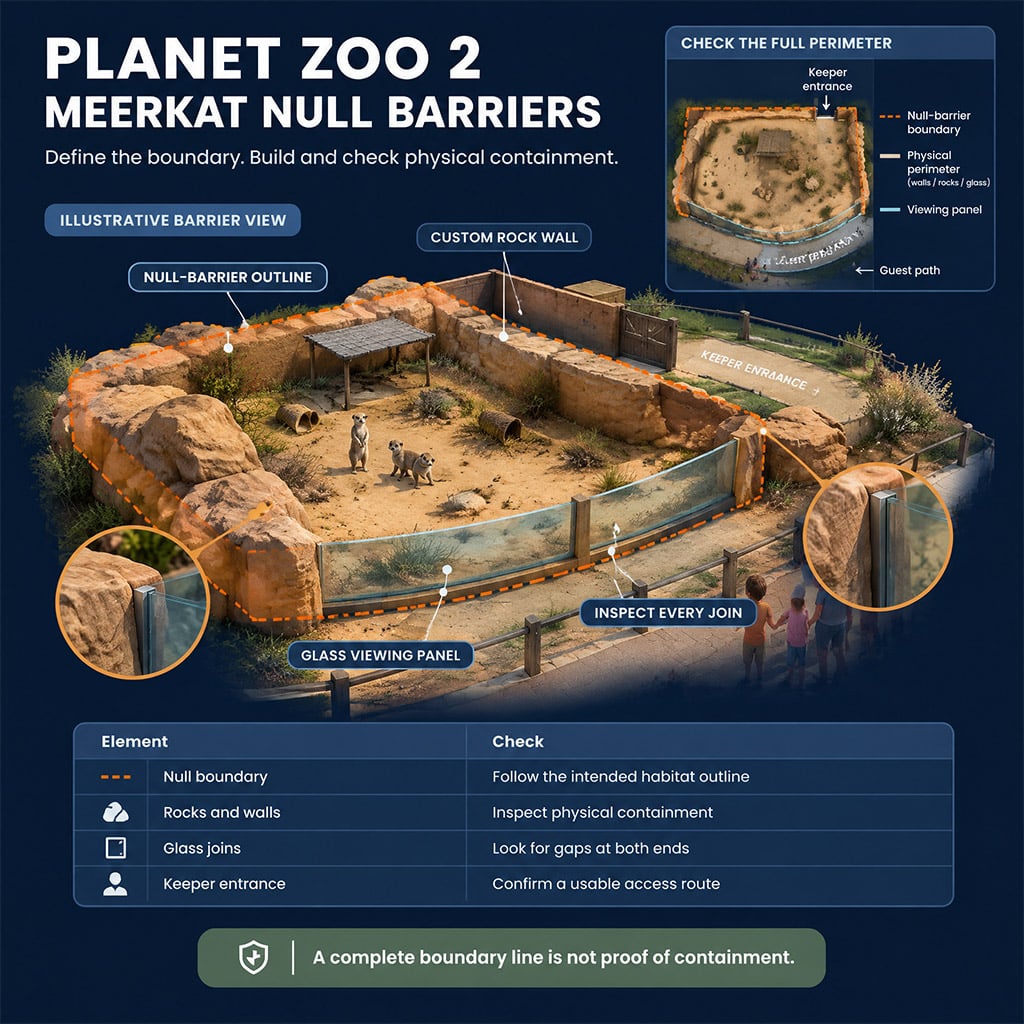
Meerkats are small, cheap, and high-appeal starters, making them the ideal opening habitat—provided your rockwork does not break their navigation mesh. Because null barriers only define territory zones without stopping movement, your custom scenery must form an airtight physical perimeter.
Clear the Footprint and Check the Perimeter
Deleting paths near existing barriers often triggers terrain deformation errors. Follow this exact sequence to keep your plaza intact:
1. Drop a manual quicksave before touching the path deletion tool.
2. Draw your habitat outline while leaving a wide buffer around the main guest walkway.
3. Right-click unwanted path segments directly instead of dragging new barriers over them.
4. Place the keeper gate on a flat edge with direct staff path access.
5. Construct your physical rock and glass perimeter along the inside of the null barrier line.
6. Run the containment check before purchasing a single animal.
Some builders swap null barriers to log barriers temporarily to auto-clear intersecting paths. Skip that workaround. Directly deleting path segments with the pathing tool prevents accidental terrain spikes that ruin glass viewing windows.
Place Rockwork Without Sacrificing Usable Space
Stack tall faux rocks along the rear wall to hide staff facilities, and keep flat, low-profile stones near the front glass so guests have an unobstructed view.
Here is where most meerkat builds break. Because meerkats have tiny hitboxes, you might assume they can squeeze through any visual gap between boulders. We ran this layout through three iterations and discovered that overlapping rock hitboxes secretly shave up to 35% off the usable floor space, even when the sand looks wide open to the naked eye.
Open the Traversable Area Heatmap after placing every rock cluster. If your meerkats cannot reach a section of the enclosure, run this diagnostic loop:
Pinpoint the exact blue border where the navigable mesh cuts off.
Select and shift one adjacent rock back by 0.5 meters.
Wait two seconds for the heatmap to recalculate.
Verify blue pathing lines connect the keeper gate, water bowl, and hard shelter.
Re-check the red escape icons along the outer wall whenever you shift perimeter stones.
Do not expand the entire habitat footprint just to hit space requirements. Shifting two culprit boulders usually restores the lost square footage for free.
Verify Shelter, Group Requirements, and Enrichment
Always construct a functional hard shelter frame and verify the welfare tab registers it before burying the roof under decorative rockwork. A visually covered cave frequently fails to register as valid weather protection if the rock pieces have gaps in their bounding boxes.
Ignore community myths telling you to build your opening enclosure for 50 meerkats. Stocking for 50 animals on day one destroys your cash reserves and triggers immediate overcrowding penalties. Check your Zoopedia tab for the exact minimum social group size and male-to-female ratio, buy only a stable starter pack, and leave an empty plot of land next door for future expansion.
When placing enrichment items, filter the build menu strictly by meerkat tag compatibility and drop foraging boxes near the front viewing glass. If a ball or feeder sits at 0% usage after ten minutes, do not buy a second one—open the heatmap and confirm a rock hitbox isn't blocking the keeper from refilling it.
FAQ (Frequently Asked Questions)
Does building a detailed entrance guarantee Tier 2 accreditation?
No, scenery alone will not unlock Tier 2 accreditation. You must open the zoo accreditation panel and fulfill the specific active milestones—typically a combination of animal welfare scores, guest education ratings, and functional facility coverage.
How much money do you need for a starter meerkat habitat?
Budget roughly $5,000 for the initial enclosure construction and starter animals. However, keep at least $3,000 to $5,000 in liquid reserve to cover the ongoing keeper wages, mechanic maintenance, and feed costs before ticket revenues stabilize.
Can null barriers keep meerkats inside the habitat?
No, null barriers only tell the game's simulation where the habitat boundary sits and provide zero physical containment. You must line the entire null perimeter with unbroken custom fences, deep moats, or rock walls and verify zero red escape points on the traversable heatmap.
Why does the welfare tab say my meerkats lack space in a huge enclosure?
Dense rockwork and foliage clusters have invisible bounding boxes that block animal movement across visibly open ground. Toggle the traversable area heatmap, locate the exact rock pinching off the blue floor mesh, and nudge it backward until the full enclosure connects.
How many meerkats should you buy for an opening-day habitat?
Only purchase the minimum viable social group listed in the in-game Zoopedia, typically one dominant pair or a small bachelor group of 4 to 6 animals. Overstocking early explodes your feeding costs and triggers dominance fighting before your keepers are trained to handle the workload.

I’m Lucas Moreau, a French Features Editor at GGWTB covering urban open-world games, life simulations, and role-playing experiences. My features explore city activities, everyday routines, and the freedom to take a different path. I look at what a new job, home, or neighborhood lets you do—not just what it costs to unlock.
Most Popular Posts
- Planet Zoo 2 Beginner Guide: Everything Need To Know
- Planet Zoo 2 Cash & Conservation Credits Guide: Smarter Franchise Mode Starts
- Planet Zoo 2 Franchise Build Guide: Entrance, Meerkat Habitat & Budget Checks
- Planet Zoo 2 Franchise Maps: Rolling Hills, Blueprint Codes & Highlands Saves
Popular Category Lists
- ARC Raiders / (359)
- Grow a Garden / (295)
- CoD: Black Ops 7 / (167)
- Star Citizen / (163)
- MLB 26 / (159)
- Monopoly Go / (153)
- ARK Survival Ascended / (128)
- Steal a Brainrot / (99)
- Blox Fruits / (74)
- Adopt Me / (74)
- Forza Horizon 6 / (72)
- Sailor Piece / (68)
- Grow a Garden 2 / (68)
- Diablo IV / (62)
- CoD: BLACK OPS 6 / (55)
- Aion 2 / (55)
- Path of Exile 2 / (48)
- Monster Hunter Wilds / (46)
- Windrose / (44)
- Maplestory Classic / (44)