



 0
0 Created: Oct 21,2026 | Planet Zoo 2
Planet Zoo 2 Beginner Guide: Everything Need To Know

Starting Planet Zoo 2 is easier when you build a small, working zoo before attempting a large showcase park. Your first goal is straightforward: give guests a connected route, give staff access to essential facilities, and give one animal species a suitable home.
This guide follows that order. It covers your opening layout, animal care, aviaries and aquariums, and the management checks that help you expand without overlooking welfare or running costs.
This is an introductory workflow, not a catalogue of every building tool. Use the current in-game Zoopedia and facility panels for exact requirements. Controls, availability, and management options may differ by platform, game mode, or update.
- 1. Set Up a Small, Connected Zoo
- Choose Your Map and Pause Before Building
- Connect Guest Paths and Staff Routes
- Select an Animal Before Designing Its Home
- 2. Build the Habitat and Establish Animal Care
- Build a Secure Boundary and Accessible Gate
- Prepare the Staff Facilities
- Adopt Animals and Complete Quarantine
- Fix Welfare One Category at a Time
- Check Traversable Areas After Decorating
- 3. Add Aviaries, Aquariums, and Exhibits Carefully
- Build an Aviary Around the Selected Species
- Check Aquarium Conditions Before Adding Animals
- Do Not Infer Compatibility From Geography
- Use Exhibits Only for Supported Species
- Recheck Conditions Through the Seasons
- 4. Manage Income, Workload, and Expansion
- Add Donations and Education at Viewing Areas
- Expand Shops in Response to Guest Needs
- Read the Financial Report Before Borrowing
- Organise Staff With Work Zones
- Approach Wildlife Reserves After the Zoo Is Stable
- First-Zoo Troubleshooting Checklist
- FAQs
- What should I build first in Planet Zoo 2?
- How do I know when quarantine is complete?
- Why is animal welfare low in a large habitat?
- Can different fish species share an aquarium?
- How can I improve my zoo's finances?
1. Set Up a Small, Connected Zoo
A compact layout makes early problems easier to spot. Keep your first attraction near the entrance and leave a separate service area behind it.
Choose Your Map and Pause Before Building
When creating a zoo, consider the available biome, continent, and terrain options. A flatter site is generally easier to plan, while sculpted terrain may require more adjustments around paths and buildings.
Climate matters, too. An animal that is comfortable during one season may need temperature control later.
Before spending money:
- Pause the simulation using the time controls.
- Locate the guest entrance and its existing path.
- Check your starting funds and mode restrictions.
- Reserve space for one habitat and a small staff area.
- Review camera movement, rotation, and zoom in your control settings.
Do not assume a PC shortcut applies to a controller or a customised key binding.
Connect Guest Paths and Staff Routes
Build a direct guest route from the entrance to your first viewing area. Avoid creating a huge plaza before you know how much traffic it needs to handle.
Use snapping options where they help you create clean connections. Inspect junctions closely: paths that appear to touch may not form a usable route.
Behind the attraction, create a staff route connecting:
- The habitat gate.
- Animal-handling facilities.
- The keeper hut.
- The staff room.
- Utilities that require maintenance access.
A staff path keeps guests out of a service route; it does not fix a missing connection.
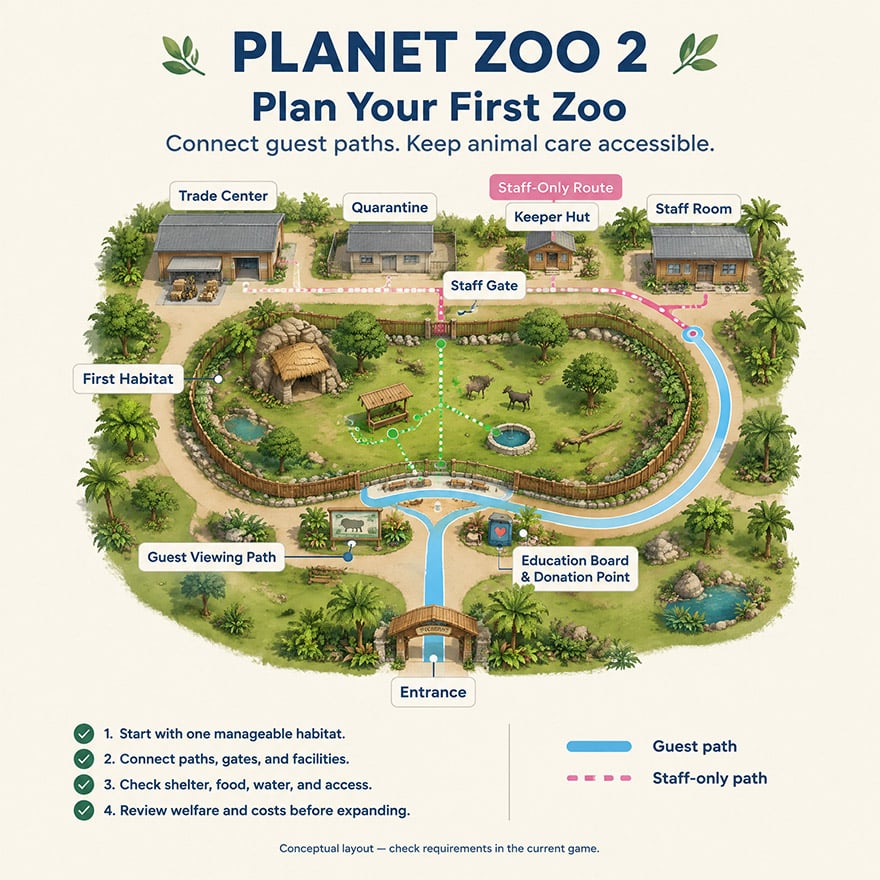
Conceptual planning illustration; not an in-game screenshot.
Select an Animal Before Designing Its Home
Open the Zoopedia before choosing a barrier or decorating an enclosure.
Check the selected species':
- Social group and sex-ratio requirements.
- Space needs for the intended population.
- Barrier strength, height, and escape-related requirements.
- Terrain, vegetation, and temperature preferences.
- Shelter, feeding, drinking, and enrichment needs.
- Purchase and ongoing care costs.
A manageable first species is one whose requirements fit your available budget and layout—not necessarily the cheapest animal in the market.
Avoid treating a maximum group size as a recommended starting population.
2. Build the Habitat and Establish Animal Care
A closed enclosure is only the beginning. Animals need suitable conditions, and staff need working routes to maintain them.
Build a Secure Boundary and Accessible Gate
Choose barriers that meet the species' requirements. Strength alone is not enough: climbing, jumping, water, and other escape-related properties may also matter.
Complete the boundary, add a habitat gate, and connect it to the service path. Then check that the game recognises the habitat.
A null barrier marks a habitat boundary without creating a physical fence. Use it only when another tested feature provides effective containment. It is not a shortcut to an escape-proof enclosure.
Prepare the Staff Facilities
Set up the facilities required by your current mode and animal-care workflow before adopting animals.
These commonly include animal trading and storage, quarantine, a keeper hut, a staff room, and veterinary facilities. Research facilities become relevant when you assign research.
Their practical roles are:
| Facility or role | Purpose | Opening check |
|---|---|---|
| Animal trading and storage | Supports acquiring and holding animals | Facility is operational and accessible |
| Quarantine | Screens incoming animals | Staff can reach it and screening can proceed |
| Keeper hut and keeper | Supports food preparation and habitat care | Short, usable route to the habitat |
| Veterinary facilities and vet | Supports health care | Treatment facilities are accessible |
| Staff room | Gives employees a place to rest | Included in relevant staff routes |
| Mechanic and utilities | Supports maintenance | Equipment has access and required connections |
Start with a team that can cover these tasks. Add staff in response to workload rather than hiring a large roster without enough work.
Adopt Animals and Complete Quarantine
Before adopting, check age, sex, health information, genetics where relevant, and the number of animals included in the purchase.
Where the game offers animals as a group or shoal, compare the individual count, not just the number of market listings.
Use quarantine where available before introducing new animals to an occupied habitat. Move animals out of quarantine when their status confirms that screening is complete. A welfare percentage is not a substitute for the quarantine result.
If a transfer fails, inspect the destination, gate, path connection, facility status, and staff availability.
Fix Welfare One Category at a Time
After animals arrive, open their welfare panel and work through the unmet categories.
A useful order is:
- Containment and access: Resolve escape warnings and inaccessible areas.
- Social needs: Check population size and group composition.
- Space and shelter: Confirm usable space, not just enclosure dimensions.
- Temperature and terrain: Adjust conditions to the species' displayed preferences.
- Food and water: Provide suitable, reachable sources.
- Vegetation and enrichment: Add compatible items and inspect the result.
Change one category at a time so you can see what solved the problem.
Large enclosures can still fail space requirements if shelters, rocks, or terrain block the areas animals can use. Decorative shelter also needs to register as usable shelter in the game.
Check Traversable Areas After Decorating
Use the available habitat heatmaps to inspect animal and staff access.
Recheck after placing:
- Large rocks or shelters.
- Dense vegetation.
- Climbing structures.
- Feeders and drinking points.
- Water or major terrain changes.
A keeper must be able to reach care items. An animal must be able to reach the resources intended for it.
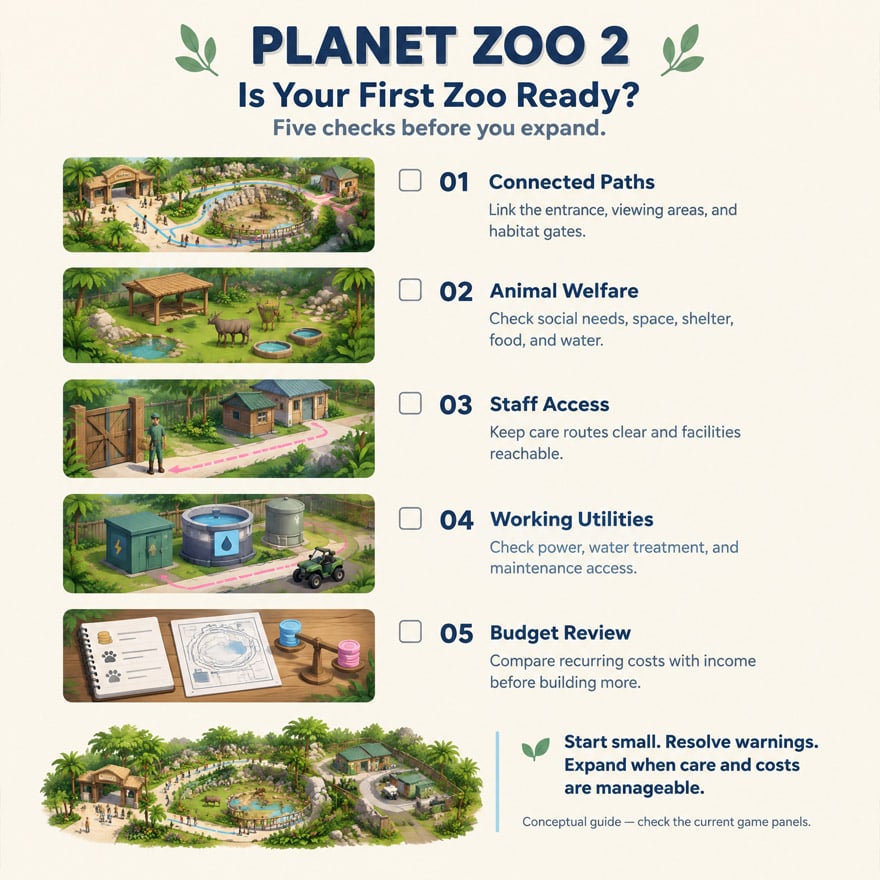
Conceptual access diagram; confirm actual accessibility with in-game heatmaps.
3. Add Aviaries, Aquariums, and Exhibits Carefully
Planet Zoo 2 includes flying and fully aquatic animals alongside other zoo species. These attractions need more than a visually convincing enclosure.
Build an Aviary Around the Selected Species
For a flying species, use its current Zoopedia entry to check containment and flying-space requirements.
Aviary planning should account for:
- Suitable side barriers and roof containment.
- Usable flying space.
- Shelter and resting locations.
- Compatible feeding and enrichment items.
- Nesting provisions where required.
- Keeper access around supports and scenery.
Do not assume adding a roof makes any terrestrial habitat suitable for birds. Likewise, do not assume every bird uses the same enclosure type.
After installing roof supports, vegetation, and other structures, inspect the habitat's recognised space and accessibility again.
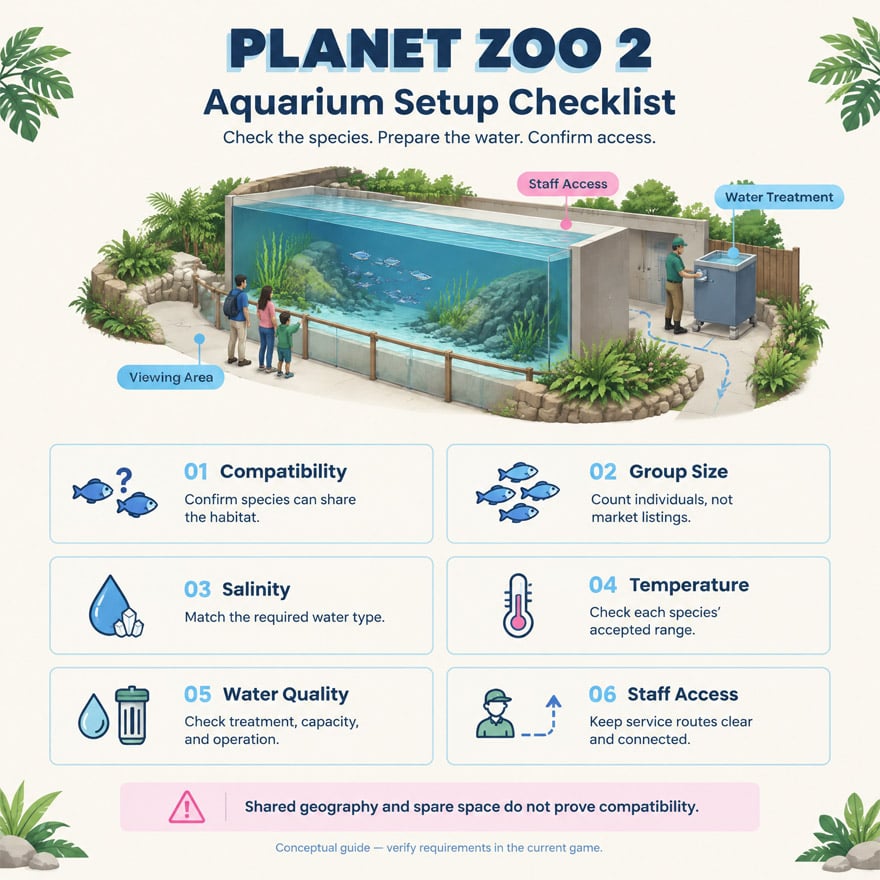
Check Aquarium Conditions Before Adding Animals
Select aquatic species first, then design the aquarium around their combined requirements.
Before transferring animals, check:
- Required water type and salinity.
- Acceptable temperature ranges.
- Water quality and treatment requirements.
- Space and social group needs.
- Staff access.
- Utility operation and capacity.
Use the current utility panels to establish the correct connections. Do not copy a fixed filtration capacity from a tutorial and assume it will suit a differently sized aquarium.
Keep systems requiring different water conditions separate where the game's utility setup requires it.
Do Not Infer Compatibility From Geography
A shared geographic range does not prove that species can share an aquarium. Check compatibility, social requirements, salinity, temperature, and space before combining them.
Adding a predator requires a separate compatibility check. Spare space alone does not establish that an aquarium is suitable.
If compatibility cannot be confirmed, start with a single-species aquarium.
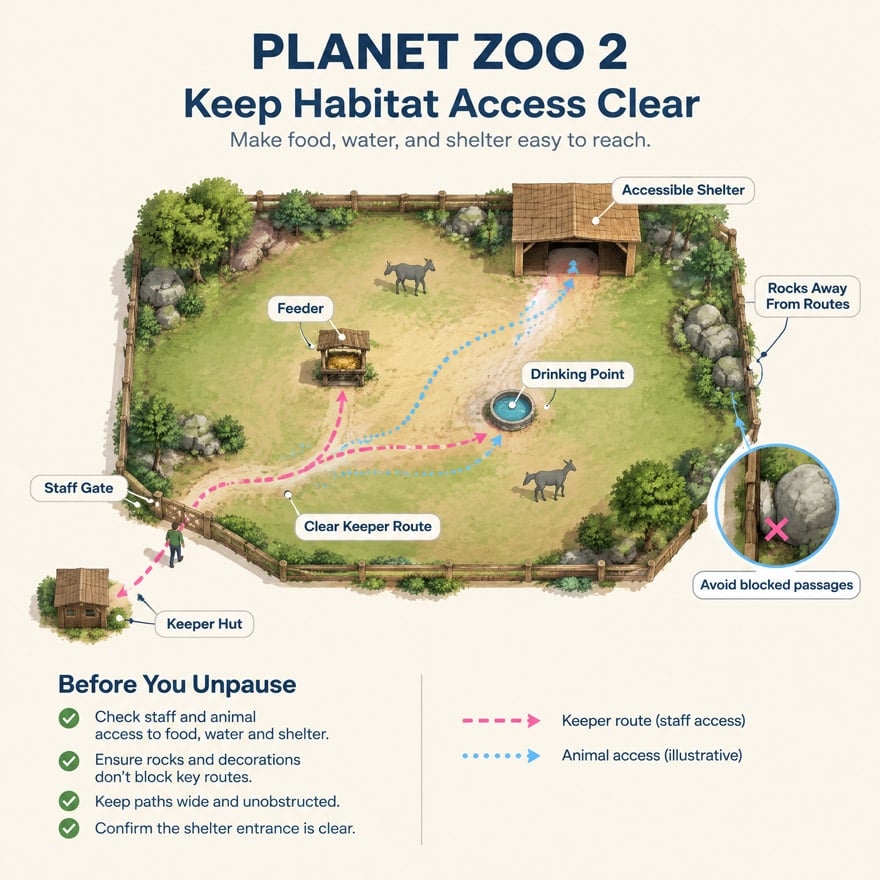
Conceptual checklist; equipment connections must be checked in the current game.
Use Exhibits Only for Supported Species
An exhibit can offer a more compact attraction than a large custom habitat, but only for species supported by that exhibit type.
Check the exhibit's settings, population limits, and care requirements after transferring animals. A decorative shell does not replace a functioning exhibit.
There is no need to demolish an established aquarium simply because its fish look small. Compare care requirements, running costs, and available space before rebuilding.
Recheck Conditions Through the Seasons
Watch temperature-sensitive species as seasons change. Where heating or cooling is available, confirm that:
- The equipment is operating.
- Its coverage reaches the relevant animal areas.
- The selected setting suits the species.
- Its operating cost fits your budget.
One device may not cover an irregular habitat. Use the temperature view and animal welfare panel to verify the outcome.
4. Manage Income, Workload, and Expansion
A successful opening zoo needs both good animal care and a sustainable operating budget. Build additional attractions when the existing ones are functioning reliably.
Add Donations and Education at Viewing Areas
Place donation points where guests stop to watch animals. Add relevant educational content and configure it for the correct species.
Check that boards and other equipment have any required power and access. Where education audio overlaps, inspect the coverage settings rather than stacking speakers in one area.
Donations can contribute to income, but they are not guaranteed to cover all expenses.
Expand Shops in Response to Guest Needs
Add food, drinks, toilets, seating, and litter bins where guest demand supports them. Start small and inspect usage before duplicating facilities.
For each shop, check:
- Guest access and demand.
- Vendor coverage.
- Operating costs.
- Staff access to rest facilities.
- Nearby litter management.
A decorative shop shell is not a functioning business unless the shop facility is installed and operational.
Read the Financial Report Before Borrowing
Track recurring expenses separately from construction spending. Animal food, wages, utilities, shops, and loan repayments can create ongoing pressure even after building stops.
If cash is falling:
- Pause nonessential construction.
- Identify the largest recurring costs.
- Review animal populations and feeding expenses.
- Inspect underused shops and excess staffing.
- Check guest views, donations, and ticket-price feedback.
Before accepting a loan, compare the displayed interest, repayment schedule, and total cost with your zoo's operating surplus. Borrowing can fund a useful expansion, but it does not fix an attraction that loses money every period.
Organise Staff With Work Zones
Create work zones around connected groups of habitats and facilities. Include the supporting buildings employees need, not just their main attraction.
After adding a new habitat, shop, or talk location, review the relevant assignments.
Train staff when workload and finances justify it. Training does not repair an inaccessible gate, a missing facility, or an overloaded service area.
Approach Wildlife Reserves After the Zoo Is Stable
Wildlife reserves add a conservation-focused management layer. Check the current reserve interface for eligible species, release-group conditions, ecosystem requirements, and observation equipment.
Before preparing a release:
- Confirm that the species is eligible for the selected reserve.
- Review the required group composition.
- Check breeding, health, and genetic conditions where specified.
- Prepare the reserve's required ecosystems.
- Confirm the release group meets every displayed condition.
These are game systems, not instructions for releasing real animals into the wild.
First-Zoo Troubleshooting Checklist
Use this checklist before spending money on another attraction.
| Problem | Check first | Practical response |
|---|---|---|
| Animals cannot be transferred | Destination, gate, paths, staff and facility status | Repair access or resolve the displayed warning |
| Welfare remains low | The unmet welfare categories | Fix the specific requirement rather than adding random decoration |
| Animals are not being fed | Keeper route, hut access and feeder accessibility | Clear obstructions and review workload |
| Water quality is poor | Treatment operation, capacity and connections | Resolve the utility warning before adding animals |
| A facility appears unpowered | Power coverage and facility status | Inspect connections; consult official support if the problem persists |
| Money keeps falling | Recurring costs and attraction income | Delay expansion and reduce avoidable expenses |
Fix the warning shown in the management panel before assuming the problem is a software bug.
Conceptual readiness checklist.
Before expanding, confirm that your animals' needs are met, staff can complete their tasks, utilities are working, and the budget can absorb another attraction. A small zoo that runs reliably is a better foundation than a large one full of unresolved warnings.
For current game information, consult the official Planet Zoo website, player guides, and Zoopedia.
FAQs
What should I build first in Planet Zoo 2?
Start with a connected guest path, one manageable habitat, and the staff routes and facilities needed to operate it. Prepare animal care before spending heavily on scenery or a large entrance plaza.
How do I know when quarantine is complete?
Check the animal's quarantine status or completion notification. Do not use a welfare percentage as the release condition. Once screening is complete, transfer the animal to a suitable, accessible destination.
Why is animal welfare low in a large habitat?
Enclosure size does not guarantee usable space or suitable conditions. Check shelter, terrain, temperature, social needs, food, water, enrichment, and traversable areas. Scenery can block access or reduce recognised space.
Can different fish species share an aquarium?
Only combine species after checking compatibility and their environmental and social requirements. Sharing a natural region or having similar temperature preferences is not enough to establish compatibility.
How can I improve my zoo's finances?
Review recurring costs, place donation points near useful viewing areas, respond to guest needs, and avoid expanding faster than income supports. Assess shops and staffing through their management panels. Treat loans as a funding decision, not a substitute for sustainable operations.


I’m Kwame Asante, a Ghanaian Staff Writer at GGWTB covering anime combat, fighting games, and adventure progression. My guides connect combos and ability choices with the grind behind them: which upgrades open up your build, and which can wait. A rare unlock is exciting—but it needs to earn its place in your lineup.
Most Popular Posts
Popular Category Lists
- ARC Raiders / (354)
- Grow a Garden / (294)
- CoD: Black Ops 7 / (167)
- Star Citizen / (163)
- MLB 26 / (159)
- Monopoly Go / (153)
- ARK Survival Ascended / (128)
- Steal a Brainrot / (99)
- Blox Fruits / (74)
- Adopt Me / (74)
- Forza Horizon 6 / (72)
- Sailor Piece / (68)
- Grow a Garden 2 / (68)
- Diablo IV / (62)
- CoD: BLACK OPS 6 / (55)
- Aion 2 / (52)
- Path of Exile 2 / (48)
- Monster Hunter Wilds / (46)
- Windrose / (44)
- Maplestory Classic / (42)
