0
0 Created: Nov 14,2025 | CoD: Black Ops 7
Black Ops 7 Best Settings: Pro Controller, Mouse/Keyboard, Graphics, Audio & HUD Setup

Before you dive into your first BO7 match, lock in the fundamentals that actually move your K/D: input response, aim behavior, visibility, and sound. Here's a field-tested setup that favors consistency under pressure, not just pretty menus. We'll start with the works-for-most baselines, then show you why they matter and how to verify them in minutes. Let's get you crisp tracking, fewer missed inputs, and clearer targets—here's the path.
Controller Settings (Fast, Stable, Aim-Assist Friendly)
This section prioritizes snappy input and predictable tracking.
Quick Wins
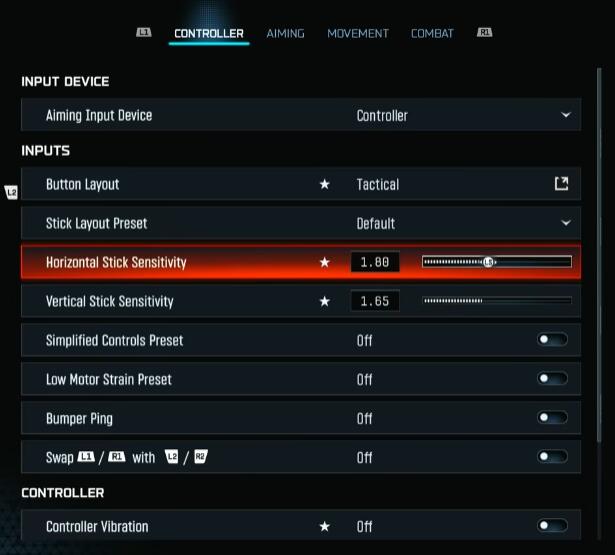
- Input device: Controller.
- Layout: Tactical (drop/crouch on right stick). If you have rear paddles, bind melee/jump there for uninterrupted aim.
- Vibration/Trigger Effects: Off. You want zero aim wobble and no variable trigger weight.
- Bumper/Trigger swap: Only if your triggers are analog and feel slow—L1/R1 are faster to spam tactically.
Sensitivity & Curves
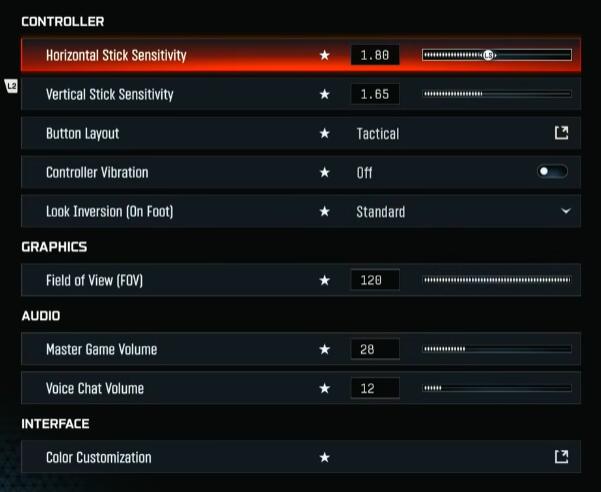
- Horizontal/Vertical: 1.8 H / 1.65–1.7 V (staggered).
- Why: Most gunfights are left-right; a touch more horizontal keeps micro-corrections tight without overflicking.
- If you overshoot at range, drop both by ~0.05–0.1. If you can't keep up in hip fights, raise H first.
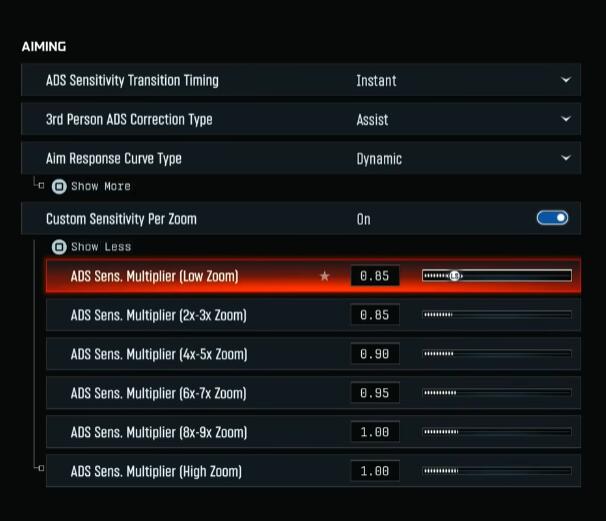
- Response Curve: Dynamic.
- Because the reverse S-curve feels snappy at micro-aim while preserving smoothness.
- ADS Transition: Instant.
- Custom Zoom Multipliers:
- Low zoom (irons/RDS): 0.85
- 3–5×: ramp to ~0.9
- 6×+: 1.0
- This keeps iron/red-dot precise but avoids sluggishness on high zoom.
Dead Zones (Do This Right)
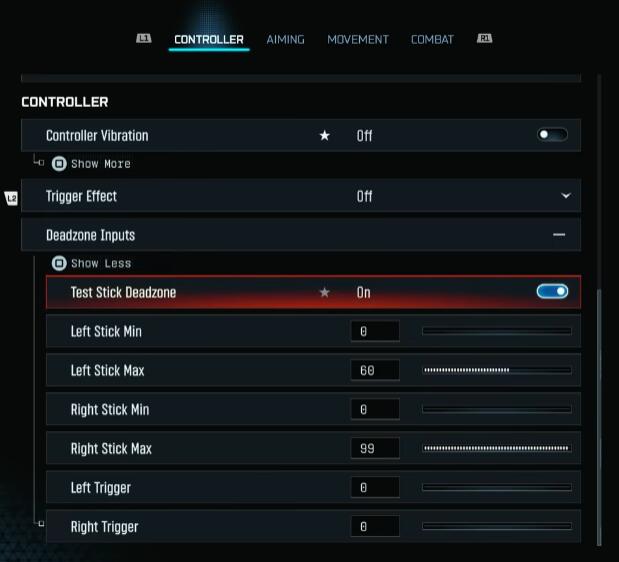
- Trigger Deadzones: 0% / 0% for fastest ADS/fire.
- Stick Min:
- Test: Set Min to 0, open stick test, note drift value after releasing the stick.
- Right Stick (aim): Set Min just above drift (e.g., drift 2% → set 3%). Avoid auto-aim fighting your input.
- Left Stick (movement): You can keep Min 0 to allow slight movement input which helps rotational AA feel consistent.
- Stick Max:
- Left Max ~60 (hit full movement sooner).
- Right Max ~90 (retain fine aim range at the top end).
Movement Assist Tweaks
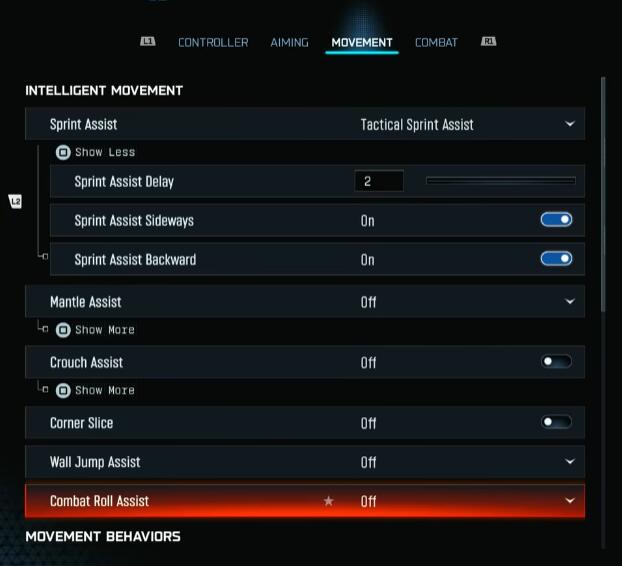
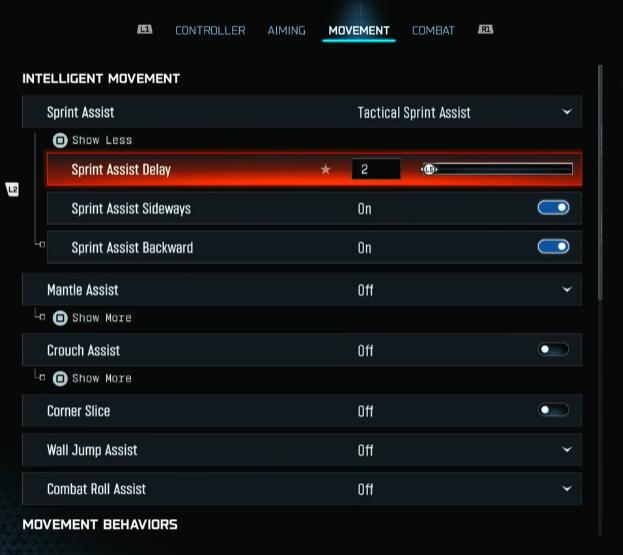
- TAC Sprint Assist: On; delay 1–2 (type exact value with a keyboard if needed).
- Sprint Assist Sideways/Backwards: On (unified feel).
- Mantle/Crouch/Wall Jump/Combat Roll Assist: Off. You want manual control to avoid unwanted moves mid-fight.
- Slide/Dive: Tap to slide with Short delay to access both moves quickly.
- Sprint Restore: On. Slide Maintain Sprint: On. Smooth slide cancels.
- Parachute/Wingsuit: Manual. Pull late, more control in drops.
- Sprint Behavior: Toggle. TAC Sprint Activation: Single Tap. Door Bash: On.
Combat
- ADS Behavior: Hold.
- Mount: ADS + Melee (prevents accidental mount).
- Reload Prioritization: Prioritize Reload in MP; switch to Prioritize Interact in Warzone-like modes.
- Mantle Cancels Reload: Off. Sprint Cancels Reload: On if you like manual reload-cancel control.
- Ammo Depleted Auto-Switch: Off (avoid unintended swaps).
Verification
- Aim wall test: Track a diagonal line across a wall with a 1–2× optic. If micro-corrections jitter, lower H slightly or raise right-stick Min by 1%.
- Movement flow: Sprint-slide-jump chain in a private match. If dives trigger accidentally, extend the dive delay to Medium.
Mouse & Keyboard (Precision Comes From DPI + eDPI)
Sensitivity is primarily a function of DPI and your centimeters-per-360.
Baselines
- DPI: 800–1600; start 800 for control.
- eDPI (DPI × in-game sens): 2400–4800 is a common BO range. Example: 800 DPI × 3.0 sens = 2400 eDPI.
- ADS Multipliers: Mirror the controller logic—lower on 1× (0.85), ramp to 1.0 on high zoom.
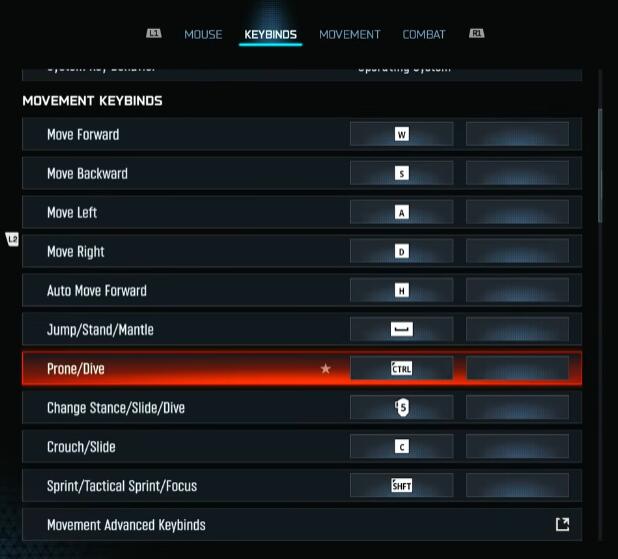
- Keybinds: Favor thumb buttons for lethal/tactical; keep prone/dive reachable (C vs. Mouse4/5).
Movement Aids
- Turn off corner slice/wall-jump/roll assists: manual control keeps aim stable during peeks.
- Sprint Restore: On for quality of life.
Micro-Test
- Microtrack the edge of a sign at 15–25m. If you overshoot, lower eDPI ~5–10%. If you can't keep up with AD strafers, raise ~5–10%.
Graphics & Visibility (PC & Console)
We optimize for clarity first, frames second, eye candy third.
Display (PC)
- Fullscreen Exclusive.
- Refresh Rate: Match monitor. Cap FPS just below max to reduce frame spikes (e.g., 240 cap on 240 Hz).
- NVIDIA Reflex:
- If CPU time > GPU time (telemetry), set On + Boost.
- If GPU time > CPU time, use Eco.
- V-Sync: Off.
- HDR: Off for competitive play (subjective).
- Gamma: 2.2. Brightness ~55 for visibility (adjust to map glare).
Quality Strategy
- Competitive: Low/Very Low where possible; disable post-process blur.
- Balanced: Mix of Low/Medium; textures Normal.
- Cinematic: High—but expect reduced consistency.
Recommended Toggles (PC and Console-where-available)
- Dynamic Resolution: Off (no visual swings mid-fight).
- Upscaling: FidelityFX CAS ~90. Frame gen: Off (latency risk).
- Ray Tracing: Off.
- Depth of Field: Off. Motion Blur (world/weapon): Off. Film Grain: 0.
- Screen-Space Reflections/Lighting/Shadows: Off (clearer glass/water reads).
- Shadows: Base Shadow Quality Normal (spot player silhouettes), but disable screen-space variants.
- Texture Resolution: Normal on mid/high GPUs; drop if VRAM constrained.
- Particle Resolution: Very Low.
- Bullet Impacts: On (intel).
- Terrain/Volumetrics: Medium for balance; drop if GPU-bound.
- Water Quality: Off/Low unless you value aquatic visuals.
Verification
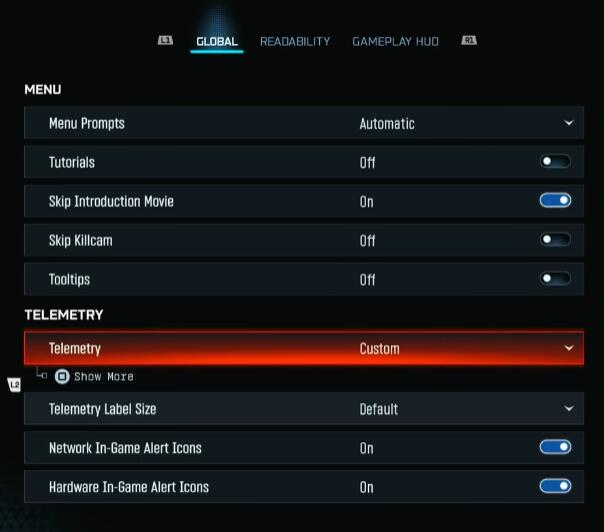
- Telemetry: Enable FPS, Latency, Packet Loss, CPU/GPU time. Aim for stable frametime over peak FPS.
- Glass/water check: With SSR off, confirm enemy clarity through panes/puddles—it should be noticeably better.
View & Camera
These settings are universal for clarity and control.
- FOV: 90–110 recommended; 120 if you're accustomed. Wider FOV reduces visual recoil but can shrink target size.
- ADS FOV: Affected (lower perceived recoil).
- Weapon FOV: Wide. Vehicle FOV: Wide.
- Camera Movement/Shake: Least. Turn off all supplementary camera effects.
- Inverted Flashbang: Optional; black flashes avoid white-out but can feel like a freeze—choose what keeps you calm.
Audio (Footstep Priority)
Sound is information; tune for footsteps and gunfire, not music.
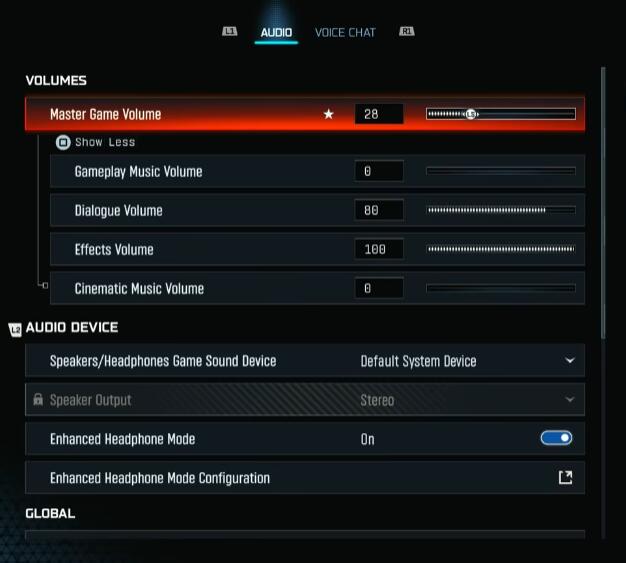
- Master: As needed for your setup.
- Music: 0.
- Dialogue: Moderate (intel callouts).
- Effects: 100 (footsteps, reloads, rips).
- Cinematic: 0.
- Mix Preset: Treyarch Mix or Home Theater as reliable defaults.
- Enhanced Headphone Mode: Test On vs Off—keep whatever gives clearer directional steps on your headset.
- Licensed Music Mute: On (stream-safe).
- Tinnitus Reduction: On. Mono Audio: Off.
Verification
- Private match: Have a friend sprint, slide, climb behind walls/floors. Adjust preset until vertical audio cues feel consistent.
Interface & HUD
See more, think less.
- Telemetry: FPS, Latency, Packet Loss, CPU Time, GPU Time, In‑Game Clock (optional).
- Network/Hardware Icons: On (packet burst, throttling alerts).
- Color Customization:
- Use Custom palette. Enemies: saturated red. Friendlies: deep blue. Neutral: purple.
- Color Filter: Filter 2 → Target Both → increase intensity for consoles/washed-out monitors. Start at 60–80.
- Minimap: Rotation On (cleaner comms). Radar weird modes: Off.
- Crosshair: Lines On; Center Dot Large/Largest. Consider a bright, non-red color to avoid blending with enemy tags.
- HUD Layout: Choose visibility-first layouts; keep clutter off center.
Console Notes
- You won't see every PC quality toggle.
Focus on:
- FOV, ADS FOV Affected, motion blur/DoF/film grain Off, color filter boost, brightness ~55.
- Controller settings above (sens, dead zones, assists Off, TAC sprint assist).
- Frame caps/VRR: Use system-level VRR if supported; prefer Performance modes.
Practical Loadout for Testing
- Weapon: Fast handling AR/SMG with a clean 1.0–1.5× optic.
- Map: A bright map with glass/water elements.
- Drill:
1) Microtrack a wall line for 10 seconds without overshoot.
2) Snap between two head-high stickers at 15m; measure misses.
3) Fight a bot strafing left/right; adjust H sens first, then right-stick Min.
Expected Gains
- 5–15% increase in first-bullet connection rate (from clearer sight picture and staggered sens).
- Reduced reload/mantle misfires (manual assists off, better binds).
- Lower input latency when CPU/GPU-bound modes are set correctly.
FAQ
Q1: My aim feels floaty after these changes—what first?
- Lower Horizontal sens by 0.05–0.1 and raise right-stick Min by 1%. On PC, confirm V-Sync is Off and Reflex mode matches your bottleneck.
Q2: Should I copy dead zones exactly?
- No. Test your own drift. Right-stick Min should sit just above your drift; left-stick Min can be 0 to keep movement engagement.
Q3: Is 120 FOV always better?
- Only if you're used to it. Targets shrink at higher FOVs. If you lose mid-range duels, try 100–105.
Q4: CAS at 90 looks too sharp—what then?
- Drop to 70–80 or slightly increase in-game brightness for softer mids without blurring motion.
Q5: Do screen-space reflections off really help?
- Yes—glass/water clarity improves, reducing false reflections and making silhouettes pop.
Summary
Lock in staggered controller sensitivity (1.8H/1.65–1.7V), Dynamic curve, precise dead zones with 0% triggers, and manual movement control. Pair that with clarity-first graphics—no motion blur/DoF/SSR, CAS ~90, and telemetry-driven Reflex mode—and a footstep-priority audio mix. Finish with a saturated enemy color profile and a bright center dot. If you find jitter, reduce H sens; if tracking lags, raise H or adjust right-stick Min by 1%. Test, tweak, verify—your aim and visibility should feel calmer, faster, and more consistent under fire.


The GGWTB Editorial Team features 10 full-time gaming editors and 23 specialist contributors, delivering hands-on tested walkthroughs, easter egg breakdowns, and game updates.
ELSA — who spearheads our in-depth COD: BLACK OPS 7, ARC Raiders guides, and patch notes—every guide is rigorously verified on live servers for accuracy.

Most Popular Posts
- Black Ops 7 Endgame Exotic Affinity Weapons Guide: Best Bonuses, Full Weapon List, and Farming Tips
- Black Ops 7 Season 1 Endgame Boss Fast Passing Guide: Colossus of Avalon & Toxic Tyrant Z‑Rex
- CoD BO7 Bot Lobbies Guide: Everything You Need To Know
- Black Ops 7 Endgame Skill Track Guides: Tactician + Bulldozer + Berserker
- Black Ops 7 Endgame Reloaded: Nightmare Boss, Exotic Upgrades, Best Skills & Fastest Progression
- Black Ops 7 Fast Weapon & Operator Leveling Max Mode-by-Mode Strategies
Popular Category Lists
- ARC Raiders / (351)
- Grow a Garden / (294)
- CoD: Black Ops 7 / (167)
- Star Citizen / (162)
- MLB 26 / (159)
- Monopoly Go / (152)
- ARK Survival Ascended / (128)
- Steal a Brainrot / (99)
- Blox Fruits / (74)
- Adopt Me / (74)
- Forza Horizon 6 / (72)
- Sailor Piece / (68)
- Grow a Garden 2 / (68)
- Diablo IV / (62)
- CoD: BLACK OPS 6 / (55)
- Aion 2 / (50)
- Path of Exile 2 / (48)
- Monster Hunter Wilds / (46)
- Windrose / (44)
- Donut SMP / (41)