0
0 Created: May 16,2026 | Windrose
Windrose Building Guide: Q Menu, Drag Build, Recipes, and Pro Base Design Tips

Stop placing walls one by one. That is the first mistake.
Windrose has a better building system than it looks at first. The game just does a poor job of teaching it. If you use the Q menu, drag building, snapping toggle, and recipe unlocks properly, your base goes from a flat box to something that actually looks built by a player who knows the system.
- Windrose Q Menu: The Building Tool Most Players Ignore
- Best Rotation Settings for Building
- Snapping On vs Snapping Off
- Use Zoomed-Out Camera for Roofs and Edges
- Drag Building: Stop Placing Every Wall Manually
- Unlock More Windrose Building Recipes
- Best Ways to Unlock Building Recipes
- What to Buy First
- Custom Furniture: Use Building Pieces Differently
- Custom Bookshelf Setup
- Custom Forge or Fire Pit Setup
- Better Base Layouts: Build Shape First, Detail Later
- Strong Starter Shapes
- Snapping, Beams, and Imperfection: The Pro Layer
- Use Snapping for Structure, Free Placement for Detail
- Use Beams and Pillars Even When You Do Not Need Support
- Stop Mirroring Every Object
- Fast Windrose Building Workflow
- Common Windrose Building Mistakes
- FAQ
- How do you open the Windrose building menu?
- How do you place multiple walls at once in Windrose?
- Should snapping be on or off when building?
- How do you unlock more building recipes in Windrose?
- What is the easiest way to make a base look better?
- Summary
Windrose Q Menu: The Building Tool Most Players Ignore
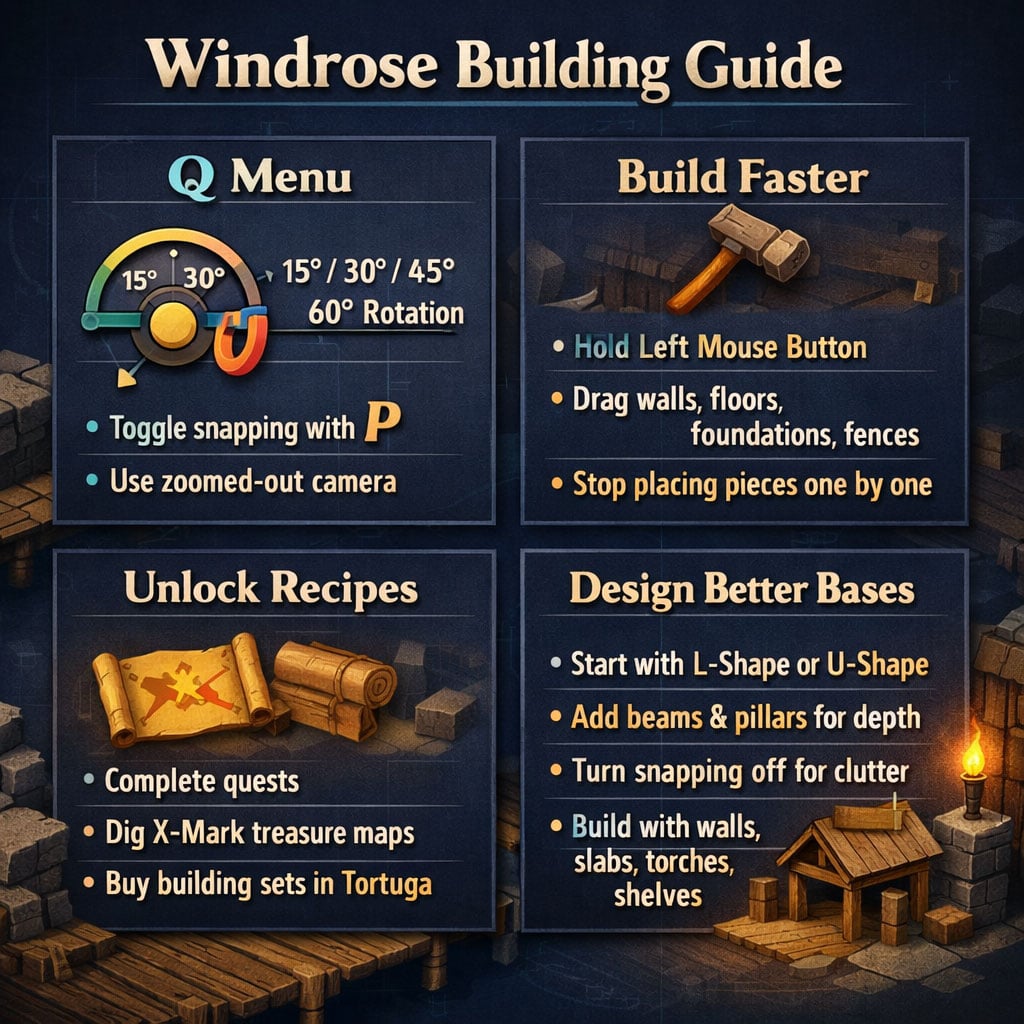
Press Q while building. This menu controls your placement precision, rotation, snapping behavior, and camera view.
If your builds feel stiff or hard to place, start here.
Best Rotation Settings for Building
| Rotation | Use It For | Why It Works |
|---|---|---|
| 15° | Furniture, decorations, small details | Best precision |
| 30° | Standard walls and general building | Default, reliable |
| 45° | Diagonal layouts, angled rooms | Clean non-square shapes |
| 60° | Hex-style or sharp creative builds | Strong stylized angles |
Use 15° for decoration work. Use 30° for normal structure. Switch often.
That alone fixes a lot of awkward placements.
Snapping On vs Snapping Off
Toggle snapping with P.
| Mode | Best For | Result |
|---|---|---|
| Snapping On | Walls, floors, foundations, roofs | Clean alignment |
| Snapping Off | Decor, docks, clutter, custom furniture | Natural placement |
Use snapping for the skeleton. Turn it off for personality.
If a piece almost fits but keeps fighting you, disable snapping. That is usually the answer.
Use Zoomed-Out Camera for Roofs and Edges
The zoomed-out building camera gives better visibility. Use it for:
- Roofs
- Upper walls
- Fences
- Large floors
- Edge pieces
- Multi-level builds
If your character is blocking the placement view, switch camera mode before blaming the building system.
Drag Building: Stop Placing Every Wall Manually
This is the biggest time-saver in Windrose building.
Hold left mouse button while placing a tileable piece. Drag the preview outward. Release to place the full line or section.
It works on most repeatable structure pieces.
| Piece Type | Use Drag Build? | Best Use |
|---|---|---|
| Walls | Yes | Fast room outlines |
| Floors | Yes | Large interiors |
| Foundations | Yes | Base footprints |
| Fences | Yes | Perimeters |
| Roofs | Sometimes | Depends on piece behavior |
| Decor | Usually no | Place manually |
This changes how you build.
A 60-wall structure placed one by one feels like a chore. Drag building turns it into a quick layout pass. That means more testing, less clicking, and faster rebuilding.
Unlock More Windrose Building Recipes
The starting build menu is limited. That is why early bases feel basic.
Better pieces come from recipes.
Best Ways to Unlock Building Recipes
| Method | Control | Best For |
|---|---|---|
| Main quests | Medium | Natural progression |
| Side quests | Medium | Extra unlocks |
| X-mark treasure maps | Medium | Random recipe finds |
| Tortuga vendors | High | Targeted building sets |
The best route is simple: progress quests, but spend time checking Tortuga NPC vendors.
Scroll through their wares. Building sets are often lower in the inventory. Hover them before buying to see what pieces they unlock.
What to Buy First
| Build Goal | Prioritize These Recipes |
|---|---|
| Pirate village | Wood walls, fences, docks, crates |
| Stone fortress | Stone slabs, pillars, heavy walls |
| Cozy house | Shelves, warm lighting, furniture |
| Forge/workshop | Stone pieces, torches, beams |
| Harbor base | Dock parts, railings, lanterns |
Do not buy blindly early on. Pick a theme, then buy around it.
More recipes mean better silhouettes, better interiors, and less copy-paste building.
Custom Furniture: Use Building Pieces Differently
The best furniture is often not a furniture item.
Use walls, beams, slabs, shelves, torches, and props to fake larger objects. This is where Windrose building gets strong.
Custom Bookshelf Setup
| Piece | Purpose |
|---|---|
| Small walls | Side panels |
| Back wall | Depth and backing |
| Shelf pieces | Storage layers |
| Beams | Frame the edges |
| Books/lanterns/bowls | Lived-in detail |
Build the frame first. Then fill it.
A shelf with clutter looks intentional. A shelf with perfect empty lines looks unfinished.
Custom Forge or Fire Pit Setup
| Piece | Purpose |
|---|---|
| Stone slabs | Fire pit walls |
| Torch | Flame source |
| Small pillar/beam | Fake fuel |
| Snapping Off | Precise placement |
Place stone slabs in a small box. Hide a torch inside. Add a beam or stick-like pillar as fuel.
Result: a forge/fire pit that looks better than many default objects.
Better Base Layouts: Build Shape First, Detail Later
Bad bases usually start with decoration.
Good bases start with shape.
Strong Starter Shapes
| Shape | Best Use | Difficulty |
|---|---|---|
| Square | Starter shack, storage | Easy |
| L-shape | Home plus workshop | Easy |
| U-shape | Courtyard, compound | Medium |
| Octagon | Tower, central hall | Medium |
| Irregular | Pirate camp, ruins | Hard |
Use an L-shape if you are stuck. It is easy and instantly better than a box.
After the footprint, divide the build into zones:
- Entrance
- Crafting area
- Storage
- Sleeping space
- Kitchen/table area
- Balcony or dock
- Display corner
Rooms need jobs. Empty rooms look unfinished.
Snapping, Beams, and Imperfection: The Pro Layer
This is where builds stop looking flat.
Use Snapping for Structure, Free Placement for Detail
| Situation | Setting |
|---|---|
| Main walls | Snapping On |
| Floors/foundations | Snapping On |
| Roofs | Snapping On |
| Tables and clutter | Snapping Off |
| Docks | Mixed |
| Custom furniture | Mostly Off |
Keep the frame clean. Let the details be messy.
That balance makes builds readable without looking sterile.
Use Beams and Pillars Even When You Do Not Need Support
Beams are not just structural. They are visual tools.
Use them to:
- Frame flat walls
- Hide seams
- Break up large rooms
- Add fake support
- Finish custom shelves
- Improve exterior silhouettes
A plain wall looks cheap. A framed wall looks designed.
After finishing the base, do one beam pass. Walk around and fix every flat surface.
Stop Mirroring Every Object
Perfect symmetry kills realism.
Do this instead:
| Object | Better Placement |
|---|---|
| Cups | Offset them |
| Plates | Rotate slightly |
| Chairs | Angle one or two |
| Crates | Stack unevenly |
| Lanterns | Cluster near work areas |
If both sides of a table match perfectly, it looks staged. If one bowl is crooked and one chair is pulled back, it looks used.
That is the goal.
Fast Windrose Building Workflow
Use this order. It saves time and prevents rebuild pain.
| Step | Action |
|---|---|
| 1 | Pick a theme |
| 2 | Lay the footprint |
| 3 | Drag-build walls and floors |
| 4 | Add roof and main structure |
| 5 | Divide rooms by function |
| 6 | Add beams and pillars |
| 7 | Place furniture |
| 8 | Add clutter |
| 9 | Turn snapping off for final detail |
| 10 | Walk around and fix flat spots |
Do not decorate first. You will waste time moving everything.
Build big shapes first. Then tighten the details.
Common Windrose Building Mistakes
| Problem | Fix |
|---|---|
| Base looks like a box | Use L-shape, porch, side room, or angled section |
| Takes too long to build | Use drag building |
| Pieces will not fit right | Toggle snapping off |
| Interior feels empty | Add zones, beams, shelves, crates |
| Walls look flat | Frame them with pillars/beams |
| Build options feel limited | Buy recipes from Tortuga vendors |
| Decor looks fake | Rotate and offset small items |
Fix one problem at a time. Most bad builds only need better shape, framing, and clutter.
FAQ
How do you open the Windrose building menu?
Press Q while building. Use it to adjust rotation, snapping behavior, and camera options.
How do you place multiple walls at once in Windrose?
Hold left mouse button on a tileable piece, drag the preview, then release. This works well for walls, floors, foundations, and fences.
Should snapping be on or off when building?
Use snapping on for walls, floors, roofs, and foundations. Use snapping off for decorations, clutter, docks, and custom furniture.
How do you unlock more building recipes in Windrose?
Complete quests, dig up X-mark treasure maps, and buy recipes from Tortuga NPC vendors. Vendors give the most control because you can preview recipe contents.
What is the easiest way to make a base look better?
Use an L-shaped footprint, frame flat walls with beams, and turn snapping off for decorations. Those three changes fix most beginner builds fast.
Summary
Windrose building is not shallow. It is underexplained.
Use Q. Toggle P for snapping. Drag-build repeat pieces. Buy recipes from Tortuga vendors. Build custom furniture from basic parts. Frame walls with beams. Stop making every object perfectly symmetrical.
The best workflow is simple: shape first, structure second, detail last.
Build clean. Decorate messy. That is how you get bases that look fast to build, easy to use, and genuinely lived-in.

Most Popular Posts
- Windrose Best Weapons Tier List, Traits, and Build Picks
- Windrose Completion Guide: Max Comfort, Weapons, Armor, Quests and Missable Items
- Windrose Best Rings, OP Necklaces, Blackbeard Maps & Upgrade Tips
- Windrose Agility Build Guide: Best Stats, Weapons, Talents, Food and Boss Setup
- Windrose Best Starter Build Guide: OP Rapier + Pistol Setup for Early to Mid Game
- Windrose OP Guide: Combat, Skills, Gear, Food, Jewelry, and Armor Sets
Popular Category Lists
- ARC Raiders / (345)
- Grow a Garden / (292)
- CoD: Black Ops 7 / (167)
- Star Citizen / (161)
- MLB 26 / (159)
- Monopoly Go / (152)
- ARK Survival Ascended / (126)
- Steal a Brainrot / (98)
- Blox Fruits / (74)
- Adopt Me / (73)
- Forza Horizon 6 / (72)
- Sailor Piece / (68)
- Grow a Garden 2 / (68)
- Diablo IV / (62)
- CoD: BLACK OPS 6 / (55)
- Path of Exile 2 / (48)
- Monster Hunter Wilds / (46)
- Aion 2 / (46)
- Windrose / (44)
- Donut SMP / (41)