0
0 Created: Apr 8,2026 | Star Citizen
Star Citizen 4.7 Gem Mining Guide: Best Ships, Atlas Geo, Crafting Gems, and Fast Profit

Gem mining is still one of the best low-investment activities in Star Citizen 4.7, and right now it matters more than ever. It is not just a starter money-maker anymore. With crafting in the game, gems now have real value as materials too, which means the old mine everything and sell it mindset no longer works as well.
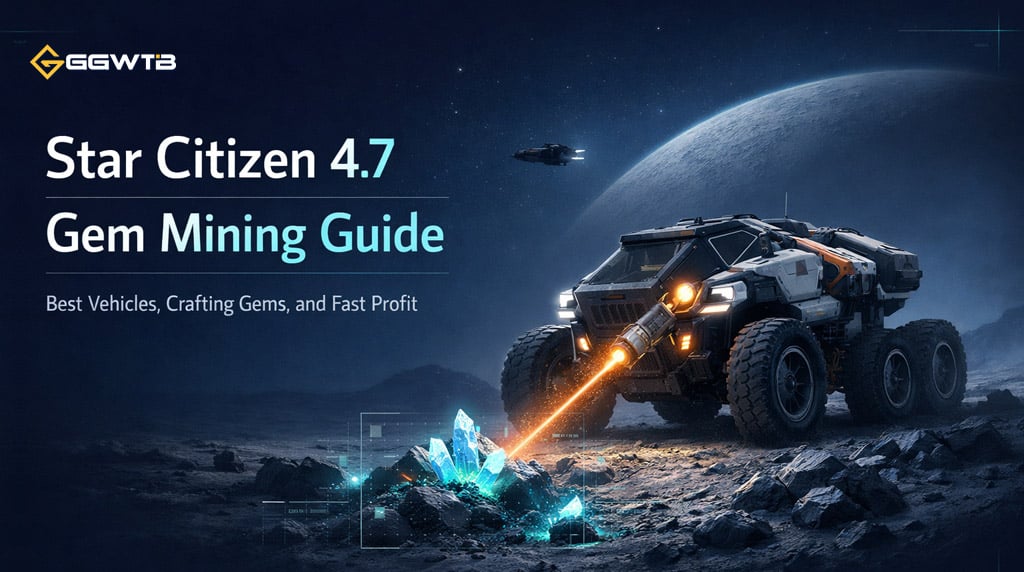
From our own runs, the sweet spot is simple: use the right vehicle, know which gems to ignore, and separate profit farming from crafting farming. If you approach gem mining with a clear goal, it becomes one of the most efficient industrial loops in the game.
- What Changed in 4.7
- Gem quality matters now
- Gem Types You Should Care About
- Best Gem Mining Vehicle in Star Citizen 4.7
- Why the Atlas Geo is the best pick
- The trade-off
- Best Ships for Gem Mining
- How to Find Gem Nodes Faster
- What usually works best
- How We Usually Mine Gems
- Best Strategy for Crafting
- Best Strategy for Fast aUEC
- Profit farming rules that work
- A Simple Storage Method That Saves Time
- Common Mistakes to Avoid
- FAQ
- What is the best gem mining vehicle in Star Citizen 4.7?
- What is the best gem for money in Star Citizen 4.7?
- Is gem mining good for beginners?
- What gem quality should I keep for crafting?
- Are caves worth it for gem mining?
- Summary
What Changed in 4.7
The big shift in 4.7 is that gem mining now feeds two systems at once:
- aUEC income
- crafting materials
That changes how we judge a good mining run. A stone is no longer valuable only because it sells well. It may also be worth keeping because of its quality rating, especially if you are crafting weapons or armor.
Gem quality matters now
All minables now roll a quality score from 1 to 1000.
| Quality | What It Means |
|---|---|
| 1–499 | Not useful for crafting |
| 500–699 | Crafting-eligible |
| 700–899 | Strong material for regular use |
| 900–1000 | Premium material worth saving |
In practice, we usually keep 700+ for general crafting and treat 900+ as high-end stock.
Gem Types You Should Care About
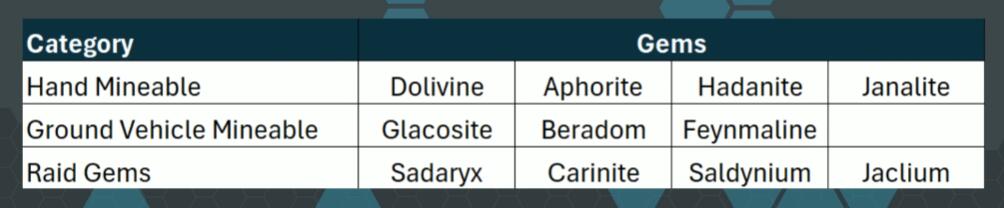
There are 11 gem types in game, but for normal surface mining, it helps to think in three groups.
| Category | Gem Types | Use Case |
|---|---|---|
| Hand-minables | Dolivine, Aphorite, Hadanite, Janalite | Easy solo mining, starter profit, crafting |
| Vehicle minables | Glacosite, Beradon, Feynmaline | Best with a mining vehicle |
| Event/Raid gems | Sadarlex, Caronite, Sevellium, Jacleum | Special activity only |
For most players, the main focus is the first two rows. That is where the reliable, repeatable money is.
Best Gem Mining Vehicle in Star Citizen 4.7
Let's keep this practical: the Atlas Geo is the best overall gem mining vehicle in 4.7.
The reason is not complicated. It can handle both node sizes, while the ROC line is more limited.
| Vehicle | Hand Nodes | Vehicle Nodes | Why Use It |
|---|---|---|---|
| Greycat ROC | No | Yes | Cheap and familiar |
| ROC-DS | No | Yes | Huge storage, but bulky |
| Atlas Geo | Yes | Yes | Best flexibility by far |
Why the Atlas Geo is the best pick
The Atlas Geo can switch between low-power mode and high-power mode. That means:
- low power for hand-minable gems
- high power for larger ground nodes
This saves a lot of time because we do not need separate vehicles or awkward workarounds depending on what we find.
The trade-off
The Geo has much smaller storage than the ROC or ROC-DS. In real gameplay, though, that is manageable. We usually just bring a couple of containers in the ship and unload regularly.
Best Ships for Gem Mining
A good transport ship makes gem mining much smoother. The vehicle is important, but so is how easily you can move it, store gems, and get back into the air.
| Ship | Best Use | Why It Works |
|---|---|---|
| Drake Cutter | Budget setup with Atlas Geo | Cheap, compact, effective |
| Cutlass Black | Flexible solo mining | Easy loading and solid utility |
| Crusader C1 | Similar to Cutlass setup | Good cargo space |
| Mole | Advanced selective mining | Can support quality-focused runs |
For newer players, Cutter + Atlas Geo is one of the best value setups in the game.
How to Find Gem Nodes Faster
This is where a lot of mining efficiency is won.
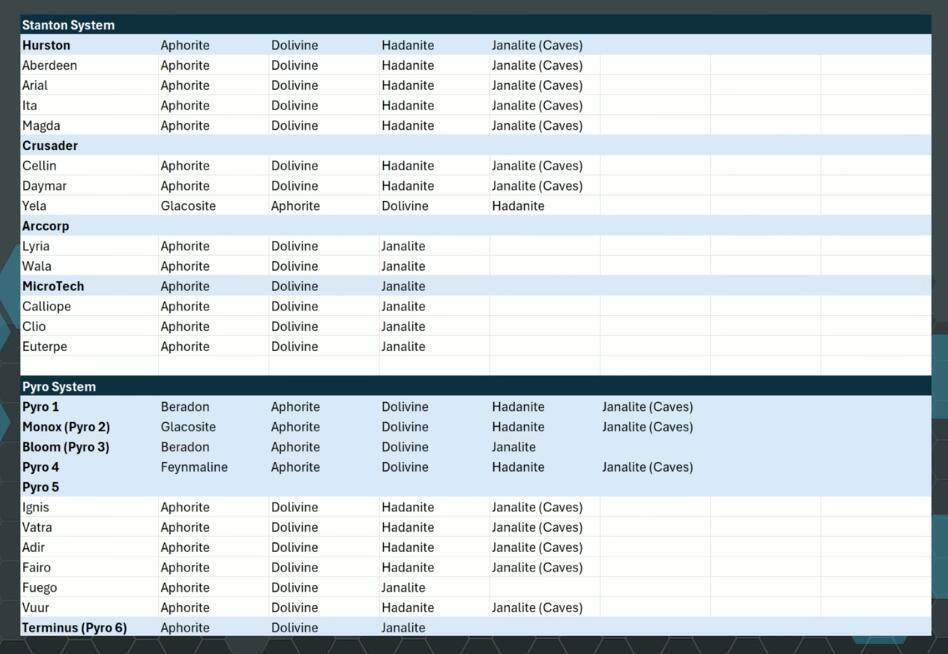
Start with a ping using Tab, then narrow your scan in scan mode. The goal is to quickly separate gem clusters from everything else on the surface.
What usually works best
- Scan from above 2 km if the planet or moon has lots of flora or fauna
- Narrow the scan angle to clean up returns
- Look for tightly packed signatures rather than spread-out rocks
- Close to around 2–3 km to reveal the gem type
A useful rule from experience: gem clusters tend to look stacked close together, while ship-mining rocks usually appear more spaced out.
That visual read is often faster than fighting with imperfect RS readings.
How We Usually Mine Gems
Once we find the right cluster, the loop is straightforward:
1. Scan the node
2. Check the gem type
3. Check the quality if using a vehicle that shows it
4. Fracture the stone in the green zone
5. Extract and sort the gems
The main decision is always this: are we here for money, or are we here for quality?
That one question determines the whole route.
Best Strategy for Crafting
If your goal is crafting, do not mine blindly.
Instead, we get better results by:
- targeting only the gem types needed for recipes
- keeping 700+ quality materials
- prioritizing 900+ when possible
- ignoring low-value clusters that do not fit the goal
This is where selective mining wins. Once we stop treating every node as equal, our storage becomes cleaner and our crafting pipeline gets much more efficient.
Best Strategy for Fast aUEC
If your goal is pure profit, Janalite is the standout gem.
| Gem | Why It Matters | Best Use |
|---|---|---|
| Janalite | Highest sale value per piece | Fast credit farming |
On solid solo runs, a simple Cutter + Atlas Geo setup can produce around 1.9 million Star Citizen Blog aUEC per hour, and with cleaner routing or a better selling point, breaking 2 million is very realistic.
Profit farming rules that work
- Ignore non-Janalite clusters
- Mine fast, not perfectly
- Keep only very high-quality pieces if you also craft
- Sell the rest
That is the whole logic. Speed matters more than precision when the goal is cash.
A Simple Storage Method That Saves Time
One of the easiest mistakes is mixing crafting stock with sell stock.
We usually fix that with a basic two-box system:
| Container | What Goes In It |
|---|---|
| Box 1 | Crafting gems, usually 700+ |
| Box 2 | Sell-only gems and lower quality stock |
It sounds minor, but this keeps your inventory under control and prevents expensive mistakes later.
Common Mistakes to Avoid
A few habits consistently hurt mining efficiency:
- mining every cluster with no clear goal
- bringing the wrong vehicle
- ignoring hot or cold environment gear
- keeping low-quality gems you will never use
- wasting too much time on weak clusters
If you find your runs feel slow, it is usually not because gem mining is weak. It is because the route lacks discipline.
FAQ
What is the best gem mining vehicle in Star Citizen 4.7?
The Atlas Geo is the best all-round choice because it can mine both hand-minable and vehicle-sized gem nodes.
What is the best gem for money in Star Citizen 4.7?
Janalite is the top pick for profit thanks to its high sale price per piece.
Is gem mining good for beginners?
Yes. It is one of the easiest industrial loops to start, especially if you use a multi-tool early and move into an Atlas Geo as soon as possible.
What gem quality should I keep for crafting?
A practical rule is:
- keep 500+ if you need basic crafting material
- keep 700+ for solid stock
- save 900+ for premium crafting
Are caves worth it for gem mining?
Usually not if efficiency is the goal. Surface clusters are faster, easier to chain, and better for sustained income.
Summary
Gem mining in Star Citizen 4.7 is in a very good place. It is cheap to start, easy to scale, and now has real long-term value because of crafting. For most players, the best approach is straightforward:
- use an Atlas Geo
- carry it in a practical ship like a Cutter or Cutlass Black
- farm Janalite for money
- keep high-quality gems for crafting
- mine with a goal, not by habit
That is what makes the loop work. Once we stop treating gem mining as random scavenging and start treating it as targeted resource farming, the returns improve fast.
Most Popular Posts
- Star Citizen 4.9 Hull C Cargo Hauling Guide: Make Millions aUEC Without Autoload
- Star Citizen 4.9 Alleso Money Guide: Best Pyro Trade Route for Fast aUEC
- Star Citizen 4.9 Battaglia Missions: CQ7 Rifle Locations, Loot Routes & Bug Fixes
- Star Citizen 4.9 Best C-788 Cannon Combos: Fastest TTK Loadouts
- Star Citizen 4.10 Quantum Drive Guide: Best Drives for Speed, Range, and Crafting
- Star Citizen 4.9 Rare Gun Attachments Farm: Echo Isles Loot Guide
Popular Category Lists
- ARC Raiders / (354)
- Grow a Garden / (294)
- CoD: Black Ops 7 / (167)
- Star Citizen / (163)
- MLB 26 / (159)
- Monopoly Go / (153)
- ARK Survival Ascended / (128)
- Steal a Brainrot / (99)
- Blox Fruits / (74)
- Adopt Me / (74)
- Forza Horizon 6 / (72)
- Sailor Piece / (68)
- Grow a Garden 2 / (68)
- Diablo IV / (62)
- CoD: BLACK OPS 6 / (55)
- Aion 2 / (52)
- Path of Exile 2 / (48)
- Monster Hunter Wilds / (46)
- Windrose / (44)
- Maplestory Classic / (42)